
If you have spent any time managing your data via an open-source tool, you know it rarely stays confined to the task you adopted it for. It holds the product information and master data, and it also quietly becomes the place where supplier records, pricing, and the integration logic to your ERP, e-commerce platform, and your marketplaces all live.
We reach for these platforms for good reasons. You get the source code, you avoid licensing lock-in, and you can bend the data model to fit how the work actually happens. Securing all of it is part of the same deal. Once you control a platform, its protection is your call to make, and a managed edition only changes how much of that work the vendor absorbs. The rest stays with you wherever the software runs.
Work Out Which Risks Are Actually Yours
Before hardening anything, get honest about where your responsibility starts and stops. 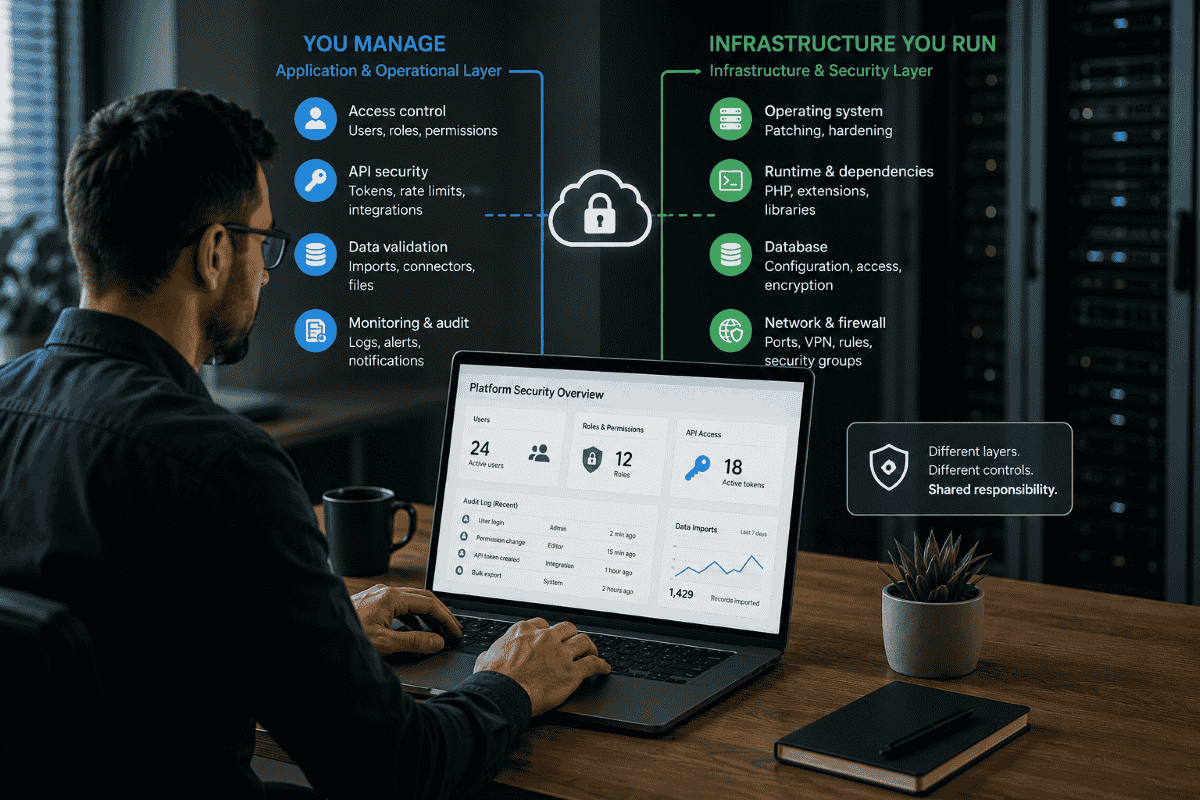
None of these scenarios described below suggest the software is incomplete. Modern data management platforms ship with authentication, granular permissions, and the means to secure every surface discussed here. Responsibility is divided the way it is for any infrastructure software: the vendor secures the code and provides the controls, while configuration, exposure, and day-to-day operation rest with whoever runs the system. What follows concerns that operational layer, which has always been the operator's to manage.
Some risks follow the software no matter how you run it: the application logic, the API surface, how access control is configured, and how much you trust the data arriving from outside. Whether you self-host or pay for a managed edition, those stay on your plate.
Then there is the infrastructure underneath, meaning the operating system, the language runtime, the database, what you expose to the network, and how quickly you patch. That layer lands hardest on whoever runs the platform on their own servers.
Lining your deployment up against those two groups shows you where the effort belongs. Run a hosted edition, and you still own access control and the credentials wiring your integrations together. Run it on a dedicated Linux host, and you own the lot, right down to the kernel.
Know Your Attack Surface Before You Touch It
Open-source data management platforms expose more than the older generation did, mostly because they were built to connect to everything around them. The places worth thinking about are the web and admin interface, the REST API, the database, the point where imports and connectors feed data in, and any component that handles files or digital assets.
Many open-source data platforms follow an API-first design. GPL-licensed platforms in the PHP ecosystem, including Pimcore and often AtroCore, expose their core functionality through documented REST APIs. In many deployments, they also provide complete API coverage across the platform and generate instance-specific OpenAPI documentation. That approach makes integration with ERP and e-commerce systems relatively straightforward. It also means the API becomes the primary surface that needs protection. Anything available through those endpoints can also be accessed programmatically, so authentication and access controls on the API effectively take on the role that network perimeters once played.
Shut the Network Perimeter First
If you only do one thing, do this one, because it pays back more than anything else and gets skipped constantly. Components that were never meant to face the public internet should not face it. Database ports and admin panels do not belong anywhere outside the trusted network, and that single oversight is behind a large share of the avoidable exposure you see across self-hosted software generally.
The measures are old, boring, and cheap to apply:
- Terminate TLS at a hardened reverse proxy and let only validated traffic reach the application.
- Keep admin access behind a VPN or bastion host rather than out in the open.
- Lock down inbound traffic with a host firewall such as nftables or ufw, plus cloud security groups where they apply.
- Bind the database to the internal interface, never to a public address.
Count Your Dependencies as the Attack Surface
Anything built on PHP pulls in components through Composer, and every one of those components arrives with its own vulnerability history. AtroPIM and AtroCore lean on selected Symfony and Laminas components and run on supported PHP 8.x releases with PostgreSQL or MySQL. Each of those layers ships security advisories, and each one needs a patching plan you have actually thought about.
Fold dependency review into the way you already work instead of saving it for an occasional audit. A software composition analysis step in CI, attention to the transitive dependencies and not just the ones you named directly, an eye on the PHP release line you sit on, and a subscription to upstream advisories so a new vulnerability lands as a ticket and not a nasty surprise. Vulnerability management earns its keep when it runs on rails.
Secure the API, Its Secrets, and Its Limits
The API carries the full weight of the platform, so it earns the most careful attention. Three things cover most of the ground.
Enforce authentication on every endpoint, and hand out scoped tokens with the least privilege a job needs rather than broad access. Keep secrets, including the API keys your ERP and storefront connectors rely on, in a secret manager or vault, and well away from the application repository or any plaintext config that ends up in version control. Put rate limiting and sane thresholds in front of bulk read and export endpoints, because a wide-open bulk export is the realistic route by which large volumes of customer, supplier, or pricing data walk out the door.
The same care extends to whatever the platform does over email or against a cloud service. Workflow approvals and automated notifications send mail through an SMTP account or a transactional mail API, and those credentials need the same vault and the same narrow scope as any other secret. Where the platform authenticates to Microsoft 365, Google Workspace, or a comparable service to send or read mail, it does so through a service account or OAuth token, and that token should be scoped to exactly what the integration uses and rotated on a schedule. An over-privileged token linking the platform to a mailbox is often worth more to an attacker than the platform login itself.
Integration credentials get targeted constantly, and the theft usually starts with social engineering against the people holding them rather than a flaw in the platform itself. Hardening the software and training the people who run it pull in the same direction.
This weighs most on the ERP and e-commerce connections, since those are the integrations an attacker can turn into money. A phishing email that harvests the credentials for a storefront or ERP connector, or a business email compromise that talks an administrator into approving a fraudulent change, bypasses the API controls entirely and reaches the same data through a trusted account. Treat whoever holds those connector credentials as part of the attack surface, and review and rotate that access the way you would any privileged login.
Treat Every Import as Untrusted
Ingesting data is the whole job of these platforms, which is exactly why the point of ingestion is a security boundary. Supplier feeds, CSV imports, and connector traffic all come from outside, so treat them as untrusted until you have checked them. Validate schema and types of import. Sanitize any field that will later render somewhere downstream, because an attribute carrying unescaped markup can turn into stored cross-site scripting the moment it reaches a storefront. For uploads in a digital asset component, check MIME types, cap file sizes, and make sure the path that stores a file cannot execute it.
Scope Access to What Each Role Needs
Most of these platforms provide granular roles, teams, and field-level permissions, and the value comes from using them deliberately rather than defaulting to broad administrative grants. The database account should hold only the privileges the application actually requires, and administrative accounts should sit behind multi-factor authentication. Dormant accounts deserve particular attention on a regular review schedule, since unused credentials accumulate quietly and remain a common route long after anyone remembers they exist.
Make the System Observable
The platform can only tell you what it records. If audit logging is disabled, there is very little to work with once something goes wrong. Enable the audit trail, then send those logs somewhere other than the application server. When a host is compromised, local log files are often modified, deleted, or simply lost during recovery. Keeping a separate copy makes it much easier to reconstruct what happened later.
Alerts also need some thought. A flood of notifications quickly becomes background noise, so focus on events that are unusual enough to justify attention. Large data exports, bulk changes to master records, or other actions that rarely happen during normal operations tend to be far more useful than routine activity. Keep enough history to follow the sequence of events instead of trying to piece it together from fragments.
Most of these platforms can generate email notifications for their own events, including repeated login failures, permission changes, or workflows that stop unexpectedly. Those messages should go to a monitored mailbox or incident channel, not a personal inbox that nobody checks. Decide ahead of time which notifications require someone to investigate. During an incident, those emails often become part of the earliest timeline available, so they are worth retaining rather than treating as routine status messages.
Plan to Recover, Not Only to Prevent
Backups are only part of the recovery plan. They need to be encrypted, stored off site, and restored often enough that the process is familiar before an outage forces you to rely on it. Plenty of environments run backup jobs for months without discovering a problem because nobody has tried restoring anything.
Database encryption deserves the same attention. If a storage volume is copied or removed, the files on disk should not be readable on their own. Restore testing catches a different class of problems. Credentials expire, storage locations change, backup formats evolve, and recovery steps drift away from the way the system actually works. Those issues usually stay hidden until someone attempts a restore.
Security Is Something You Keep Doing
None of this is exotic, and that is rather the point. Securing an open-source data management platform comes down to keeping it up: a steady patch cadence, dependency audits that run on their own, access reviews on a schedule, and monitoring that surfaces the activity worth a second look. Self-hosting and open source are entirely sound choices once the team owns the full stack, from the kernel up to the API schema. These platforms pay you back in flexibility for that ownership. Your job is to make sure the same openness that makes them so useful never turns into the easiest way in for someone else.


 PREVIOUS
 NEXT
NEXT 
Other FAQs
- Exploring Malicious Code Risks: Strategies for Email Safety
- Proven Strategies for Effective Malware Removal on Windows Computers
- Why Outsourcing Email Security is Critical for Modern Businesses
- Comprehensive Guide to Safeguarding Against Domain Spoofing Threats
- Effective Strategies to Combat Insider Threats in the Workplace
- Strategies for Email Authentication to Counter CEO Impersonation
- Critical Factors for Selecting Email Security Solutions in Business
- Harnessing Managed Security Services for Enhanced Cybersecurity Vigilance
- Effective Penetration Testing Techniques for Cybersecurity Enhancement
- Managed SIEM Solutions: Boosting Email Security for Small Businesses

Join Our Community
of Readers!