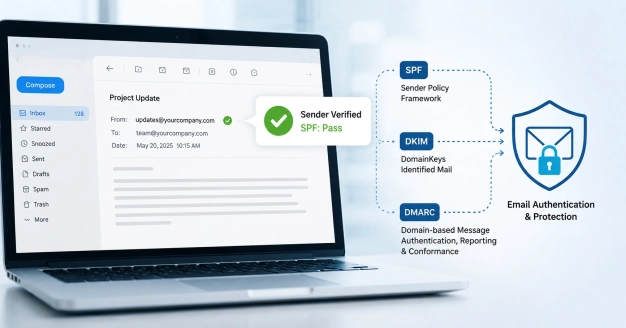
Think of an SPF (Sender Policy Framework) record as a digital guest list for your domain. It’s just a simple line of code in your DNS settings that tells the rest of the internet which mail servers—like your Google Workspace, Microsoft 365, or marketing tools—are actually allowed to send emails on your behalf. When someone receives an email from you, their provider checks that "guest list" to confirm the sender is legit. If the server isn't on your list, the receiving system gets suspicious, which is exactly why SPF is the first line of defense against someone trying to impersonate your brand.
The risk with SPF lies in its maintenance; it is rarely a "set it and forget it" configuration. As your business grows and you adopt new third-party tools for ticketing, marketing, or automation, those services must be added to your record to avoid delivery failures. Furthermore, there are technical constraints, such as the 10-lookup limit, which can cause authentication to fail if your record becomes too cluttered. If your SPF record is outdated or misconfigured, even your most important business communications may be sent directly to the spam folder or rejected entirely, damaging your domain's reputation.
Ultimately, SPF is the foundation of a robust email authentication strategy. While it works best when paired with DKIM and DMARC to provide a comprehensive verification layer, SPF remains the first line of defense for establishing sender trust. Treating your SPF record as a living document that evolves with your tech stack is one of the most effective ways to ensure your emails consistently reach the inbox and that your brand’s communication remains secure and reliable.
How an SPF Checker Tool Tests Your Domain’s DNS Record
SPF checker tools are essential for ongoing SPF monitoring, proper configuration, and ongoing SPF reporting. When conducting SPF validation, the SPF test tool performs a DNS lookup to retrieve your domain’s TXT record that defines the SPF policy. The tool then parses and evaluates each SPF mechanism and modifier, such as SPF include, SPF all mechanism, and SPF redirect, to determine whether the email sending sources specified are properly authorized.
A comprehensive SPF checker streamlines the SPF record lookup process, providing instant visibility into your domain authentication status. Some platforms have an SPF lookup utility to allow administrators to run a complete SPF record check, flagging any SPF errors, syntax errors, or compliance failures that could threaten both email deliverability and overall security posture. Other services can dig deeply into DNS records, alerting you to common configuration flaws and offering a step-by-step analysis.
The core objectives of an SPF diagnostic tool are to evaluate:
- Whether the SPF record exists and is accessible via DNS lookup
- The accuracy and function of all SPF mechanisms (A record, MX record, PTR record, IP4/IP6 addresses, etc.)
- Whether the record references all authorized IP addresses, third-party email service providers, or SMTP relay platforms
- Potential oversights, such as excessive DNS lookups or unauthorized sender inclusions
Accurate SPF check and ongoing SPF monitoring enable organizations to rapidly detect and resolve vulnerabilities, ensuring their SPF status consistently reflects best practices.
Common SPF Record Errors and What They Mean
Despite its relative simplicity, maintaining valid SPF record syntax and ensuring correct configuration can lead to several common SPF errors. These errors are frequently identified during an automated SPF record check using an SPF diagnostic tool.
Typical SPF Errors Include:
- SPF Record Not Found: This indicates that there is no SPF TXT record published for the domain, resulting in an immediate SPF fail during validation.
- Multiple SPF Records: Domains should only have a single SPF record. Multiple records can cause SPF validation failures or ambiguous SPF result outcomes.
- Too Many DNS Lookups: SPF mandates a maximum of 10 DNS lookups per evaluation. Exceeding this limit triggers a permerror, often caused by excessive SPF include directives referencing external domains or services.
- Invalid Mechanisms or Modifiers: Mistakes in SPF tags—such as malformed SPF include, SPF redirect, or using deprecated qualifiers—lead to syntax errors and failed SPF validation.
- Redundant or Misplaced ‘all’ Mechanisms: Incorrect placement or overlap of the SPF all mechanism can inadvertently permit unauthorized senders or block legitimate mail servers.
For instance, gloabal SPF validator platforms can instantly pinpoint these issues, while other SPF tools provide actionable guidance for remediation. Understanding your SPF errors and interpreting the SPF status generated by your chosen SPF test tool are foundational to effective risk assessment and SPF compliance.
Analyzing SPF Pass and SPF Fail Results
- SPF Pass: Occurs when the sending mail server’s IP address is listed as an authorized sender in your SPF record. Messages are far less likely to be flagged as spam or rejected.
- SPF Fail: Indicates the sending server’s IP is not included in the SPF record, raising a red flag for mailbox providers and significantly impacting email deliverability.
- Neutral, Softfail, or TempError: These intermediate statuses may signal syntax errors, temporary DNS issues, or ambivalent authentication protocol settings.
How to Fix and Optimize Your SPF Record for Better Deliverability
Mitigating SPF errors and enhancing your SPF policy is vital for sustained email authentication and high deliverability. The optimization process begins with a thorough SPF domain check, ideally using an advanced SPF checker or SPF diagnostic tool that offers recommendations specific to your environment and email service providers.
Steps to Remediate and Strengthen Your SPF Record
1. Perform an SPF Record Lookup: Use a reliable SPF record lookup service or an SPF test tool to review your current DNS TXT record.
2. Consolidate to a Single Record: Ensure your domain has only one SPF record. Merge or remove conflicting entries as necessary.
3. Minimize DNS Lookups: Review and eliminate unnecessary SPF include mechanisms or fragmented DNS references. Remember the 10-lookup limit to avoid permerrors.
4. Validate All Sending Sources: List only legitimate authorized IP addresses or mail servers that send email for your domain—including all third-party vendors (e.g., Mailchimp, Delivery Center).
5. Correct SPF Record Syntax: Adjust SPF tags, mechanisms, and qualifiers to align with provider documentation, referencing best practice examples from Google and Microsoft.
6. Leverage Diagnostic and Monitoring Tools: Use continuous SPF monitoring and reporting to stay alert to unauthorized changes or new email threats.
7. Test, Update, and Deploy: Every SPF update should be validated using an SPF check or SPF test tool to pre-empt SPF fail events and preserve domain reputation.
Regular risk assessment and SPF evaluation routines using tools like the SPF checker ensure that even as your authorized sender or sending sources evolve, your DNS records and TXT record remain fully compliant.
Best Practices for Ongoing SPF Monitoring and Email Security
Domain authentication is not a one-time event but rather an ongoing SPF monitoring discipline. As new email threats emerge and your organization introduces new Products, Tools, or Resources, it is vital to maintain rigorous, automated SPF validation and reporting.
Proactive Measures for SPF Compliance
- Deploy an Automated SPF Monitor: Use an SPF diagnostic tool or SPF monitoring solution that routinely checks the SPF status and alerts you to critical changes.
- Integrate with DMARC and DKIM: Implementing a DMARC policy in tandem with robust SPF and DKIM records vastly improves email security and enables fine-grained SPF reporting.
- Regular Policy Reviews: As Mailbox Providers like Verizon or major platforms update their requirements, revisit your SPF policy, checking with trusted resources, community-driven blogs, and API references.
- Utilize Threat Intelligence: Evaluate feedback or peer reviews to benchmark your email authentication practices against industry standards.
- Document and Audit Sending Sources: Maintain a living inventory of every sending source and regularly perform a domain authentication audit with an SPF tool.
By embedding these best practices into your organization’s IT and messaging workflow—with ongoing SPF check, scheduled SPF record update, and routine SPF test execution—you'll harness the full value of Sender Policy Framework authentication. Comprehensive, periodic SPF record checks safeguard not only your domain reputation but also fortify your broader email deliverability and email security posture.


 PREVIOUS
 NEXT
NEXT 
Other FAQs
- Exploring Malicious Code Risks: Strategies for Email Safety
- Proven Strategies for Effective Malware Removal on Windows Computers
- Why Outsourcing Email Security is Critical for Modern Businesses
- Comprehensive Guide to Safeguarding Against Domain Spoofing Threats
- Effective Strategies to Combat Insider Threats in the Workplace
- Strategies for Email Authentication to Counter CEO Impersonation
- Critical Factors for Selecting Email Security Solutions in Business
- Harnessing Managed Security Services for Enhanced Cybersecurity Vigilance
- Effective Penetration Testing Techniques for Cybersecurity Enhancement
- Managed SIEM Solutions: Boosting Email Security for Small Businesses

Join Our Community
of Readers!


