A ransom note changes the priority, not the problem.
The files are already encrypted. The attacker may already have the data they wanted. People naturally want to start restoring systems as quickly as possible, but that isn't always the safest move. A server can be rebuilt. Evidence can't.
Good ransomware response is rarely about finding the fastest fix. It's about slowing things down just enough to understand what you're dealing with. One compromised workstation calls for a different response than a compromised domain controller. A single encrypted file share isn't the same as an attacker with administrative access across the network. 
The steps that follow are intended to help you make those decisions while there's still time to contain the damage.
How Ransomware Spreads
Ransomware is a type of malware designed to encrypt data, and it spreads by first gaining access to a target system, encrypting the files there, and then demanding that the victim pay a ransom. Individual incidents will vary, but will always contain three main elements: infection and distribution vectors; data encryption; and ransom demand.
Today, many ransomware attacks follow the same template, driven by the rise of ransomware-as-a-service. Advanced threat actors have formed their own organizations that operate as businesses, generating revenue by deploying ransomware attacks. Recently, these organizations have found it more lucrative to develop ransomware and sell it through ransomware service models to individual threat actors, rather than exclusively carrying out their own campaigns. Some common ransomware tactics include:
Social Engineering
Because threat actors must gain access to the network they often begin their attacks by targeting an organization’s greatest vulnerability: people.
78% of ransomware attacks began with an email last year
Attackers email individuals and attempt to build a rapport with their targets before executing phishing campaigns.
Occasionally, there are several exchanges before anything malicious is sent. Once they have the victim’s trust, attackers will send a malicious link or file with an executable that allows them into a company’s network. Attackers may also distribute malicious Windows shortcut files using the LNK file extension, which can launch scripts or malware without appearing to be a traditional executable.
Double Extortion
Double extortion occurs when threat actors compromise your data, encrypt it, and then analyze it. Because they already possess a copy of your data, they are able to identify how to extort your business for the most money possible. This information will typically include revenue, your employees, your industry, and your partners and clients. Then attackers will only have to take and leverage your most critical data to extort your business.
Triple Extortion
Triple extortion is a step further than double extortion, notched up due to the addition of an active and aggressive threat actor. They utilize the compromised information on your employees, partners, and clients to harass them via emails, texts, and phone calls.
How to Prepare For A Ransomware Attack
With proper preparation, your company can drastically lower the cost and impact of a ransomware attack. In fact, ransomware recovery or remediation costs can be 10 to 15 times more than the ransom. Adopting best practices for ransomware prevention can reduce an organization’s exposure and minimize potential damages: 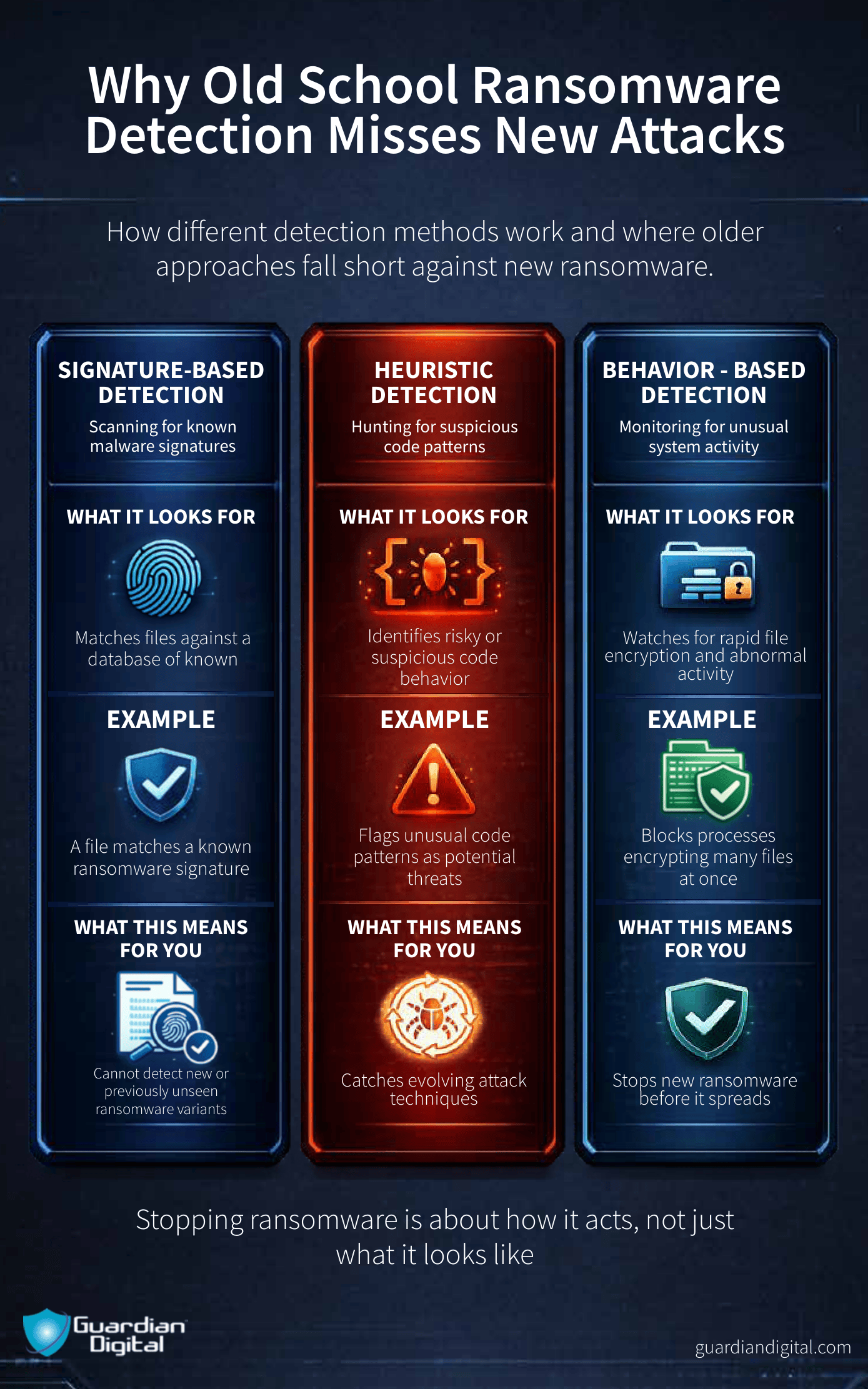
Education
Training is basic, but it matters. Most ransomware still needs a person, a weak process, or a missed warning somewhere near the start. An attachment lands in the inbox. A link points to a fake login page. A file name looks normal enough to open. Ransomware detection begins with identifying suspicious behavior before encryption. Run phishing tests often enough that employees recognize the pattern, then show them what they missed. Keep it practical. What the email looked like. What the link did. What should have been reported. The goal is not to turn every user into an analyst. It is to make the first bad click less likely.
Email Security
When it comes to cybersecurity, solutions must be layered to ensure the most coverage. A multi-layered approach is essential in preventing ransomware as cyberattacks continue to grow more sophisticated, as should the tools that prevent them. A layered email security approach provides stronger ransomware protection, reducing the likelihood that a single missed threat results in a successful compromise.
MFA
Multi-factor authentication (MFA) confirms a user’s identity with the use of a combination of factors, with the most common one being their credentials, and the second being a limited-time one-time password (OTP), biometric, or key card. MFA can most easily be understood as something you know and something you have. This additional authentication reduces unauthorized access as the attacker needs all three pieces of required information during authentication.
Backups
Data backups enable an organization to recover from an attack with a minimum of data loss and without paying a ransom. Performing routine backups is important for preventing data loss, as well as being able to recover in the event of corruption or disk hardware malfunction. Functional backups are also a critical part of ransomware recovery after an attack.
The Aftermath of A Ransomware Attack
Ransomware Prevention matters because the cleanup is usually where the real damage shows up. The ransom is one line item. After a ransomware attack, the business is left to deal with locked systems and lost productivity. Missed orders, angry customers, and a long recovery process lie ahead.
Small and medium-sized businesses get hit especially hard here. Around 60% shut down after a ransomware attack when they cannot recover backups, rebuild systems, or absorb the cost of being offline. Reputation goes with it. So does public confidence. Even if the files come back, the business may not.
The majority of law enforcement agencies and experts advise against paying ransomware attackers, on the grounds that this will only encourage hackers to create more ransomware. Despite this, many organizations disregard this mentality and begin a cost-benefit analysis and weigh the price of the ransom against the value of the encrypted data. Research shows that while 66% of companies say they would never pay a ransom, in actuality, 65% end up paying the ransom after getting hit. Besides the financial cost of a ransomware attack, other damages include reputational harm to the business and compromised data of clients.
Successful ransomware attacks might go unnoticed until after encryption is complete and a ransom note has been displayed on the infected computer’s screen. It is unlikely that the encrypted files are recoverable; however, there are some steps that should be taken immediately: 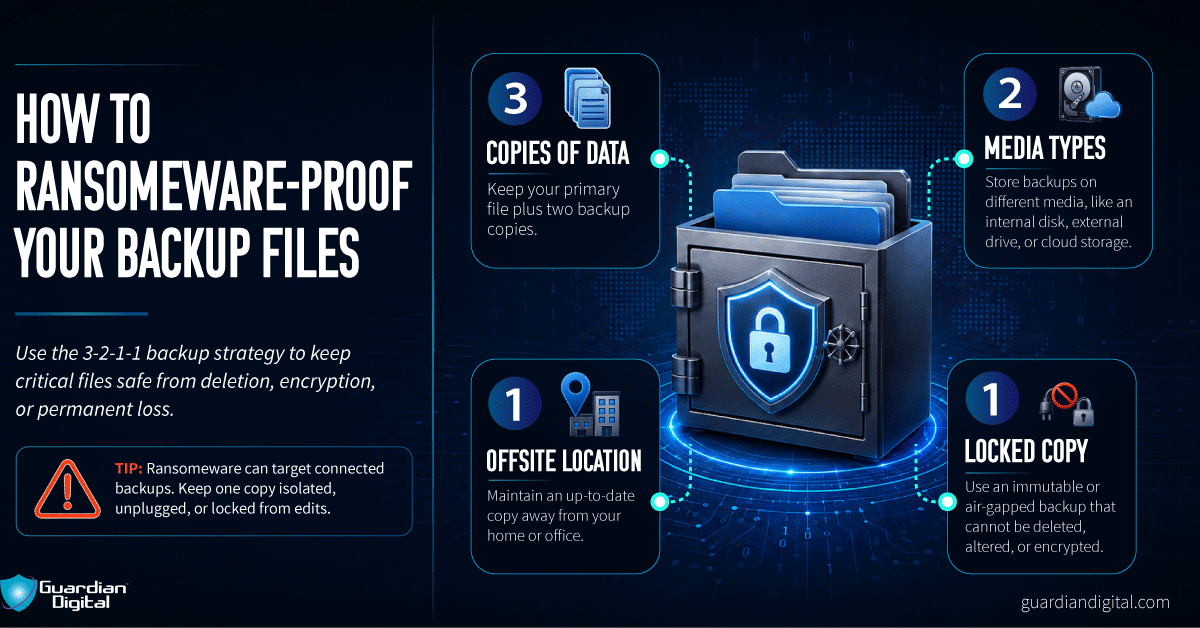
- Quarantine the Device: variants may try to spread to connected drives and other machines; by removing access to other potential targets you effectively limit the spread.
- Leave the Device On: encrypted files may cause a computer to become unstable, and turning off a computer can result in loss of volatile memory.
- Create a Backup: decryption of files for some ransomware variants is possible without paying the ransom. Make a copy of encrypted files on removable media in case a solution becomes available in the future or a failed decryption effort damages the files.
- Seek Professional Help: computers sometimes store backup copies of files stored on them. A digital forensics expert may be able to recover these copies if they have not been deleted by the malware.
- Wipe and Restore: restore the machine from a clean backup or operating system installation. This ensures that the malware is completely removed from the device.
Ransomware Attack FAQ
When you’re preparing a ransomware contingency plan for your business, it’s helpful to know these answers before you have to take action:
What are the early warning signs of a ransomware attack?
Unexpected behavior is usually the first clue.
A burst of failed logins. PowerShell running from an Office application. Large numbers of files being renamed. Backup jobs failing without explanation. Multiple users reporting suspicious emails within a short period. None of those proves ransomware on its own. Together they often point in the same direction.
How long does a ransomware attack take to encrypt files?
The encryption itself may only take a few minutes.
Attackers rarely rush to that stage. They spend far more time learning the environment than encrypting it. Credentials, backups, domain controllers, virtualization hosts, file servers. Those are the things they're looking for before anyone sees a ransom note.
When encryption starts, the hard part is already over.
How does ransomware detection differ from regular malware detection?
Traditional malware often leaves you hunting for a file.
Ransomware leaves you watching a system behave in ways it never should.
One process starts modifying thousands of files. Shadow copies vanish. A workstation begins reaching into network shares it has never accessed before. Those changes are enough to justify an incident response long before anyone identifies the ransomware family.
Final Thoughts on Mitigating a Ransomware Attack
Ransomware doesn't expose one security failure. It exposes every small decision that accumulated before the attack.
An unpatched server. A phishing email someone trusted. Backups that looked fine because nobody ever restored them. Administrator accounts with far more access than they needed.
Organizations recover faster when those problems have already been addressed. The ransomware itself is only part of the incident.


 PREVIOUS
 NEXT
NEXT 
In this article
Stay Informed with Our Latest Insights
- Why Email Thread Hijacking Makes Compromise Harder to Detect
- Calendar Phishing Attacks: How Malicious Invites Bypass Email Defenses and Change Enterprise Risk
- SaaS Attacks and Email Security: How SaaS Platforms Became the Delivery Layer
- Data Leaks from AI-Generated Code Are Fueling Email Breaches
- How to Protect Your Business Against Spear Phishing: A Defense Playbook

Join Our Community
of Readers!
Must Read Blog Posts
- Phishing Scams in 2026: The Rise of AI and Deepfake Risks
- Understanding Email Viruses: Detection, Prevention, and Security Strategies
- Effective Phishing Protection: Strategies and Training for Businesses
- Essential Ransomware Strategies for Effective Business Protection
- Maximizing Email Security: Advanced Strategies for Threat Defense
- Microsoft 365 Phishing: Why Attacks Still Reach Inboxes and How to Stop Them