Malware attacks are rapidly evolving and becoming difficult to detect. An especially dangerous type is fileless malware, which is gaining popularity among cybercriminals due to its ability to evade filtering and deceive users.
Fileless malware attacks exploit existing, trusted system applications to install and run malicious code on target systems. This malicious code is used to encrypt and exfiltrate sensitive data and transfer this data directly into the hands of the attacker. Fileless malware can be seen as a cybercrime double play - it also enables malicious actors to silently eavesdrop on your system, often providing access to confidential business information. This article will demystify fileless malware and offer advice on how to safeguard against it.
Antivirus Can't See Fileless Malware
Because fileless malware does not use executable files and therefore lacks a signature, most traditional, signature-based antivirus and email security solutions cannot detect this emerging exploit, leaving users, systems, and critical data vulnerable.
What Is Fileless Malware?
Unlike file-based email malware, fileless malware does not rely on traditional executable files, called the “payload.” Instead, fileless malware uses a technique known as “living-off-the-land”, which repurposes tools that are already installed on the infected system to operate. Threat actors typically exploit tools such as Microsoft Office Macros, WMI, and PowerShell - essentially turning these systems against themselves.
How Do Fileless Malware Attacks Work?
Fileless malware attacks can be used to encrypt, exfiltrate, and deliver critical data to cybercriminals, and to compromise other systems by installing malicious code. 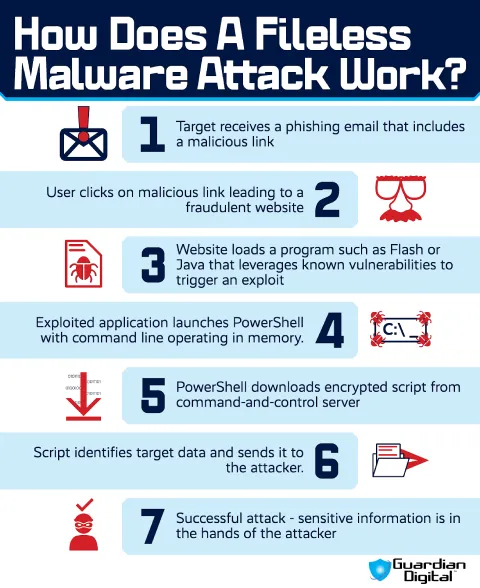 Like all email malware, fileless malware is typically delivered through phishing emails containing malicious links or weaponized attachments. Office documents are common, but attackers also abuse PDF malware to exploit vulnerable applications and execute code without requiring a traditional executable. When the user clicks, the website or attachment loads a program such as Flash or Java that leverages vulnerabilities to trigger an exploit in a trusted application. Attackers also distribute malicious Windows shortcut files using the LNK file extension. Opening the shortcut can launch PowerShell or other trusted Windows utilities, allowing fileless malware to execute without dropping a conventional payload onto disk.
Since fileless malware does not involve executable files as regular malware does, antivirus protection is ineffective against these attacks. Instead, fileless malware attacks leave no typical footprint on the target system. They use trusted system tools that can’t be removed or disabled, so these exploited tools keep running until attackers call them off or they render the system inoperable.
How to Detect Fileless Malware
Effective malware protection depends on finding suspicious activity before it turns into a larger compromise. Fileless malware leaves fewer artifacts than traditional malware, but it does not disappear without a trace. It still executes commands, launches processes, creates network connections, and abuses legitimate Windows components. Those behaviors become the evidence.
One of the first places to look is PowerShell activity. Administrative scripts are common in many environments, so PowerShell by itself is not suspicious. A hidden PowerShell process launched from Word, Excel, Outlook, or another Office application deserves much closer attention. The same goes for WMI event subscriptions that suddenly appear on systems where they have never been used. Both techniques provide execution and persistence without requiring a malicious executable on disk.
Process relationships often explain what happened next. Office applications rarely need to spawn cmd.exe, PowerShell, or mshta.exe during normal work. Scheduled tasks created outside routine administration also deserve scrutiny, especially if they launch encoded commands or scripts from unusual locations. Even when nothing is written to disk, these parent-child process relationships leave useful evidence behind. 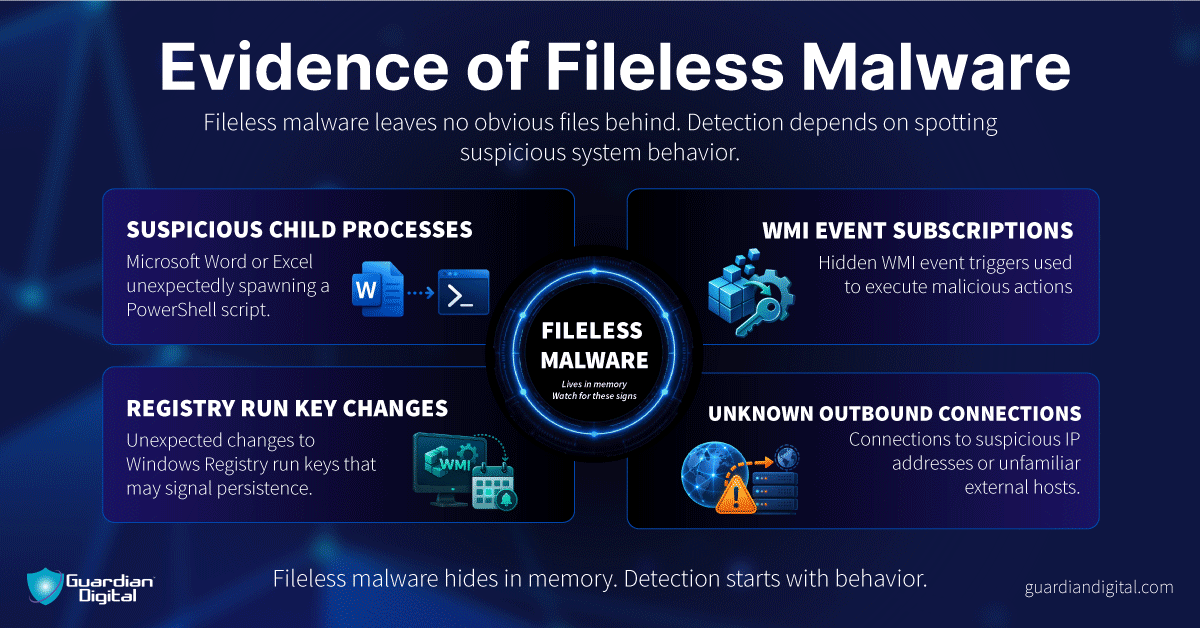
Network activity helps complete the picture. A PowerShell process making outbound connections, memory-only processes communicating with external hosts, or EDR alerts tied to unusual script execution can all point toward fileless malware. No single alert confirms an infection. The strongest conclusions come from correlating multiple artifacts and identifying IOC across the affected system rather than relying on one event in isolation.
How To Defend Against Fileless Malware Attacks
Start with patching. It doesn’t solve everything, because fileless malware can strike like a zero-day attack, exploiting vulnerabilities before patches become available. However, fileless malware often needs a weak spot to run code in the first place, so patches will still reduce your system’s overall vulnerability. An old browser plugin, an exposed Office feature, a misconfigured app. Once that code lands, it may not write a normal payload to disk. It can move straight into PowerShell, WMI, or another Windows tool the system already trusts.
Email filtering has to catch the setup. The bad message may carry a link, a document, or other email attachments that only look harmless until the user opens it. That is where many email virus protection techniques still help. Block the phish. Strip the weaponized attachment. Rewrite or inspect the link before the browser gets involved.
After execution, the problem changes. Signature scanning has less to work with because there may be no obvious executable sitting on disk. At that point, the useful signals are behavior. Office launching PowerShell. WMI is creating persistence. A script reaching out to an external host. That is where endpoint security, process visibility, and alert tuning matter more than a basic antivirus scan.
Fileless Malware Protection FAQ
Fileless malware doesn't behave like traditional malware, so a lot of questions come up during investigations and security reviews. These answers focus on how these attacks actually work, what they leave behind, and what administrators should look for.
Why is fileless malware dangerous?
It does not behave like the malware most tools were built to catch. There may be no obvious executable on disk, no strange installer in Downloads, no single file to quarantine. The activity shows up in the way trusted tools behave. PowerShell runs a command. WMI creates persistence. A process reaches out to an external host. That is harder to catch late.
How does fileless malware usually spread?
Email is a common starting point. A user opens a document, clicks a link, or interacts with an attachment that triggers the next step. The payload may never arrive as a normal file. Instead, the exploit pushes commands into memory and starts using Windows tools that are already present.
What does “living off the land” mean in cybersecurity?
It means the attacker uses what is already on the machine. PowerShell, WMI, scripts, scheduled tasks, Office macros. Nothing exotic. That is the problem. These tools also support real administration, so blocking them outright can break normal work.
Can antivirus software stop fileless malware?
Basic antivirus software may miss it. Signature scanning works best when there is a file to inspect. Fileless malware gives it less to grab onto. Detection has to look at behavior instead, such as Office launching PowerShell, encoded commands, strange child processes, or scripts making outbound connections.
How does email security help prevent fileless malware?
Email security matters because it can stop the setup before execution starts. Block the phishing message. Strip the attachment. Inspect the link. Once the user opens the document and the code starts running through trusted Windows components, the investigation moves from the mailbox to the endpoint.
What is the best defense against fileless malware?
Stop the first click where possible, then watch what the endpoint does next. That means patched applications, strong email filtering, limited privileges, script monitoring, and endpoint detection that can follow process behavior. Not just files. Behavior. 
Fileless Malware Protection: The Bottom Line
Malware attacks are becoming more advanced and effective, leveraging stealthy techniques and evading detection by only running in the computer’s memory as opposed to relying on executable files. Fileless malware attacks are used to gain administrative privileges to systems, download more malicious payloads, and perform a wide range of other malicious activities.
Stopping fileless attacks requires more than traditional email virus protection because they don't rely on executable files. Businesses should safeguard their critical assets with advanced, adaptive cloud email security that can prevent fileless malware emails and other threats from reaching the inbox.


 PREVIOUS
 NEXT
NEXT 
In this article
Stay Informed with Our Latest Insights
- Why Email Thread Hijacking Makes Compromise Harder to Detect
- Calendar Phishing Attacks: How Malicious Invites Bypass Email Defenses and Change Enterprise Risk
- SaaS Attacks and Email Security: How SaaS Platforms Became the Delivery Layer
- Data Leaks from AI-Generated Code Are Fueling Email Breaches
- How to Protect Your Business Against Spear Phishing: A Defense Playbook

Join Our Community
of Readers!
Must Read Blog Posts
- Phishing Scams in 2026: The Rise of AI and Deepfake Risks
- Understanding Email Viruses: Detection, Prevention, and Security Strategies
- Effective Phishing Protection: Strategies and Training for Businesses
- Essential Ransomware Strategies for Effective Business Protection
- Maximizing Email Security: Advanced Strategies for Threat Defense
- Microsoft 365 Phishing: Why Attacks Still Reach Inboxes and How to Stop Them