
Attackers know that abusing trusted SaaS platforms works better than building fake infrastructure from scratch. A shared-document alert or OAuth consent request blends into normal business traffic until it is abused. Most business email security tools were built to catch spoofing, bad reputation, or known malicious links. They struggle more when the attack rides through services the company already trusts, like Dropbox, Slack, or DocuSign.
That changes the focus for SaaS security teams. Instead of filtering only malicious email, defenders end up tracking tenant abuse, suspicious sharing activity, OAuth permissions, impossible login patterns, and odd collaboration behavior that looks legitimate at first glance.
This article looks at how attackers use legitimate SaaS ecosystems to bypass traditional defenses, why existing controls struggle to keep pace, and what changes for defenders when trusted business platforms become part of the attack path rather than merely the environment surrounding it.
Why Attackers Prefer SaaS Platforms for Phishing and Account Abuse
Attackers use SaaS platforms for the same reason employees do. They’re already trusted, already integrated into daily work, and usually ignored by users unless something breaks. A phishing email from a random domain still gets attention from filters and users. A SharePoint notification or Dropbox share request usually doesn’t.
That trust changes how phishing campaigns get delivered. Instead of standing up fake domains and burning infrastructure every few days, attackers can abuse legitimate services that already have a strong sender reputation and valid authentication records. Microsoft 365 notifications pass SPF, DKIM, and DMARC because Microsoft is actually sending the email. Same with Google Workspace or DocuSign. The infrastructure isn’t spoofed. The workflow is what’s being abused.
Remote work made this easier. Businesses have normalized constant collaboration traffic over the last few years, especially across SaaS platforms tied to messaging, file sharing, and project management. Users click cloud storage links all day. They approve meeting invites, shared docs, MFA prompts, and e-signature requests without thinking much about it because that’s normal work now. Attackers noticed the same thing.
Shared Files aren't Automatically Safe
Exercise caution before you open an internally shared document. Make sure it links to a real project, not a suspicious website.
These types of phishing attacks also have less operational friction. For the attacker, building phishing infrastructure is a significant time investment that is usually blocked once reputation systems catch up. Compromising a legitimate Microsoft 365 tenant or abusing an OAuth workflow gives immediate legitimacy instead. In some campaigns, the attacker never sends malware at all. The goal is access to mailboxes, Teams chats, shared drives, or delegated application permissions that can persist quietly after the initial compromise.
How SaaS-Based Phishing and OAuth Attacks Actually Work
A common SaaS attack might begin with a Microsoft 365 or Google Workspace document share notification. The user gets an email saying someone shared a file, clicks through, and then lands on either a fake login page or an OAuth approval screen asking for access to mail, files, or contacts. Sometimes the phishing page sits behind multiple legitimate redirects, so the user only sees trusted SaaS platforms the whole way through.
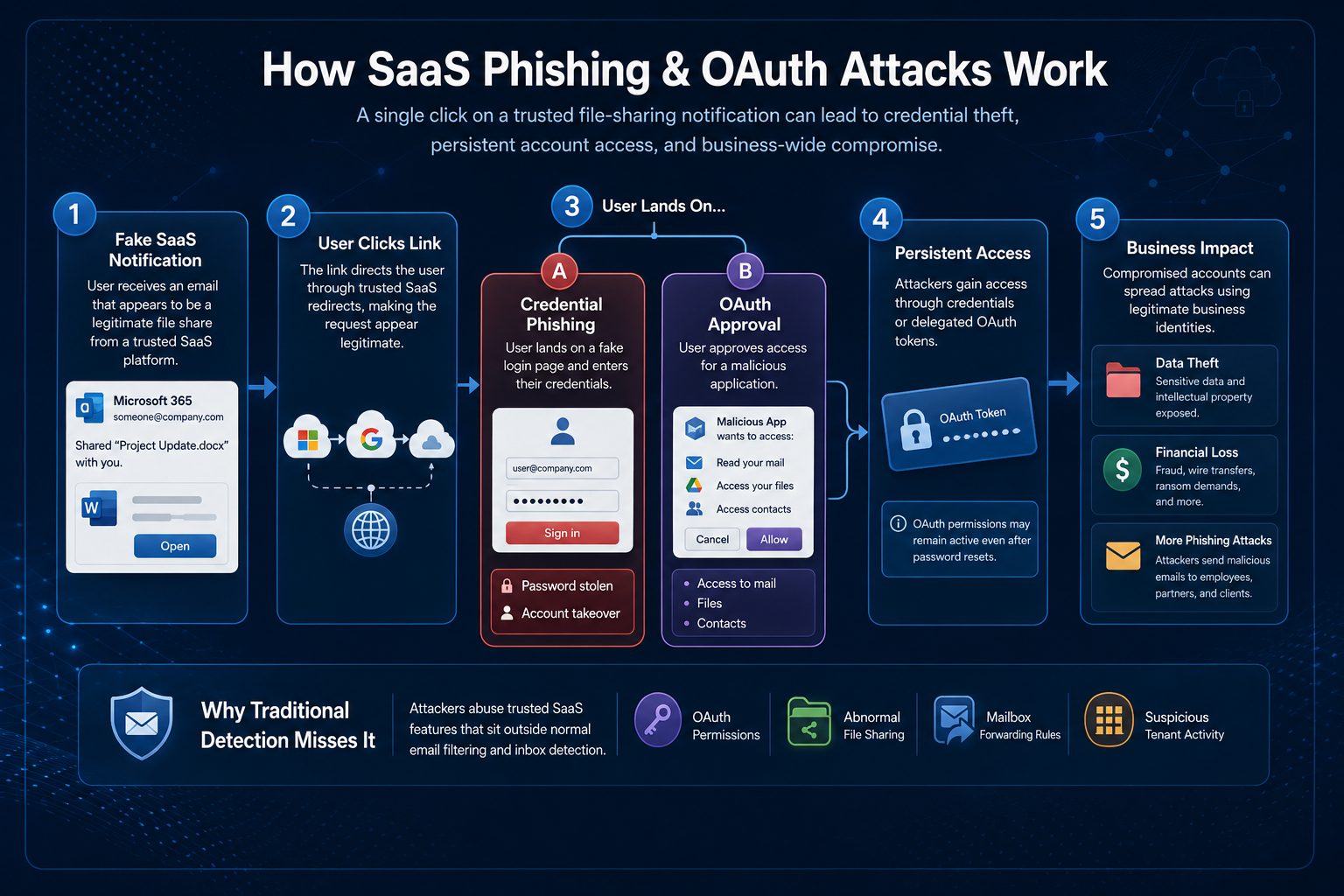
OAuth phishing causes bigger headaches during response because the attacker may never steal the password at all. Instead, attackers get the user to approve a malicious app. The app gets delegated access, which provides the attacker with persistent access through tokens instead of credentials. Teams handling phishing recovery often discover that the delegated access survives even after credentials are reset.
Compromised app environments dramatically expand the reach of phishing campaigns. Once an attacker gets into Microsoft 365, they can send malicious emails internally or to partner organizations from the real business account. No spoofing or fake domains required.
This is why SaaS security keeps drifting into identity monitoring instead of just email filtering. Business email security tools still matter, but they miss a lot of the abuse happening around OAuth permissions, abnormal sharing activity, mailbox forwarding rules, and suspicious tenant behavior that sits outside normal inbox detection logic.
Why Traditional Business Email Security Controls Miss SaaS Abuse
Email security tooling was built around the idea that malicious traffic looks different from legitimate traffic. Attacks that come through common business SaaS platforms expose that assumption as outdated.
That creates problems for traditional business email security workflows. URL rewriting and attachment sandboxing still help in some cases, especially in campaigns that rely on malware such as Kinsing cryptominer infections, but they lose visibility when the attack moves through trusted SaaS platforms or OAuth approval flows rather than direct malware delivery. A SharePoint link or Dropbox share request doesn’t automatically stand out the same way a random external domain would.
Internal phishing is another issue teams underestimate. Once a tenant is compromised, attackers can send messages from real employee accounts within existing email threads, using normal collaboration patterns. Those alerts are harder to prioritize when the sender is trusted. Analysts end up spending more time validating intent than validating infrastructure.
This is where SOC teams run into alert fatigue. The traffic volume inside SaaS environments is already high, and aggressive inspection creates false positives fast. But ignoring trusted collaboration traffic entirely leaves obvious blind spots. Most organizations end up somewhere in the middle, trying to balance SaaS security visibility against operational noise.
What SaaS Attacks Change for Phishing Detection
A phishing alert used to be fairly straightforward. Check the sender, inspect the domain, pull headers, block indicators, and move on. SaaS attacks slow that process down because the SaaS platform isn’t a suspicious sender.
Tracking activity across multiple systems is another headache. Every SaaS platform logs differently, exposes different APIs, and hides useful visibility behind licensing tiers. Microsoft 365 might give decent audit data, while another SaaS platform barely logs sharing activity at all. Correlating activity across email, identity providers, cloud apps, and endpoints becomes manual work unless the environment is already heavily integrated.
Due to the slow investigative process and inconsistent cross-app logs, SOC teams end up building detections around abnormal behavior rather than static evidence of account compromise. SaaS attacks can be identified by impossible travel, suspicious OAuth consent grants, unusual file-sharing spikes, mailbox forwarding changes, or login activity tied to unfamiliar tenants.
SaaS Security Best Practices that Stop Phishing Attacks
Businesses need administrative policies that limit the impact of phishing attacks. SaaS security involves building monitoring and response capabilities to mitigate the reach of SaaS-based phishing, while educating users to exercise security awareness that extends beyond their inbox.
Zero Trust: Many organizations still treat trusted SaaS traffic differently from email and other traffic. Once attackers start operating inside the same SaaS platforms that employees use all day, it’s necessary to adopt zero-trust approaches that assume even approved collaboration platforms can become part of the attack path.
Manage App Permissions: One thing that helps immediately is locking down OAuth approvals. When users can still approve external applications with very little oversight, this is an easy inroad for attackers. Security teams usually discover the problem later during an incident review when they realize a malicious app had mailbox or file access for weeks. To avoid this outcome, teams need to limit permissions to external applications.
Behavior Monitoring: SOC teams should be watching SaaS traffic and comparing it against normal, baseline behavior. Automatic alerts should be set for activities such as new app consent grants, unusual changes to mailbox permissions or forwarding rules, and logins tied to unfamiliar locations and devices. Alerts can give teams enough time to revoke user access and stop the spread of phishing messages in response to these behavior patterns.
Security Awareness Training: Telling users “don’t click suspicious links” doesn’t prepare them for attacks launched from actual SharePoint notifications or DocuSign workflows. Training should emphasize how to verify unexpected requests internally and teach SaaS platform users to exercise caution with external sharing, repeated MFA prompts, and unusual consent requests.
Business Email Safety Depends on SaaS Security
The interesting part about SaaS attacks isn’t that attackers invented a completely new phishing model. Most of the techniques are familiar. Credential theft, social engineering, account takeover, persistence. What changed is the delivery layer.
Instead of relying on obviously malicious infrastructure, attackers now operate through SaaS platforms that employees already trust. For defenders, the bigger adjustment is realizing that business email security no longer stops at the inbox. A clean SPF record or a trusted sender domain doesn’t say much about whether the activity behind it is legitimate. SaaS security depends on tracking user identity, tenant relationships, abnormal sharing behavior, delegated permissions, and cross-platform visibility, rather than on traditional reputation-based filtering alone.
Ignoring SaaS traffic entirely leaves blind spots that attackers already know how to abuse. The infrastructure changed, so the trust assumptions around SaaS platforms also need to change.
Email Security and SaaS Platforms FAQ
When SaaS abuse threatens email workflows, businesses will need a combination of email and SaaS security practices.
Why do SaaS-originated phishing emails bypass secure email gateways?
The authentication checks pass because the service itself is legitimate. SPF passes. DKIM passes. DMARC passes.
These authentication protocols can only confirm that the sender is authorized to send the email, but not that the content or workflow is safe. A phishing link delivered through a real Microsoft 365 notification can still pass every authentication check successfully while leading the user straight into credential theft or an OAuth approval flow.
From the gateway perspective, the traffic often looks completely normal until you start inspecting the behavior around it.
What is OAuth consent phishing?
Instead of stealing the password directly, the attacker tricks the user into approving a malicious application. Usually, it asks for access to mailboxes, files, contacts, or collaboration data, and the request often looks like a normal SaaS integration prompt.
The messy part comes later. Once the user grants permission, the attacker may keep access through OAuth tokens or delegated permissions even after the password gets reset. Teams used to traditional account compromise sometimes miss that the first time around because the credentials themselves may no longer matter much once consent has been granted.
Are internal SaaS phishing attacks harder to detect?
Usually, yes. Once an attacker compromises a tenant or employee account, they can send phishing internally using legitimate accounts and existing conversation threads. Phishing attacks via SaaS platforms often bypass external filtering because, technically, the messages appear to come from trusted users and infrastructure.
How should SOC teams monitor SaaS-based attacks?
Most teams end up focusing more on behavior than static indicators. OAuth grants, abnormal file sharing, impossible travel logins, mailbox forwarding rules, token usage, MFA fatigue activity, and suspicious tenant relationships usually provide more useful signals than domain reputation alone.
What changes should organizations make to improve business email security against SaaS abuse?
Most organizations eventually shift toward stronger identity monitoring, tighter OAuth governance, better SaaS data collection, and more contextual inspection of trusted collaboration traffic. The focus moves away from only blocking malicious email and toward validating whether the activity itself makes sense operationally.


 PREVIOUS
 NEXT
NEXT 
In this article
Stay Informed with Our Latest Insights
- Why Email Thread Hijacking Makes Compromise Harder to Detect
- Calendar Phishing Attacks: How Malicious Invites Bypass Email Defenses and Change Enterprise Risk
- SaaS Attacks and Email Security: How SaaS Platforms Became the Delivery Layer
- Data Leaks from AI-Generated Code Are Fueling Email Breaches
- How to Protect Your Business Against Spear Phishing: A Defense Playbook

Join Our Community
of Readers!
Must Read Blog Posts
- Phishing Scams in 2026: The Rise of AI and Deepfake Risks
- Understanding Email Viruses: Detection, Prevention, and Security Strategies
- Effective Phishing Protection: Strategies and Training for Businesses
- Essential Ransomware Strategies for Effective Business Protection
- Maximizing Email Security: Advanced Strategies for Threat Defense
- Microsoft 365 Phishing: Why Attacks Still Reach Inboxes and How to Stop Them