Most security teams are still watching inbox activity much more closely than calendar activity. Mail filters, attachment scanning, spoofing checks. All useful. But meeting invites move through a different workflow, and the usual controls do not inspect them the same way. That leaves a blind spot that phishing attackers have started figuring out how to use.
This article looks at how calendar phishing actually works, why malicious .ics file invites keep slipping through normal email security processes, and what defenders need to pay attention to once scheduling systems become part of the attack surface.
Why Calendar Phishing Works Better Than Traditional Email Phishing
Part of the advantage of calendar phishing is workflow conditioning, and the other part is the context in which meeting invites appear. Users look at meeting invites differently from regular emails. That sounds obvious, but it changes how people react when something suspicious lands in their inbox.
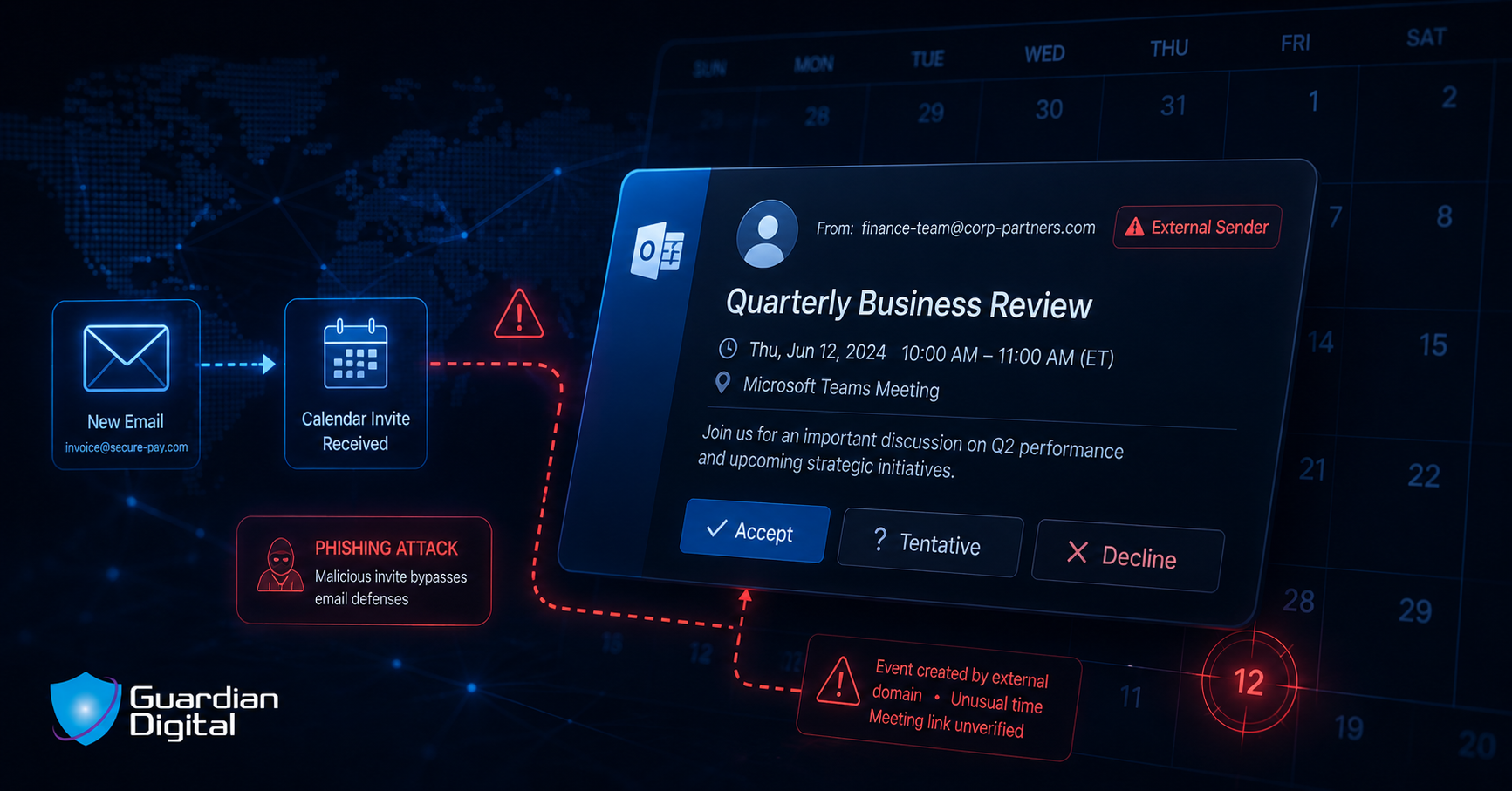
Distraction: People accept invites from mobile devices between calls, while commuting, or halfway through another task. Nobody is stopping to inspect organizer headers or hover over conferencing links when Outlook already dropped the event onto the calendar and started pushing reminders across Teams and phones.
Urgency: Meeting invites also carry a built-in urgency that standard phishing emails sometimes lack. The user assumes they are already behind on something and clicks first. Calendar phishing attackers leverage that context.
Event Reminders: Calendar phishing also sticks around longer than phishing emails. Even if the original invite gets ignored, reminders keep resurfacing the event throughout the day. Recurring meetings make this messier than standard phishing attacks. One malicious invite can stay visible on a user’s schedule for weeks, especially in environments where calendar entries auto-populate before users manually review them.
Careful Calendar Clean-Up
Watch out for auto-populated calendar events, especially if they are recurring - each one could contain a phishing link, so delete them all before you forget about the original unsolicited invite.
Trust: Internal-looking meeting requests automatically feel more legitimate because they arrive through systems employees already depend on all day. Most organizations train users to question strange emails. Very few train them to question calendar traffic with the same level of skepticism.
How Attackers Weaponize Calendar Invites and .ICS Files
Most of these attacks are pretty simple. The attacker sends a meeting invite that looks normal enough for somebody to click without thinking too hard about it. No exploit kit. No fancy payload. Just a fake Teams or Zoom meeting dropped into the middle of someone’s workday.
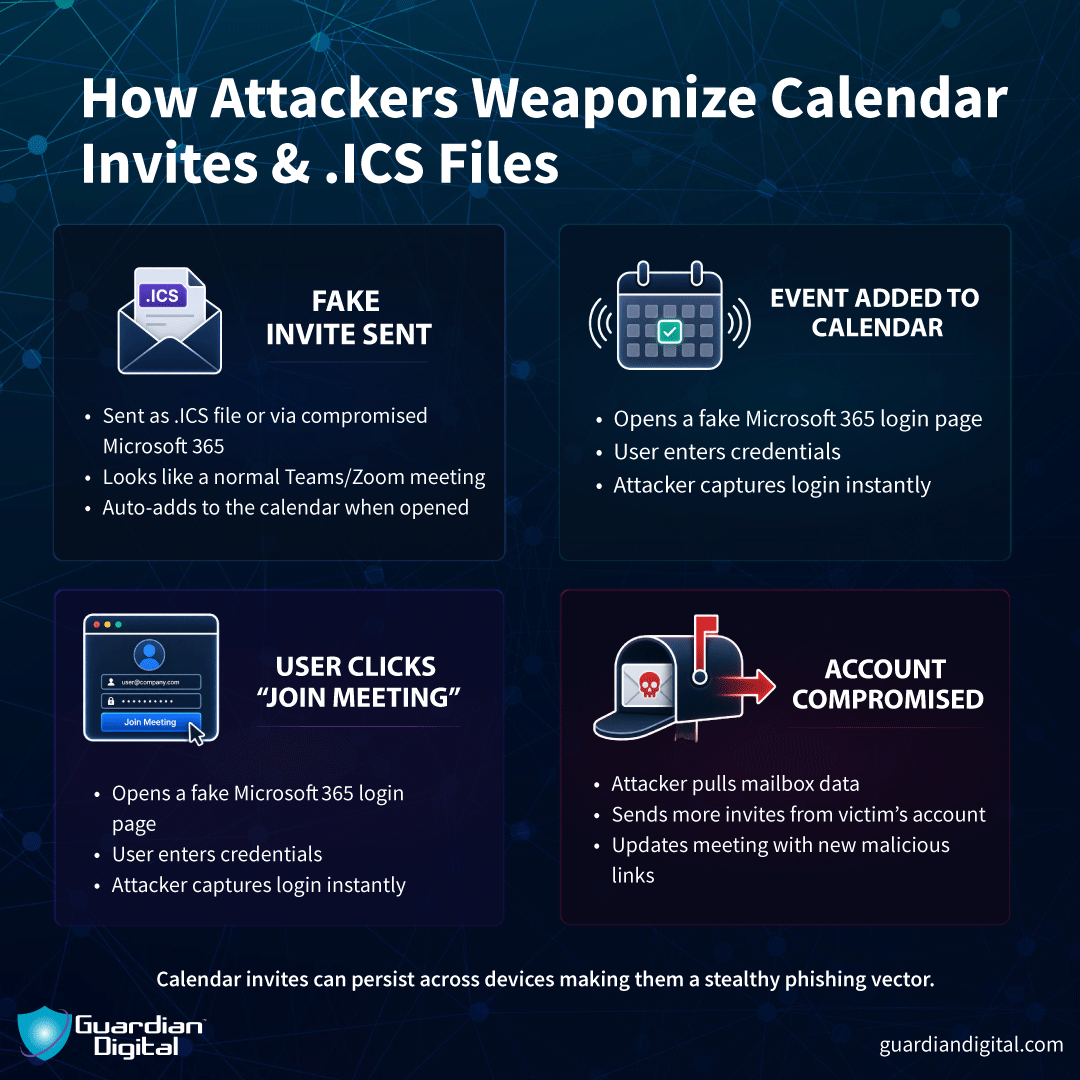
The invite usually comes as a .ics file attachment. The user opens it, the event gets added to the calendar, and now the fake meeting keeps showing back up through reminders and notifications. Other campaigns send the invite straight through compromised Microsoft 365 accounts, so the organizer already looks trusted before the victim even opens it.
The link inside the invite is usually the real objective. The user clicks “Join Meeting,” lands on what looks like a Microsoft 365 login page, enters credentials, and the attacker starts pulling mailbox data or sending more invites from the account a few minutes later.
Even after the original message gets deleted, the event can stay sitting on calendars across phones, Outlook clients, and shared schedules. Attackers sometimes update the meeting later with a new link or resend the invite to push it back to the top of notifications.
Where Traditional Email Security Controls Fail
Most email security tools were built to inspect inbox traffic, not calendar behavior. They are good at catching malicious attachments, spoofed domains, and weird links in message bodies. Meeting invites do not always move through those checks the same way, especially once they start bouncing between collaboration apps and synced devices. That creates a blind spot.
A fake invoice email with a suspicious attachment might get quarantined immediately. A meeting request with a malicious Teams link often looks like ordinary business traffic unless somebody is specifically checking organizer details or calendar activity. In a lot of environments, nobody is.
Internal trust assumptions make detection harder too. If the organizer appears to come from inside the tenant or from a known vendor domain, most users stop questioning it immediately. Attackers know that. Once they compromise a legitimate mailbox, calendar phishing becomes much more convincing because the requests blend into existing conversations and schedules instead of arriving cold.
Another issue is alerting. SOC pipelines still prioritize mailbox rules, attachment detonations, and login anomalies while largely ignoring meeting creation, organizer changes, or suspicious recurring invites. So the attack stays active longer because nobody is really watching that layer closely enough.
Detection and Monitoring Gaps Email Security Teams Usually Miss
Most teams are collecting solid mailbox data and still missing the actual calendar activity tied to the attack. Phishing emails and login events might be recorded, but meeting creation, organizer changes, forwarded invites, and recurring updates often get ignored completely. Then, organizations only realize they had their business email hacked by calendar abuse after reconstructing timelines during a post-incident review.
After a phishing attack, investigators naturally check mailbox rules, forwarding settings, suspicious logins, and attachment history first. Calendar events usually come later, if they get checked at all. Recurring invites are also easy to overlook because they blend into normal scheduling noise. A fake weekly “Finance Sync” meeting does not stand out much in a large environment unless somebody is actively reviewing organizer behavior or unusual invite patterns. Detection rules don't look for that yet.
Third-party scheduling tools add another layer of mess. Conference integrations, booking systems, and automated scheduling apps spread activity across multiple logs and dashboards, which makes investigations slower once an attacker starts moving through those systems. Once attackers get access to connected business email accounts, those tools can help spread malicious invites further without triggering the same suspicion a normal phishing email would.
Mailbox review alone is no longer enough to trace phishing attacks. Calendar history, organizer changes, forwarded invites, and recurring meeting behavior all need to become part of the investigation process now.
Policy Decisions That Actually Change Risk
Most organizations already have phishing policies. The problem with those policies is that they usually stop at the inbox. Calendar systems tend to get treated like neutral productivity tools instead of another place where attackers can abuse trust.
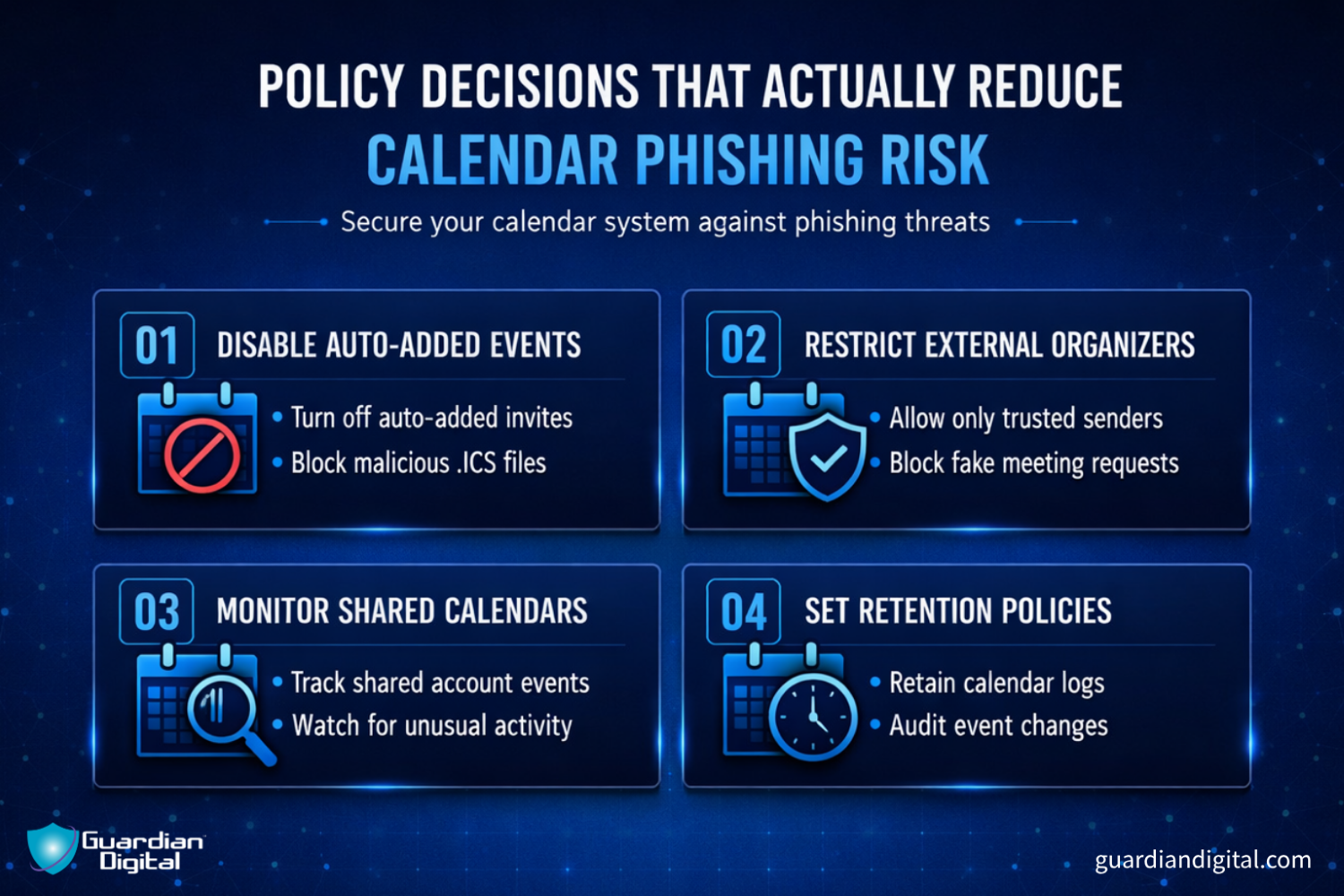
One of the biggest things worth reviewing is automatic invite handling. In some Microsoft 365 environments, external meeting requests can land on calendars before users even look at the original message. Convenient for scheduling. Bad when the invite is malicious and starts firing reminders across phones and desktops all day.
External organizer permissions matter too. A lot of tenants leave them fairly open because locking them down too aggressively frustrates vendors, recruiters, customers, and partners. Fair concern. But if nobody is reviewing how external invites are handled internally, attackers end up with a very easy delivery mechanism.
Shared mailboxes and delegated calendars create additional risk that teams often underestimate. Executive assistants, finance coordinators, and HR scheduling accounts handle huge volumes of meeting traffic. They tend to process invites quickly, making them useful targets for attackers to test calendar phishing campaigns within an organization.
Retention settings are another overlooked issue. If calendar activity logs disappear after a short period, incident response becomes guesswork once investigators need to reconstruct who received, accepted, or modified malicious meetings.
Protecting Calendars from Malicious Event Invites
The best way to limit the success of calendar phishing requests is to stop their events from showing up on employee calendars. In Microsoft 365 environments especially, external calendar invites can get processed automatically before the user even interacts with them. Disabling automatic processing helps cut down on junk events showing up directly in employee calendars. It forces users to actively accept the invite instead of silently trusting it because it appeared alongside legitimate meetings. To go a step further, businesses can also create mailbox rules that quarantine, redirect, or delete any emails containing an external .ics file.
Even when the opportunities to receive phishing messages are limited, user awareness is still important. Inbox users should treat unexpected calendar invites the same way they treat suspicious emails:
- Carefully inspect who the sender information before opening any meeting invites. If the invite included links or attachments, avoid opening them until the sender is verified through another channel.
- Report the calendar notification email if the sender looks unfamiliar or the request feels out of place.
- Then delete the calendar event itself, not just the email notification. A lot of users miss that part and leave recurring events sitting on the calendar even after the phishing message gets removed.
Most malicious invites do not look obviously fake anymore, particularly when attackers use compromised Microsoft 365 accounts or trusted SaaS infrastructure to send them. The broader fix is treating calendar workflows with the same level of scrutiny already applied to email authentication, login monitoring, and account protection policies. These steps should be combined with broader efforts to secure email account access across collaboration systems tied to the same identity layer.
Why Calendar Phishing Forces a Different Trust Model
Calendar phishing works because the meeting itself feels routine. Employees are used to getting reschedules, vendor calls, interview requests, finance reviews, and random last-minute invites from leadership. Most people are moving too fast during the day to inspect every conferencing link, and users tend to trust the workflow automatically.
That creates an email security gap. Organizations spend a lot of time hardening inbox protections, while calendar systems inherit the same trust without the same level of monitoring or review. Meanwhile, attackers are already using scheduling infrastructure as part of phishing campaigns, internal reconnaissance, and email account compromise.
The bigger takeaway is not that calendars suddenly became dangerous overnight. It is that collaboration platforms now sit much closer to identity systems than defenders assume. Meeting invites become another way for phishing attackers to collect credentials and maintain a presence inside normal business activities without drawing much attention.
Calendar Phishing FAQ
Calendar phishing confuses a lot of teams at first because the attack does not really look like phishing once it hits the user. It looks like ordinary work. A meeting request. A reschedule. A Teams invite that somebody forgot about. That is why people keep clicking these things even in environments with decent email security controls.
How does calendar phishing differ from regular phishing?
Normal phishing usually shows up as a sketchy email asking the user to open an attachment or reset a password. Calendar phishing hides inside meeting traffic that people already trust.
The user sees a meeting request from “Finance” or “HR,” clicks accept, and moves on with their day. Nobody is slowing down to inspect organizer details when Outlook has already added the event to the calendar and started pushing reminders to their phone.
The persistence is different too. A phishing email gets deleted eventually. A fake meeting invite can keep popping back up for days through reminders and recurring events.
Can malicious .ics file attachments execute malware directly?
Usually, the .ics file itself is not the payload. Most of the time it is just carrying a malicious meeting link or redirecting the user to a fake Microsoft 365 or Zoom login page.
The attacker wants credentials more than anything else. Once they get the account, they can start sending more invites internally from a legitimate mailbox, which is where things get ugly.
Why do users trust calendar invites more than email messages?
Because meetings feel routine. People answer invites quickly between calls, on mobile devices, while multitasking. They are not treating the interaction like a security decision.
Most users are trained to question weird emails. Very few are trained to question a calendar request that looks like it came from someone they work with.
Does Microsoft 365 scan calendar invites for malicious links?
It can, depending on how the environment is configured. Defender for Office 365 catches a lot of obvious malicious links and attachments.
The problem is compromised accounts and trusted senders. Once attackers start sending invites from inside the tenant or through legitimate collaboration tools, the requests look much more normal and are harder to separate from real business traffic.
Can attackers spoof internal meeting organizers?
Absolutely. Sometimes they spoof display names. Other times, they compromise a real mailbox and send the invites directly from the account.
That second scenario is harder to spot because everything technically looks legitimate. Real domain. Real mailbox. Real scheduling history. The only suspicious thing might be the meeting link itself.
What logs should security teams collect for calendar phishing investigations?
Calendar creation and modification history matters a lot here. Same with organizer changes, forwarded invites, recurring meeting updates, OAuth approvals, and account login activity tied to the user.
One thing teams run into constantly during investigations is missing retention data. The phishing email might still exist in logs while the actual calendar activity needed to reconstruct the attack is already gone.
Are Google Calendar users vulnerable to the same attack methods?
Yes. The workflow looks a little different than Microsoft 365, but the trust problem is the same.
Attackers still abuse external invites, fake conferencing links, and compromised accounts to push malicious meetings into normal scheduling traffic. Users usually trust the platform's behavior more than they trust random email.
Should organizations disable automatic calendar invite processing?
Not completely. Turning everything off usually creates enough friction that users start working around the controls anyway.
What makes more sense is tightening how external invites are handled, reviewing organizer permissions, and paying closer attention to high-risk departments like finance, HR, and executive support teams where meeting traffic moves fast all day.
How do SOC teams detect suspicious recurring meetings?
Usually, by tying calendar activity back to suspicious login behavior or compromised accounts.
If a user suddenly creates dozens of recurring meetings with external links right after an impossible travel alert or suspicious OAuth approval, that deserves attention. The hard part is filtering normal scheduling noise out of large environments where thousands of recurring meetings already exist.


 PREVIOUS
 NEXT
NEXT 
In this article
Stay Informed with Our Latest Insights
- Why Email Thread Hijacking Makes Compromise Harder to Detect
- Calendar Phishing Attacks: How Malicious Invites Bypass Email Defenses and Change Enterprise Risk
- SaaS Attacks and Email Security: How SaaS Platforms Became the Delivery Layer
- Data Leaks from AI-Generated Code Are Fueling Email Breaches
- How to Protect Your Business Against Spear Phishing: A Defense Playbook

Join Our Community
of Readers!
Must Read Blog Posts
- Phishing Scams in 2026: The Rise of AI and Deepfake Risks
- Understanding Email Viruses: Detection, Prevention, and Security Strategies
- Effective Phishing Protection: Strategies and Training for Businesses
- Essential Ransomware Strategies for Effective Business Protection
- Maximizing Email Security: Advanced Strategies for Threat Defense
- Microsoft 365 Phishing: Why Attacks Still Reach Inboxes and How to Stop Them