
Multi-factor authentication exists because passwords fail in predictable ways. Credentials are reused, phished, and pulled from older data breaches, often without anyone noticing right away. Once a password leaks, it usually works everywhere it was reused.
That pattern explains why so many account takeovers begin quietly. The entry point is rarely an exploit. It is an inbox, a cloud login, or a reused credential that still opens the door. In Microsoft 365 environments, that access tends to cascade quickly into password resets, impersonation, and broader compromise.
Multi-factor authentication does not correct the initial exposure. It changes what happens next by making a stolen password insufficient on its own. The login slows down, an extra step appears, and the attempt either fails or becomes visible.
What Is Multi-Factor Authentication (MFA) and How Does It Work? 

In short, MFA is designed to prevent simple failures. A password on its own keeps working long after it should not. Reuse is common, phishing attacks are routine, and malware collects credentials quietly over time.
MFA changes the condition for access. A login that used to succeed now pauses. Something else is required. A device, an app prompt, a biometric. Without that second proof, the session does not start.
That shift matters because it changes outcomes, not exposure. Credentials still leak. The difference is that reuse stops working at scale. Failed attempts show up in logs instead of disappearing into normal traffic.
Most teams notice those failures before they notice the compromise.
Which MFA Methods Are Best for Your Organization?
No multi-factor authentication method works everywhere, and that becomes clear once deployment moves beyond a small test group. Each option shifts risk in a different way, and the tradeoffs tend to surface during daily use rather than during setup.
- SMS-based authentication is easy to deploy and easy to abuse. SIM swapping and social engineering make it unreliable, especially in environments already dealing with credential reuse.
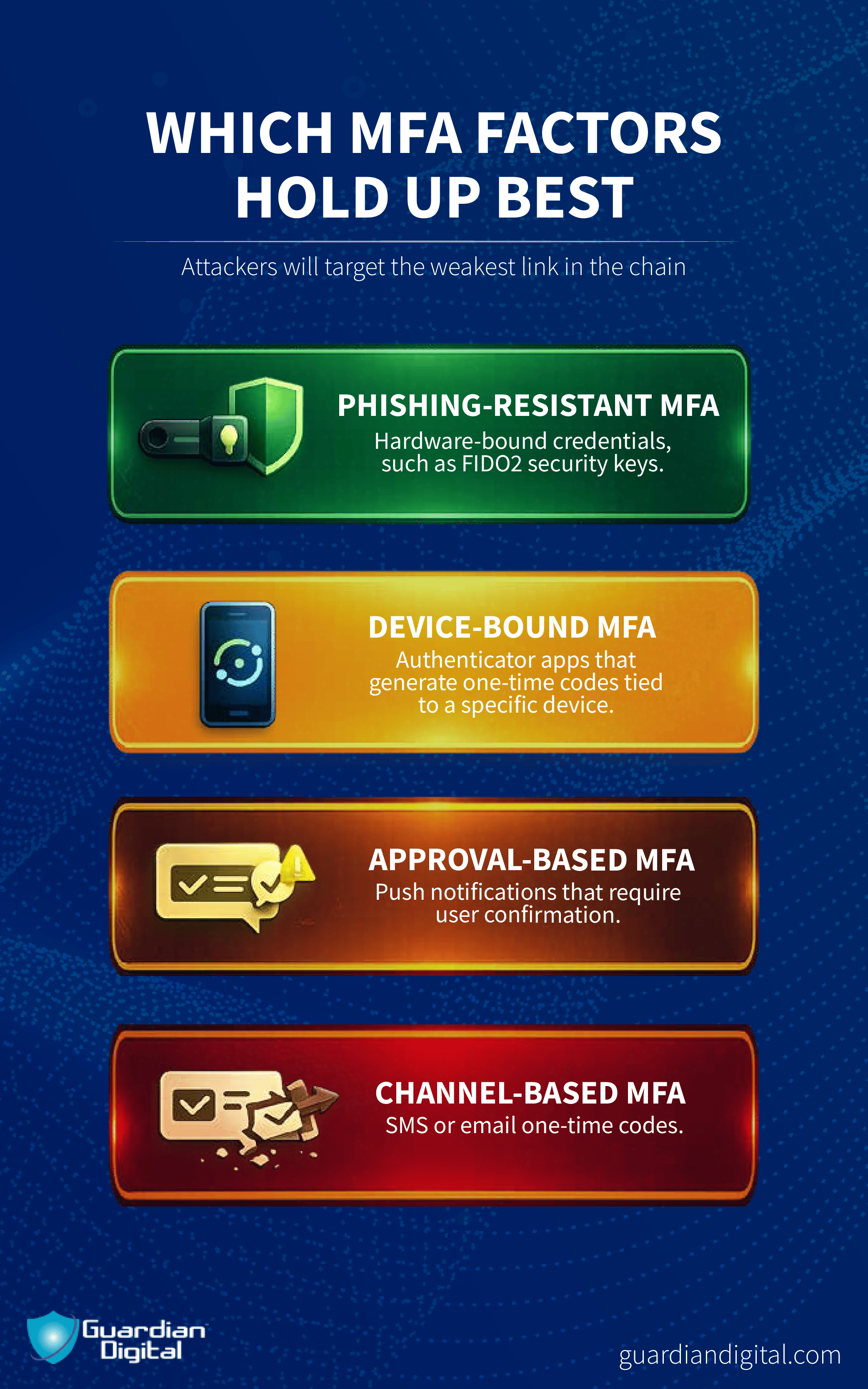
- Authenticator apps hold up better. Codes are generated locally, expire quickly, and avoid phone network risk. This has become the baseline for most cloud platforms, including Microsoft 365.
- Push-based authentication lowers friction but introduces approval fatigue. Attackers exploit this during spear-phishing campaigns by triggering repeated requests until one is approved.
- Hardware tokens provide stronger isolation and work well for privileged access, but they add operational overhead.
- Biometric authentication improves usability but depends on the endpoint. Poor device hygiene weakens the control without making that obvious.
Most organizations layer these methods rather than choosing one. Lower-risk access stays simple, while administrative roles and sensitive systems require more substantial proof. Over time, those distinctions matter more than the technology itself.
How to Set Up MFA for Your Organization in 5 Steps
Multi-factor authentication rollouts succeed or fail on order, not intent. Turning it on everywhere at once feels decisive, but it often leads to lockouts, workarounds, and pressure to weaken controls. A layered approach holds up better once real users and real attackers show up.
Step 1: Identify how access actually happens: Start with where identities authenticate today. Email, cloud portals, remote access, legacy protocols, service accounts. This inventory is never perfect, but it surfaces the paths attackers use and the ones that will break first.
If an access path is invisible to you, MFA will not protect it.
Step 2: Group users by risk, not convenience: Some accounts get targeted more often and cause more damage when they fall. Administrative roles, finance, executives, and externally exposed users should move first.
Lower-risk users can follow once enforcement and support are stable. This sequencing reduces noise and limits rollback pressure.
Step 3: Enforce MFA at primary entry points: Focus on the logins attackers test at scale. Web access, email, VPNs, and cloud identity providers. This is where reused credentials and phishing kits collide with reality.
In environments tied to Microsoft 365 security, conditional access becomes the control plane. MFA stops being advisory and starts shaping outcomes.
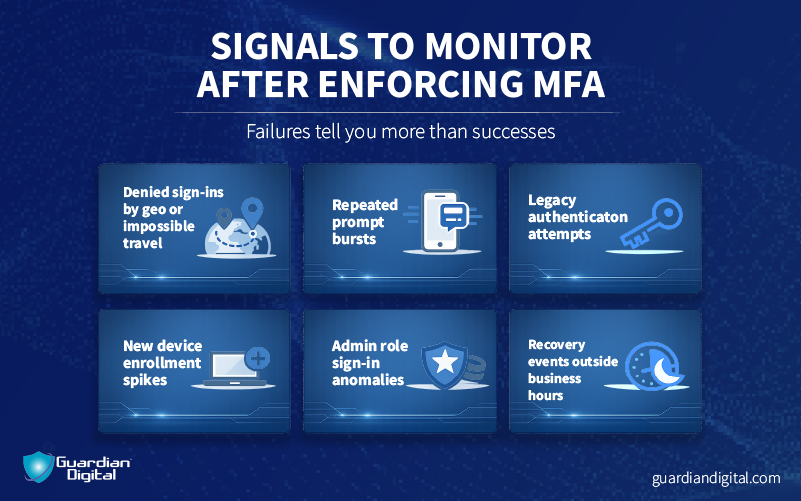
Step 4: Watch failures, not successes: Failed logins are the signal. Repeated prompts, denied access, and approval fatigue show where users struggle and where attackers probe.
If enforcement generates no friction, it is probably incomplete.
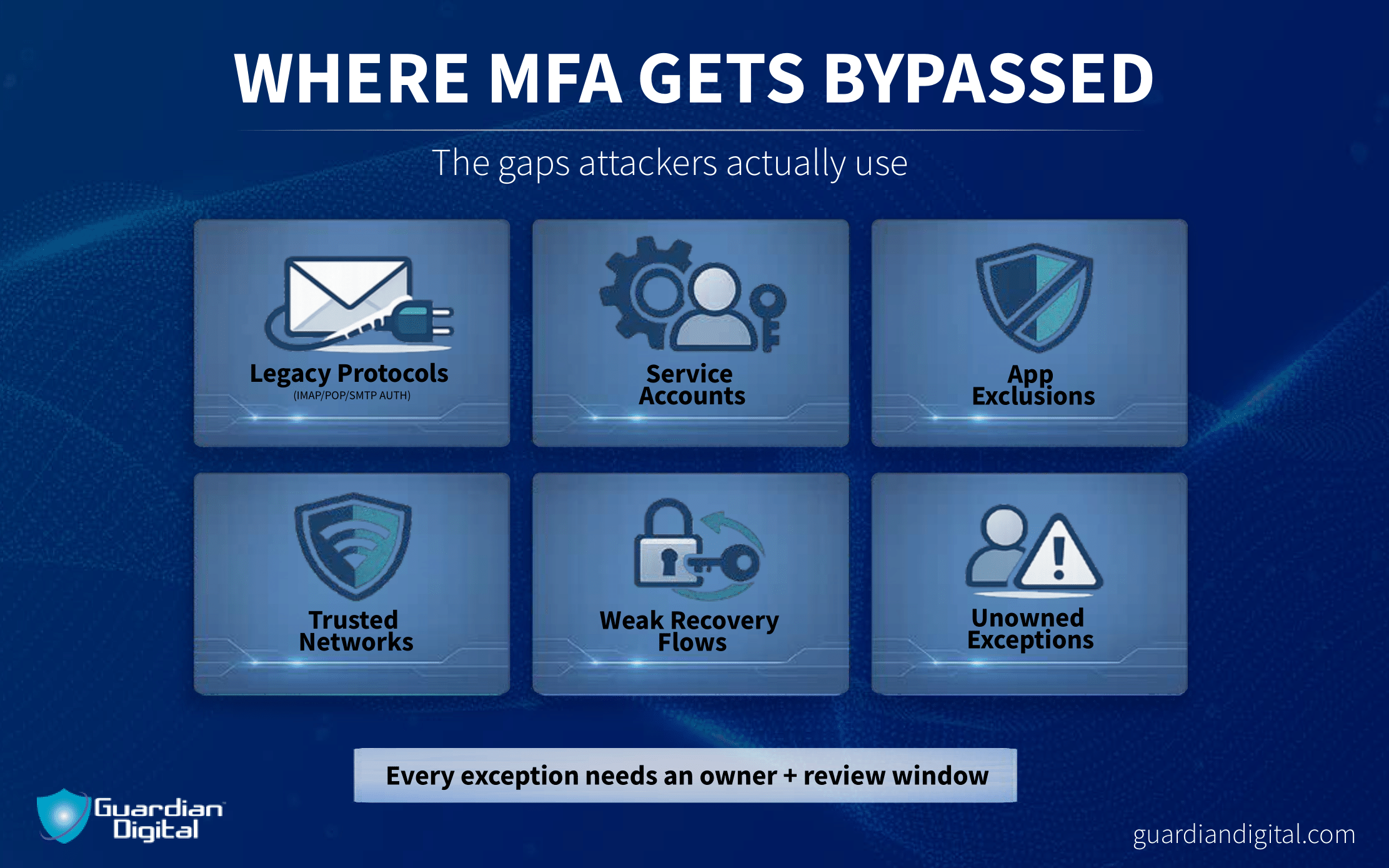
Step 5: Close the bypasses: Once MFA blocks the obvious paths, attackers pivot. Legacy authentication, service accounts, and recovery workflows become the new targets.
Every exception needs an owner and a review window. MFA only holds when bypassing it is harder than using it.
Common Challenges When Deploying MFA (and How to Overcome Them)
Most MFA problems are operational. The control is enabled, users are enrolled, and coverage still ends up incomplete. Not because of advanced attacks, but because everyday workflows were not accounted for.
- User behavior creates approval risk: Push-based MFA floods users with prompts, leading to approvals becoming reflexive. Attackers trigger repeated requests until one slips through. Fewer prompts and clearer context work better than training.
- Legacy access paths stay exposed: older protocols do not support MFA, so exceptions pile up and get ignored. Once primary logins are protected, attackers move on to recycled passwords, which still work. Disabling or isolating legacy auth matters more than expanding coverage.
- Weak factors linger too long: SMS stays because it is easy, not because it holds up. SIM swapping and social engineering still work against it. Stronger factors should be the default.
- Misconfiguration does the most damage: Policies exist, but enforcement is uneven. Apps are excluded. Networks are overtrusted. This is where common cybersecurity mistakes appear. MFA appears enabled, yet access still bypasses it.
- Support and recovery undo enforcement: Help desks bypass MFA to restore access, creating an alternate login path. Recovery needs controls and ownership, or it undermines the rest.
Most of these failures are not design flaws. They are gaps that form after rollout, when MFA stops being a project and starts being infrastructure. If those gaps are not revisited, MFA stays present but stops being protective.
While multi-factor authentication dramatically reduces the risk of account compromise, it’s only one part of a broader security decision. Some organizations also evaluate where their identity and email providers are based, how user data is handled, and which privacy regulations apply. In those cases, exploring European alternatives to mainstream platforms can be part of a wider effort to strengthen account security and data protection.
Why Does Email Security with MFA Matter?

Email is where attackers start because it works. Credentials get phished or reused, and the inbox is usually the first place they try them. That makes email security less about stopping every message and more about controlling what happens when one succeeds.
Mailbox access opens doors fast. Password resets fire. MFA prompts get intercepted. Internal threads turn into impersonation. Forwarding rules get planted and sit there quietly. You do not need long access to do damage, just enough time and no friction.
MFA adds that friction. A stolen password on its own stops being enough. The login fails or throws a signal that shows up in logs instead of disappearing into normal traffic. That break in the flow is often the only chance to catch the intrusion before it spreads.
This is where layering matters. Filters reduce volume and catch a lot of junk, but they miss things by design. MFA backs them up by limiting impact when spam filtering does not catch the message that matters.
The inbox still anchors identity for most organizations. If it falls, everything downstream is easier. MFA does not make email invulnerable, but it shortens exposure and forces attackers to slow down where they rely on speed.
Top Use Cases for Multi-Factor Authentication
Multi-factor authentication matters when attackers already have something to work with. A password, a token, a login that should not still function. MFA changes what happens next by slowing access and breaking the quiet part of an intrusion.
Stolen credentials and inbox-led compromise: Most intrusions still start with a password. Users reuse them, malware collects them, and email delivers them. Credentials stop being sufficient, and the login either fails or leaves evidence instead of turning into access.
Cloud account takeover attempts: Cloud platforms concentrate identity. One successful login often opens email, storage, and internal tools at once. MFA forces an extra step at the point where attackers test first. That added friction disrupts automated attempts and exposes abuse that would otherwise blend into normal sign-ins.
Lateral movement from a single user: Many compromises start small. One account gets accessed, then password resets and new sessions follow. MFA slows that spread. Each new login requires confirmation, which limits how fast one foothold turns into broader access.
Credential exposure outside your environment: Credentials leak through malware, third-party vendors, and reused passwords from older incidents. When those leaks feed into data breaches, MFA helps cap the damage. Recycled passwords lose value when they cannot be replayed at scale.
Abuse of privileged accounts: Administrative access is still the fastest way to escalate. MFA does not make these accounts safe, but it makes simple reuse and brute testing ineffective. That extra barrier often creates the delay defenders need to see what is happening.
Across these cases, MFA plays the same role. It does not prevent every compromise. It limits reach, slows momentum, and forces attackers out of the background.
Implementing MFA for Microsoft 365 and Cloud Platforms
Implementing MFA in cloud platforms starts with accepting where identity lives. One tenant, one directory, and a shared control plane that governs email, files, and administrative access. MFA has to apply at that layer, or it becomes decorative.
Most organizations begin with user logins, then expand outward. Web access, email, and remote sessions come first because that is where credentials are tested. Enforcement needs to be tenant-wide at this stage. Partial coverage leaves predictable gaps that get found quickly.
The next step is consistency. MFA that applies to users but not administrators, or to some applications but not others, creates parallel access paths. Those paths tend to persist because they keep things working. Attackers do not need to guess which ones exist. They test until one responds.
Cloud platforms make policy enforcement easier, but they also amplify mistakes. A single misconfigured rule applies everywhere at once. That makes validation as important as rollout. Failed logins, denied access, and prompt patterns should be reviewed early and often.
Implementation finishes where exceptions begin. Legacy authentication, service accounts, and recovery workflows need explicit ownership. If MFA can be bypassed to keep work moving, it will be. Closing those paths is part of deployment, not cleanup.
Advanced MFA Security: Beyond Basic Authentication
MFA is effective because it targets a narrow problem. Stolen credentials. Reused passwords. Quiet logins that should not succeed. Outside of that lane, its value drops, and pretending otherwise creates blind spots.
MFA does not stop session abuse once access is granted. If an attacker gets into a mailbox and starts impersonating users or manipulating payment workflows, the control has already done its job. Business Email Compromise plays out after authentication, not during it. MFA helps earlier in the chain, but it does not replace monitoring or response.
The same limit applies to availability attacks. Denial-of-Service Attacks, for example, do not care who is logging in. They target infrastructure, bandwidth, and service stability. MFA sits upstream from that problem and does not meaningfully change the outcome.
This does not make MFA weak. It makes it specific. It blocks credential-based access and forces attackers to shift tactics. That shift is valuable because it narrows the problem space and reduces the number of silent failures defenders have to chase.
MFA works best when it is treated as one control among many. It protects identity. Other layers handle behavior, payloads, and persistence. Mixing those roles blurs accountability and weakens the system.
Multi-Factor Authentication FAQs
These are the questions that usually come up once organizations start enforcing MFA.
What exactly is Multi-Factor Authentication (MFA), and why should my organization implement it?
MFA requires more than a password to complete a login. The second factor changes the outcome when credentials leak, which they do. Organizations implement MFA because it limits how often a stolen password turns into access.
Is MFA really more secure than using just a strong password?
Yes. Strong passwords still get reused, phished, and pulled off endpoints. Once exposed, they work anywhere they are reused. MFA removes that single point of failure.
Can MFA protect against phishing attacks?
It does not stop phishing emails from being sent or opened. It reduces what happens after credentials are entered. In many cases, the login fails or generates a signal instead of granting access.
Is MFA necessary for email security, or is it just for IT infrastructure?
It is necessary for email. The inbox drives password resets, internal trust, and cloud access. When email falls, everything else follows. MFA adds friction at the point where attackers expect none.
Conclusion: Why Multi-Factor Authentication Still Matters
Identity is still the easiest place to fail quietly. Email logins, cloud access, and administrative sessions all hinge on credentials that get reused and exposed. MFA matters because it interrupts that pattern before damage spreads.
It does not stop every attack. It does not prevent malware from executing or ransomware from encrypting systems once access is achieved. What it does is remove the silence. Failed logins surface. Abuse becomes visible. Time shifts back to the defender.
As environments continue to centralize around cloud identity, controls that fail loudly matter more than controls that promise perfection. MFA earns its place by doing one thing consistently. It makes stolen credentials less useful and compromises harder to ignore.
For more email security insights, sign up for Guardian Digital’s newsletter.


 PREVIOUS
 NEXT
NEXT 
In this article
Stay Informed with Our Latest Insights
- Why Email Thread Hijacking Makes Compromise Harder to Detect
- Calendar Phishing Attacks: How Malicious Invites Bypass Email Defenses and Change Enterprise Risk
- SaaS Attacks and Email Security: How SaaS Platforms Became the Delivery Layer
- Data Leaks from AI-Generated Code Are Fueling Email Breaches
- How to Protect Your Business Against Spear Phishing: A Defense Playbook

Join Our Community
of Readers!
Must Read Blog Posts
- Phishing Scams in 2026: The Rise of AI and Deepfake Risks
- Understanding Email Viruses: Detection, Prevention, and Security Strategies
- Effective Phishing Protection: Strategies and Training for Businesses
- Essential Ransomware Strategies for Effective Business Protection
- Maximizing Email Security: Advanced Strategies for Threat Defense
- Microsoft 365 Phishing: Why Attacks Still Reach Inboxes and How to Stop Them




