Email phishing scams are creating more work for security teams. Phishing messages no longer stand out the way they once did, largely thanks to generative AI in the hands of threat actors.
Spelling is usually correct, even if the message isn't being written in their first language. The formatting is fine. References to projects, vendors, coworkers, and internal processes are often accurate enough. Nothing seems unusual during a quick review.
Phishing is not fundamentally different today, but it got much more accessible, and writing believable lures is no longer the hard part. That change shows up everywhere. In inboxes. Help desk tickets. Mailbox investigations. The underlying attack may still involve a malicious link, credential theft, or malware delivery, but the fraud detection isn't obvious.
The cybersecurity risk comes from that overlap between legitimate communication and fraudulent communication. The line separating the two keeps getting thinner. This article examines how AI-driven phishing tactics have changed, what warning signs still matter, and where defensive controls continue to make a difference.
What Makes Email Phishing Scams Dangerous?
Phishing attacks can be damaging in a number of ways. An email is just the start. What matters is what happened after the message was opened, the attachment was downloaded, or the credentials were entered. A user signs into a fake Microsoft 365 page. An MFA request gets approved without much thought. A mailbox begins forwarding messages outside the organization. By the time those artifacts appear during an investigation, the original email is often several steps behind. 
A successful phishing attack can create access that was never supposed to exist. Internal conversations become visible. Password reset workflows become useful to the attacker. Financial systems, cloud applications, and collaboration platforms suddenly sit behind a compromised account instead of a trusted employee. The initial compromise may be small. The opportunities that follow are not.
This is one reason organizations continue paying attention to evolving phishing threats even when they have strong filtering controls in place. The objective is not always malware delivery. Many campaigns are designed to collect credentials, hijack sessions, redirect payments, or gain access to information that already exists inside the environment.
Recovery efforts are where the impact becomes visible. Mailbox reviews. Account audits. Password resets. Log analysis. Sometimes legal teams and finance departments become involved. A message that took ten seconds to read can generate days of work across multiple teams.
How Have Phishing Tactics Changed?
The phishing email itself is no longer the most interesting part of the attack.
A lot of recent investigations involve messages that would not have stood out a few years ago because there is very little in them to analyze. No obvious grammatical errors. No strange formatting. In many cases, the email is shorter than the legitimate messages sitting around it in the same thread. The difference is usually hidden in the request.
The rise of QR code phishing is a good example. Instead of asking someone to click a suspicious link, the email contains a code and little else. The user scans it from a phone, leaves the environment where they would normally inspect a URL, and lands on a credential harvesting page that looks convincing enough to do its job.
Phishing Attackers are Better at Matching Context
Effective phishing pays attention to conversational context. Vendor conversations. Internal projects. HR notifications. Password resets. Phishing attacks have the same objectives as always, but generative AI tools make it easier to build a believable email lure.
Successful phishing attacks still rely on basic social engineering, but AI-generated content raised the baseline quality of phishing emails. That doesn't mean every campaign uses sophisticated deepfake technology. What changed is that messages that once required time, research, and decent writing skills can now be produced quickly and adjusted repeatedly until they fit the audience. That shift shows up across consumer scams, business email fraud, and targeted credential theft alike.
The result is less noise and fewer obvious mistakes. Investigators are spending less time explaining why an email looked suspicious and more time explaining why it didn't.
How to Identify Today's Most Common Email Phishing Scams
Phishing attacks can be identified by fake email addresses, misleading subject lines, suspicious links or attachments, and a sense of urgency that exploits the target’s emotions. These common elements are packaged within a variety of delivery methods. Not just email, but through social media, collaboration platforms, text messages, and QR codes. They find their targets through these different channels. What doesn't change is the underlying objective. Attackers are still trying to collect credentials, deliver malware, or obtain information that can be used somewhere else later.
The details of phishing scams evolve constantly. The mechanics tend to repeat themselves. These are some common attack types that everyone should know how to recognize:
Spear Phishing and Business Email Compromise (BEC)
Spear phishing attackers already know who they want to reach before the message is sent. Ideal targets are finance personnel, payroll administrators, executive assistants, and anyone else involved in moving money around or approving sensitive requests. It's not a generic scam lure. Spear phishing emails are crafted with one person in mind.
The research is often surprisingly simple. Public employee profiles, vendor information, corporate websites, social media activity, and previous breaches can provide enough context to make a request feel familiar when it arrives. Sometimes the message asks for credentials. More often, it asks for an action.
That is where Business Email Compromise starts to work. The email does not have to exploit a system. It only has to fit inside a process that already exists.
A payment approval. New banking details. An invoice that looks close enough to the normal vendor workflow. A request for financial data from someone who appears to have the authority to ask for it. Nothing about that has to look technically malicious.
Whaling follows the same pattern, just with a more powerful name attached to the request. A CEO, CFO, or senior manager gives the message weight before anyone reads it closely. The attacker is counting on that. Not fear exactly. Momentum. The employee sees authority, sees urgency, and the verification step gets smaller.
Social Media Phishing
Social media gives attackers something they used to spend a lot of time collecting: context.
Job titles, employer information, professional relationships, recent projects, travel updates, family details, and contact information are often available without much effort. None of that is necessarily sensitive on its own. Viewed together, it becomes useful.
A phishing message sent through a social platform rarely looks like a traditional phishing email. It may arrive as a direct message, a connection request, a comment, or a support notification. Sometimes the attacker impersonates a colleague. Sometimes a recruiter. Sometimes a brand the user already follows. The objective changes from campaign to campaign. The approach usually stays familiar.
Many users apply different levels of scrutiny depending on where a message appears. An unexpected email may receive a second look. A direct message on a platform they use every day often receives a faster response. Attackers understand that.
Anyone researching trap phishing will recognize a similar theme. The goal is to create a situation that encourages the user to act before examining the request too closely. Whether the message arrives through email or social media matters less than the behavior it is trying to trigger.
The platform changes. The social engineering doesn't.
How to Spot a Phishing Attempt
The first clue is often not the sender's address. It is the request. 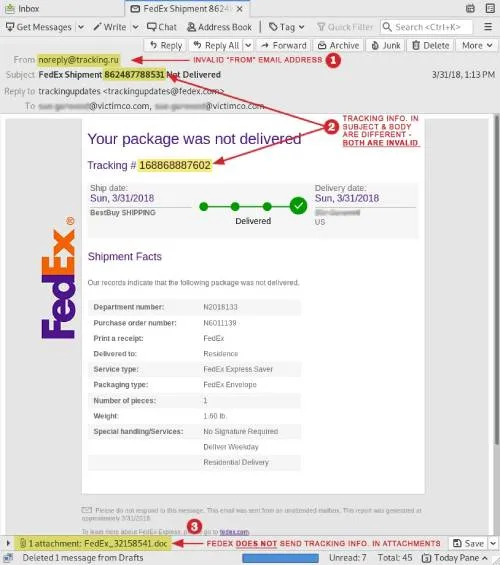
A payroll update that nobody expected. A document-signing notice tied to no active contract. A vendor asking for payment changes near the end of the month. Those messages can look normal in isolation, which is why they get through.
Sender details still matter, but they rarely tell the whole story. The domain may be off by one character. The display name may be familiar, while the address is not. In brand impersonation cases, the page behind the link usually does more of the work than the email itself. As in a DocuSign scam email, the email pushes the user toward a login, a signature, or a file review. The fraud sits behind the click.
Good review slows the request down. Does this match the sender’s normal behavior? Was this document expected? Did the link go where the message claimed it would go? A phishing attempt usually breaks somewhere in that chain. Not always loudly. Sometimes just enough.
How Can You Protect Your Business Against Phishing?
Organizations can stop phishing losses by combining employee training and email security controls to create barriers between receiving financial or data-sharing requests and acting on them.
Creating a clear system of verification closes a surprising number of security gaps. For example, a finance employee who receives new banking instructions and calls the vendor before updating the account can save their company from being scammed. Whenever someone receives an unexpected document-sharing request, they should know how to reach out and confirm it through another channel. The same goes for login prompts. These are small interruptions, but they matter.
Technical controls also play an important role. Filtering, authentication policies, mailbox monitoring, endpoint protection, and account security measures all reduce opportunities for attackers. None of them eliminates phishing by themselves. They make mistakes less expensive and investigations easier when something goes wrong.
Anyone searching for how to prevent phishing attacks is usually looking for a single control that solves the problem. Most organizations discover there isn't one. The defenses that work best tend to be layered across the same workflow that attackers are trying to exploit.
The goal is not to examine every email forever. It is to create enough points where a suspicious request has a chance to be questioned before someone acts on it.
Phishing Scam FAQ
Questions usually come after the incident, not before it. By then, someone is trying to understand why the email looked normal enough to pass.
What Is AI Phishing?
AI phishing is phishing with the writing problem mostly removed.
The attacker still wants the same things: credentials, payment access, malware delivery, session tokens, and internal data. What changed is how easily the lure can be shaped. A rough prompt can turn into a clean payroll notice, a vendor follow-up, or a fake document request that sounds close enough to the real thing.
That matters during review. The old signals are weaker. Bad grammar, awkward phrasing, and a strange tone were used to help. Now the message may read like an ordinary business email, which is exactly the point. Anyone studying a broader phishing attack will see the same pattern. Better packaging around the same objective.
How Do Deepfake Phishing Scams Work?
Scams use generative AI to imitate the voices and likenesses of real, familiar people. This is effective because if employees think they are talking to a coworker or client in real time, they are more likely to act on sudden requests, even if they don’t quite make sense. The rapid improvement in this technology has taken a lot of people by surprise, and even experts can’t always pinpoint the fakes. 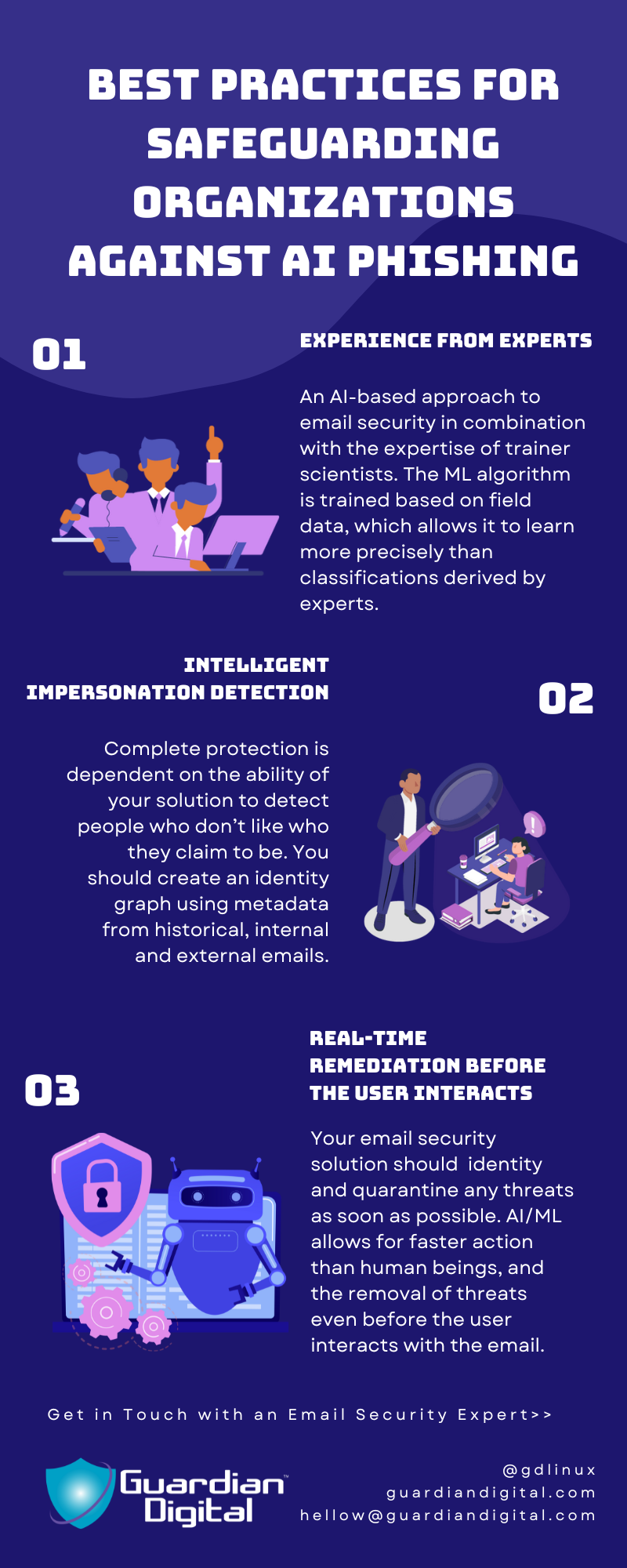
Not every deepfake scam is sophisticated. Many fail. The concern is that people are trained to verify links and email addresses, but aren’t prepared to say no to someone in a video call who looks like their boss.
What Is QR Code Phishing?
Instead of asking the recipient to click a URL, this type of phishing attack contains a QR code that sends them somewhere else entirely. When people scan it with a phone, the destination often gets less scrutiny than a traditional link inside an email.
A lot of the usual warning signs disappear in the process. There is no domain to hover over. No obvious URL to inspect. Anyone relying on a phishing link checker quickly runs into the same challenge. The destination remains hidden until after the code is scanned.
Why Are Email Phishing Scams Harder to Detect Today?
The phishing messages showing up in investigations today are often short, clean, and fairly believable. They reference real services, real companies, and sometimes real conversations. That makes detection harder. Anyone looking at spam vs. phishing will eventually run into the same distinction. Spam is trying to reach as many people as possible. Modern phishing campaigns often try to look like they belong in a specific inbox. The message may not look suspicious until somebody slows down and examines the request instead of the email.
How Does Phishing Increase Cybersecurity Risk?
A password obtained in a phishing attack often leads to mailbox compromise. Then, a compromised mailbox can expose internal conversations, password reset requests, vendor communications, and information that was never meant to leave the organization. Attackers can then use that access to move somewhere else within a business communication network.
Final Thoughts On Email Phishing Scams
The phishing campaigns generating the most work today are not always the most technically sophisticated. Many succeed because the request looks ordinary long enough for somebody to act on it.
Generative AI, deepfakes, and QR-based attacks have changed how phishing messages are delivered, but the objective remains familiar. Obtain credentials. Gain access. Move money. Collect information. The mechanics evolve faster than the goal.
That is why investigations often come back to the same questions. Did the request make sense? Did it match normal behavior? Was there an opportunity to verify it before action was taken?
The technology will continue to change. Those decision points tend to remain.


 PREVIOUS
 NEXT
NEXT 
In this article
Stay Informed with Our Latest Insights
- Why Email Thread Hijacking Makes Compromise Harder to Detect
- Calendar Phishing Attacks: How Malicious Invites Bypass Email Defenses and Change Enterprise Risk
- SaaS Attacks and Email Security: How SaaS Platforms Became the Delivery Layer
- Data Leaks from AI-Generated Code Are Fueling Email Breaches
- How to Protect Your Business Against Spear Phishing: A Defense Playbook

Join Our Community
of Readers!
Must Read Blog Posts
- Phishing Scams in 2026: The Rise of AI and Deepfake Risks
- Understanding Email Viruses: Detection, Prevention, and Security Strategies
- Effective Phishing Protection: Strategies and Training for Businesses
- Essential Ransomware Strategies for Effective Business Protection
- Maximizing Email Security: Advanced Strategies for Threat Defense
- Microsoft 365 Phishing: Why Attacks Still Reach Inboxes and How to Stop Them