
URL rewriting, or link-wrapping, is a phishing tactic that abuses trusted email protection platforms to conceal the actual destination of a shared link.
Phishing emails now pass through real security filters, originate from compromised accounts, and lead to fake Microsoft 365 login screens. The most dangerous part? The URLs don’t look suspicious.
These aren’t sloppy scams. The latest campaigns don’t rely on typos or mismatched logos. They use tools meant to protect users—link scanners, email gateways, sanitizers—as camouflage from threat detection. When a link starts with a domain that users recognize from their organization’s security tools, it tends to be trusted. Often, it is. That’s what makes it effective.
In the sections below, we’ll break down how URL rewriting services are being misused, walk through Real-world phishing email examples that exploit them, and show how to spot these attacks before they land.
What Is URL Rewriting and Why Do Security Tools Use It?
Secure email gateways and threat protection platforms use URL rewriting to protect email users from malicious websites. When an email comes in with a URL, the system changes it so that it goes through a limited scanning service instead of the original link. So, if the location turns out to be bad, the defenders can stop the click or record it. 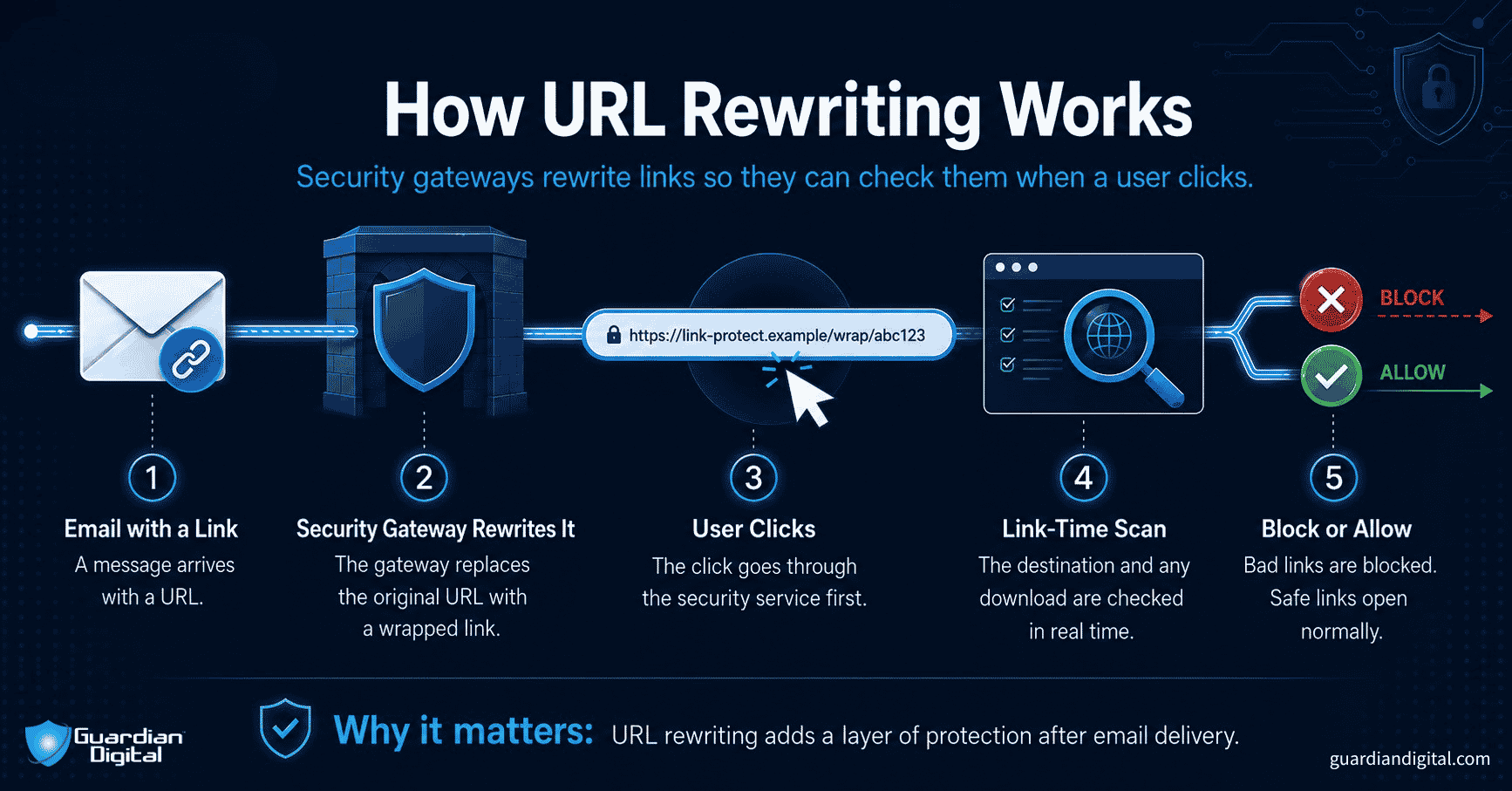
You’ve seen these rewritten links before. Instead of pointing to a direct destination like onedrive.live.com, the URL might start with something like urldefense.example.com or linkprotect.securityhost.net. These are examples of trusted link wrappers, commonly used by secure email gateways and threat protection platforms.
The goal is to create a layer of control after delivery. Wrapped links allow for link-time scanning, meaning the destination is checked right when the user clicks, not just when the email arrives. They also enable click tracking and forensic logging, which help security teams understand user behavior during an incident.
Exploiting Redirect Chains to Evade Threat Detection
URL rewriting is a useful defense. But it’s also predictable. Attackers have learned that if they start with a redirect using something like a Bitly link, the final URL gets hidden behind the trusted wrapper. To the user, the link looks like it’s been scanned. And technically, it has. But the redirect path wasn’t always visible at the time of the scan. 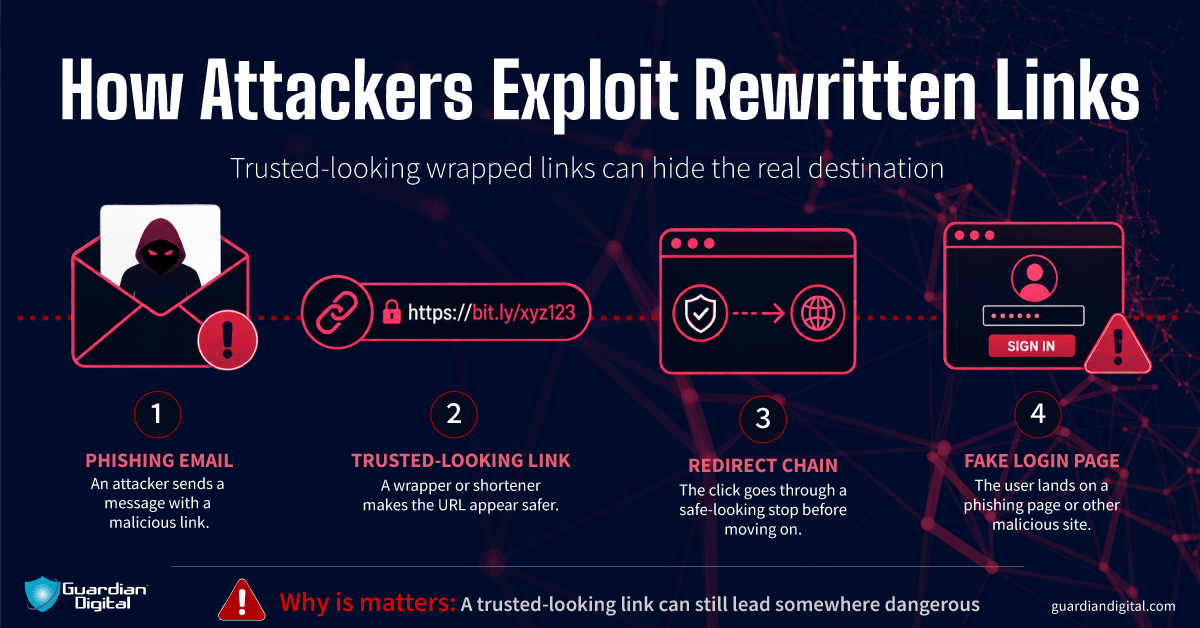
Understanding how phishing attacks evolve helps explain why these campaigns are so effective — they don't rely on obvious red flags; they rely on infrastructure users already trust. That’s what makes these phishing email examples harder to catch. The attacker doesn’t need to hide the fake login page behind a sketchy domain. The security system does it for them.
Phishing Email Examples: Attacks That Evaded Filters with URL Rewriting
The most convincing phishing email examples today don’t come from throwaway domains or foreign IPs. Many of the most damaging campaigns borrow techniques from spear phishing, using personalized context and trusted infrastructure to make every message feel like it belongs. They come from real accounts, pass through enterprise-grade security filters, and include links that appear safe. A recent campaign shows how attackers are using trusted link wrappers to make these emails harder to detect and easier to trust.
Case 1 — Phishing Emails Rewritten by Proofpoint
One wave of phishing emails came from compromised business accounts. Each message included a Bitly-shortened link that redirected to a credential theft site. After delivery, the links were automatically rewritten by Proofpoint’s URL Defense feature. 
The redirect chain looked like this:
bit.ly → urldefense.proofpoint.com → fake Microsoft 365 login
To recipients, the links looked familiar. The sender was legitimate, and the wrapper domain matched what they’d seen in other internal messages. Since the redirection happened after delivery and the Bitly link initially resolved to a clean page, nothing was blocked.
The attackers used several lure formats:
- Missed voicemail alerts
- Encrypted Zix messages
- Shared Microsoft Teams documents
Each led to a convincing Microsoft 365 login screen, often with the user’s email pre-filled via URL parameters. This level of personalization mirrors what you'd find in a spear phishing attack, where the goal is precision over volume, and every detail is chosen to reduce suspicion.
Case 2 — Attacks Routed Through Intermedia’s Link Protection
ALT: Email lure spoofing a file share from “SecureDocs Portal” example with a link rewritten by Intermedia’s URL Defense to conceal the true phishing destination.
Another set of phishing email examples used Intermedia’s link protection. The pattern was nearly identical: a shortened link sent from a compromised account, rewritten by the security platform, and routed to a fake login page.
Again, the security wrapper gave the link a layer of credibility that undermines normal threat detection. The filters passed it, and the user trusted it, until the final page harvested their credentials.
How URL Rewriting Tactics Change Phishing Attacks
These examples highlight a technical strategy that doesn’t rely on user error. Instead, attackers use redirection and link rewriting to build trust into the message. The result isn’t just a phishing email that looks safe, and it behaves that way until the moment credentials are submitted.
Studying these attacks gives defenders a clearer picture of how trust can be exploited, even when security tools are in place and working as intended. Link-wrapping abuse overlaps with trap phishing because the mechanics of baiting users through trusted infrastructure follow the same logic.
The phishing email examples we provided above aren’t just convincing. They are built to avoid suspicion at every step, both from users and from the threat detection systems designed to stop them.
They Look Like Security
A wrapped link that starts with a domain tied to a security service often signals legitimacy to users. That is not a mistake. It is the result of training. Many organizations encourage users to trust messages that pass through visible layers of protection. Attackers use that trust to lower defenses.
They Pass the First Scan
Most filters analyze links when the email is delivered. In these campaigns, the original URL resolves cleanly during that scan. The malicious redirect only activates when the user clicks. That delay allows the attack to pass inspection and reach the inbox. Some phishing scammers obscure the origin of malicious links even further by using a double rewrite attack – passing their links through multiple URL rewrite tools before delivery to the target
They Match What Users Expect
Everything about the message, such as the sender, tone, and formatting, follows the patterns of legitimate communication. Voicemail alerts. Document shares. Encrypted message notifications. None of it feels out of place, so users move quickly.
They Rely on You Not Looking Closely
Most users do not hover over links or expand headers. When a link shows a trusted domain, there is little reason to question it. The visible signs all check out. That is what makes these attacks effective and why threat detection requires going beyond surface-level indicators.
How to Spot a Phishing Email That Uses URL Rewriting
It’s not just about spotting typos. These attacks are built to look clean, pass through filters, and take advantage of tools users are trained to trust. Knowing how to spot a phishing email that uses link-wrapping means reading beyond the surface. 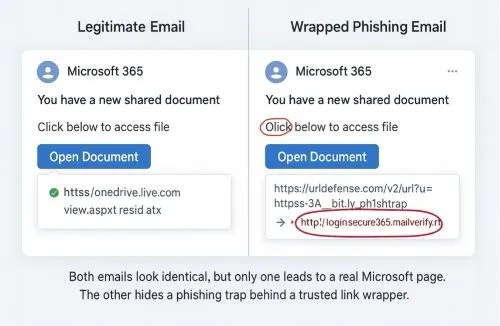
Hover to See the Whole Path: Don’t stop at the first domain. Hover over the link and trace the full redirect chain. You’re looking for a shortened URL up front, a known wrapper in the middle, and an unfamiliar destination at the end. That sequence should raise questions, not confidence.
Don’t Mistake Wrappers for Validation: A link that starts with something like click.securitymail.com tells you the email passed through a scanning layer. It does not tell you that the final destination is safe. That distinction matters. Attackers are counting on users to blur the two.
Look for Small Mismatches: Phishing emails rarely feel completely off. They feel slightly off. A Teams file from someone who has never sent you one. An encrypted message without context. These gaps that attackers exploit are similar to seasonal phishing scams, wrapping urgency and familiarity into messages that feel routine.
Check the Domain, Not Just the Name: Real accounts get compromised. A familiar name in the “From” field does not mean the message is legitimate. Take a second to verify the sender domain. If something does not line up, trust that signal.
Slow Down the Click: These emails are built for speed. Short message. Known format. Safe-looking link. Slowing down is one of the most reliable ways to catch them. Ask yourself: Does this make sense right now? Was I expecting this?
Why Trusted URL Rewriting Services Will Keep Getting Abused
This isn’t a bug. Hijacking vendor infrastructure is a repeatable tactic that compromises built-in email security features.
Link-scanning services routinely rewrite URLs into domains like urldefense.[vendor].com or url.emailprotection.link is a behavior designed to protect users at click-time. That process works as intended. But it also signals inspection: a visual cue that the link might be safe. Attackers know this. And they build for it.
Attackers Build Their Workflow Around Link Wrappers
Modern phishing kits now include redirect chains built specifically to trigger URL rewriting. In observed campaigns, shortened URLs were passed through secure email gateways that rewrote them into formats like urldefense. The message looked clean. The link looked filtered. And the malicious redirect only triggered after the user clicked.
Any Platform That Wraps URLs Can Be Used
This tactic isn’t limited to one vendor. Any system that rewrites links for scanning can be used this way. The wrapper obscures the true destination and adds credibility without needing to break or bypass anything. QR code phishing operates on the same principle. Both tactics conceal the true URL destination with a trusted visual format to redirect users.
It’s Reliable Because of How Users Behave
When users see a familiar wrapper like urldefense, they often assume the link has been vetted. That trust makes the message more believable, and the click more likely. The tactic works not because it evades inspection, but because it looks like it passed inspection.
Unfortunately, this tactic doesn’t depend on a vulnerability. It works because of how security infrastructure and human behavior intersect. Until organizations treat trusted link wrappers as potential trust signals, not a trust guarantee, the tactic will continue to succeed.
Attackers don’t need to outsmart filters or invent new payloads. They just need to stay within the systems users already trust. That’s what makes this tactic scalable and why defenders can’t afford to overlook it.
What to Do If You Clicked on a Rewritten Phishing Link
Clicking the link isn’t a failure, but doing nothing afterward is.
If you clicked on a phishing link while using a trusted link wrapper:
- Disconnect from the network: Break the connection. Don’t wait to see what happens.
- Notify your security team: Fast reporting gives them the chance to isolate the impact.
- Don’t enter credentials: If you already did, treat them as compromised. Reset immediately.
- Report the email and the link chain: Security teams need the full message and the full redirect path. That’s how detections get updated and patterns get mapped.
This is a tactic designed to look clean. The users who fall for it aren’t careless. They’re doing what the infrastructure taught them to do. What matters is what happens next. Understanding how to prevent phishing attacks before a click happens is always more effective than damage control after — habits built in advance close gaps that tools alone can't cover.
Upgrade Your Defenses to Catch URL Rewriting Attacks
The most dangerous phishing emails don’t look suspicious. They pass through real infrastructure, use real accounts, and rely on users doing exactly what they’ve been trained to do.
This tactic works because it hides behind familiarity as well as known senders, trusted domains, and URL rewriting services that suggest safety. If your defenses stop at what looks risky, these emails will keep getting through.
Guardian Digital’s URL Protect feature adds a critical layer of threat detection. It dynamically analyzes and blocks malicious links, even those embedded within seemingly benign wrappers like those starting with URL defense, before they reach the user.


 PREVIOUS
 NEXT
NEXT 
In this article
Stay Informed with Our Latest Insights
- Why Email Thread Hijacking Makes Compromise Harder to Detect
- Calendar Phishing Attacks: How Malicious Invites Bypass Email Defenses and Change Enterprise Risk
- SaaS Attacks and Email Security: How SaaS Platforms Became the Delivery Layer
- Data Leaks from AI-Generated Code Are Fueling Email Breaches
- How to Protect Your Business Against Spear Phishing: A Defense Playbook

Join Our Community
of Readers!
Must Read Blog Posts
- Phishing Scams in 2026: The Rise of AI and Deepfake Risks
- Understanding Email Viruses: Detection, Prevention, and Security Strategies
- Effective Phishing Protection: Strategies and Training for Businesses
- Essential Ransomware Strategies for Effective Business Protection
- Maximizing Email Security: Advanced Strategies for Threat Defense
- Microsoft 365 Phishing: Why Attacks Still Reach Inboxes and How to Stop Them