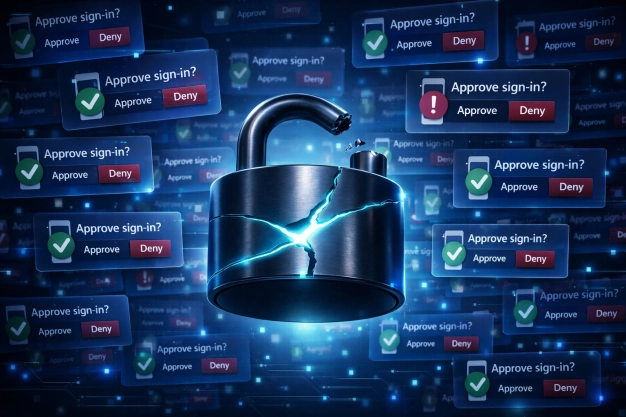
MFA fatigue is leading to email account takeovers in 2026, mostly because it targets user behavior. Repeated MFA prompts follow odd login attempts, flooding the user with push requests until one gets approved. The pattern is obvious in hindsight, but in the moment, stress and exhaustion can manipulate users to give in.
This type of attack is very easy to carry out for threat actors with access to email account credentials. For account takeover prevention, users need to treat unexpected MFA prompts like phishing links. It’s something to question, not approve on reflex. Controls like number matching and limiting push attempts help, but most of this still comes down to whether the user pauses or just clears the alert.
What is MFA Fatigue? 
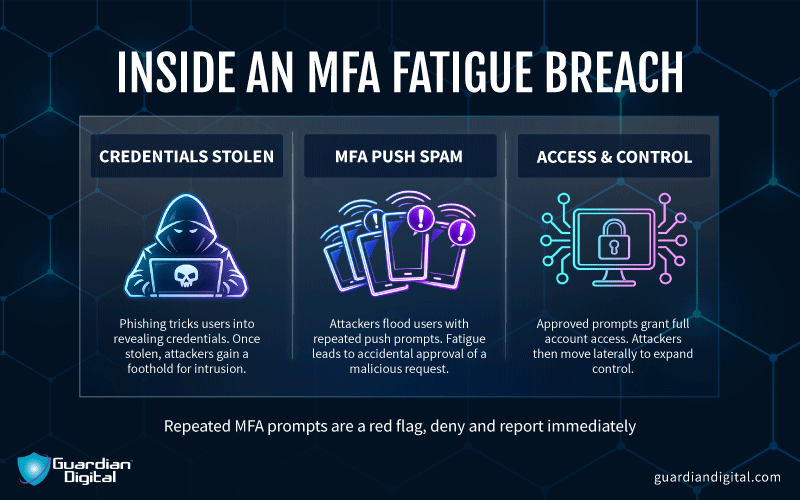
MFA fatigue is when an attacker keeps sending push notifications to a user until they finally tap “approve” just to make it stop. This bypass relies on pressure and timing. What should be a control turns into annoyance, and eventually someone clears it just to stop the prompts, especially if they’re distracted or off-hours. MFA isn’t being broken here. The user just gives in, so it looks like a normal multifactor authentication success.
Employees who get an unexpected MFA prompt should deny the request immediately and report it to IT or the security team. Ignoring repeated prompts or approving one “just to stop the notifications” is exactly what attackers count on during MFA fatigue campaigns.
Once an email account is open, things escalate quietly. After gaining account access through MFA fatigue, the attacker can perform password resets and establish persistence without deploying malware. That makes account takeover prevention harder if you’re only watching for payloads.
What are the Signs of an MFA Fatigue Attack?
The most obvious sign is multiple push notifications in a short window without the user initiating anything. That often lines up with login attempts from new locations. Then, following approval, attackers are likely to initiate inbox changes that undermine email defense.
SOC teams should monitor for suspicious activity to flag an unfolding MFA fatigue attack. Things like impossible travel, repeated MFA attempts, new email forwarding rules, or other sudden account updates are the signal to step in before a full account takeover unfolds.
Report Suspicious Login Attempts
Just ignoring repeated push notices isn't enough to stop MFA fatigue attacks. Notify IT of any authentication requests that you didn't initiate.
Why are Phishing Attacks Linked to MFA fatigue?
Phishing attacks are often a precursor to MFA fatigue cases. That’s because phishing is a good method for obtaining usernames and passwords. Attackers pull valid credentials from data breach dumps or infostealer logs, then log in and start hammering the MFA prompt until something gives.
To address this problem, SOC teams have to shift how they look at a successful login. MFA logins shouldn’t be treated as clean by default anymore, especially if the approval follows a burst of denied attempts or comes from an unusual session. That pattern shows up in targeted spear phishing attacks tied to MFA fatigue.
Can MFA Fatigue Attacks Happen Without Phishing?
Yes. MFA fatigue attacks can happen without phishing if attackers already have valid credentials from password reuse, infostealer logs, credential stuffing, or previous breaches.
A lot of these campaigns start quietly months before the MFA spam begins. Employees reuse passwords across personal and corporate accounts, credentials leak somewhere unrelated, and then automated tools test those logins against cloud email portals. No fake login page required. The attacker only needs the correct username and password, plus a target willing to eventually approve a push notification at the wrong moment.
How Many MFA Prompts Should Trigger a Security Alert?
One unexpected MFA prompt should be treated seriously, especially for privileged accounts or remote access systems. Multiple prompts within minutes usually indicate active login attempts and should trigger automated alerts and investigation.
Security teams often focus on failed logins while overlooking MFA spam patterns in authentication logs. Email platforms like Microsoft 365 and Google Workspace keep detailed records of sign-in attempts, but they can’t help if your organization only reviews the records after a compromise becomes visible.
How Can Users Tell a Real MFA Prompt From an Attack?
If you didn’t just log in somewhere, don’t approve the MFA request. That’s the easiest way to look at it. Random prompts that show up when you’re not signed in to email, VPN, or company apps are usually a bad sign.
Attackers rely on routine and distraction. Someone checks email on a laptop, gets interrupted during a meeting, then a push notification appears on their phone that feels vaguely connected to normal work activity. That uncertainty is enough. Real prompts usually match a clear login event, while malicious ones tend to appear repeatedly, at odd hours, or from unfamiliar locations that don’t line up with normal access patterns.
What Should IT Do After a User Accidentally Approves an MFA Request?
IT teams must lock the account down immediately. Then, reset the password, revoke active sessions, kill suspicious sign-ins, and start checking what the attacker touched while they had access.
Attackers move fast once they are inside an email account. The first thing they usually do is set up persistence so they can get back in later without needing another MFA approval. In email environments, that often means inbox forwarding rules, OAuth app abuse, adding recovery methods, or digging through mailbox history for finance threads and password reset emails. IT should also check whether the attacker accessed shared mailboxes, SharePoint, Teams, or other cloud apps tied to the same identity provider.
How Can Companies Train Employees To Avoid MFA Fatigue Attacks?
Companies need to teach employees that random MFA prompts are a sign that someone already has their password. If a login request shows up out of nowhere, deny it and report it.
Reinforcement matters because most users aren’t actually careless. They’re just distracted, buried in Teams alerts, email notifications, VPN reconnects, and password resets. Good training shows people what these attacks actually look like in real environments, especially around Microsoft 365 or Google Workspace accounts, where an accidentally approved prompt can suddenly hand over an inbox, internal threads, and finance approvals.
Which Accounts Are Most at Risk from MFA Fatigue Attacks?
Admin accounts are the big target. After that, finance teams, executives, HR, and basically anyone with access to email, payroll, or cloud admin panels.
Executive mailboxes are useful because they’re full of approvals, internal discussions, vendor conversations, all the stuff attackers use for business email compromise scams. Finance and HR accounts get hit constantly for the same reason. Regular user accounts still matter, but attackers prioritize the accounts that open the most doors.
How Often Should Businesses Review MFA Logs?
Businesses should review MFA logs continuously through automated monitoring and conduct deeper manual reviews regularly. Waiting for monthly audits is usually too slow to catch active abuse.
Authentication data tells a story long before ransomware deployment or data theft becomes obvious. Repeated MFA denials, impossible travel events, unusual login times, and bursts of push requests often appear early in the intrusion chain. Email security teams increasingly correlate MFA logs with mailbox activity, phishing reports, and endpoint alerts because isolated log reviews miss the bigger picture.
Should Businesses Disable Push-Based MFA?
Businesses should not disable push-based MFA completely, but they should strengthen it with additional verification controls. Push authentication alone is no longer enough for higher-risk environments.
There’s still value in push MFA because it blocks a large amount of automated account abuse that password-only systems cannot stop. The issue is that attackers have adapted. Cloud email accounts remain a prime target because they connect identity systems, file storage, internal messaging, and password recovery workflows into one place. Organizations moving toward phishing-resistant MFA, passkeys, or hardware security keys are responding to that reality rather than abandoning MFA altogether.
How Can Businesses Counter MFA Fatigue Attacks?
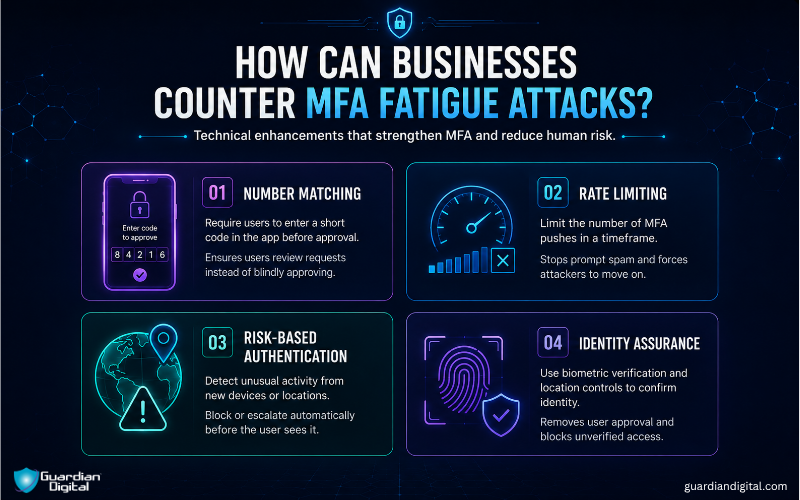
There are a few technical enhancements that can back up default MFA and make it less likely for user decisions to compromise security:
Number Matching: This is a familiar step in MFA security apps, where the app user is prompted to enter a short numeric code before the request is approved. Simple user interaction checks like this are getting deployed because they force users to actually look at the request instead of automatically hitting “approve” to clear it.
Rate Limiting: Capping the number of MFA pushes that can be sent within a certain timeframe is an effective deterrent. If the security system cuts off repeated prompts after a few attempts, the spam-until-approval approach falls apart immediately. While rate limiting isn’t a concrete barrier to every attacker, most will move on to an easier target rather than waiting it out.
Risk-based Authentication: Repeated prompts from a new device or location should stand out; when they do, access can be blocked or escalated automatically before the user even sees the request. Taking user judgment out of the equation tightens account takeover prevention.
Identity Assurance: Finally, some security solutions are looking beyond MFA architecture. Identity assurance is an MFA alternative that replaces consent-based authentication, like push notices, with strict identity and location-based controls. User identity is confirmed by biometric data stored offline, and cryptographic origin validation proves that the verified user is physically close to their device while logging in. Enforcement rules cut off requests from unverified persons and locations.
The strength of identity assurance models over MFA is that they remove the human decision to approve or not, which MFA fatigue attacks exploit. This level of security can even defeat sophisticated attacks where hackers bypass MFA with real-time phishing kits.
Conclusion
Push-based MFA doesn’t hold up well on its own. It’s too easy to approve spammed authentication requests without thinking. Device trust, session context, and behavior matter as much as credentials do for account takeover prevention. Stronger security measures, such as risk-based authentication and identity assurance, can help protect users from prompt bombardment, but ultimately, user awareness still carries weight. The system trusts their decisions, even when they're wrong.


 PREVIOUS
 NEXT
NEXT Other FAQs
- Exploring Malicious Code Risks: Strategies for Email Safety
- Proven Strategies for Effective Malware Removal on Windows Computers
- Why Outsourcing Email Security is Critical for Modern Businesses
- Comprehensive Guide to Safeguarding Against Domain Spoofing Threats
- Effective Strategies to Combat Insider Threats in the Workplace
- Strategies for Email Authentication to Counter CEO Impersonation
- Critical Factors for Selecting Email Security Solutions in Business
- Harnessing Managed Security Services for Enhanced Cybersecurity Vigilance
- Effective Penetration Testing Techniques for Cybersecurity Enhancement
- Managed SIEM Solutions: Boosting Email Security for Small Businesses
In this article

Join Our Community
of Readers!