Email tends to stay around longer than anyone expects. An employee leaves, but their mailbox stays active “just in case.” A legal request pauses deletion. Nobody wants to remove old conversations if there’s even a small chance they might matter later.
Some retention is necessary. Finance, HR, and regulated industries often have strict requirements around what must be preserved. The problem is that most businesses never separate important records from email, which simply never gets cleaned up.
You usually notice it during audits, migrations, or investigations. Old attachments resurface. Searches become cluttered. Security teams reviewing compromised accounts often end up sorting through years of stale mail that should not still exist.
Email retention policies decide what gets kept, archived, or deleted. Simple on paper. Harder once legal, compliance, operational, and security requirements start colliding.
What Are Email Retention Policies? 
Email retention policies set rules around how long messages stay available, when they move into archives, and when they should finally be deleted.
Some messages only need short-term retention. Contracts, HR records, and financial communications often need much longer storage. Without clear rules, businesses usually end up with inconsistent archive habits across departments and years of unnecessary mail sitting untouched.
Why Email Retention Matters
Email retention policies affect much more than storage because email itself ends up holding operational, legal, financial, and security-related information all at once.
Email Contains Critical Business Data
Contracts, HR discussions, invoices, approvals, customer conversations, and security alerts all move through email. Over time, inboxes become informal records of how the business actually operates.
The Risk of Over-Retention
Keeping too many emails expands exposure. During compromised account investigations, analysts regularly find years of historical mail still sitting in inboxes. 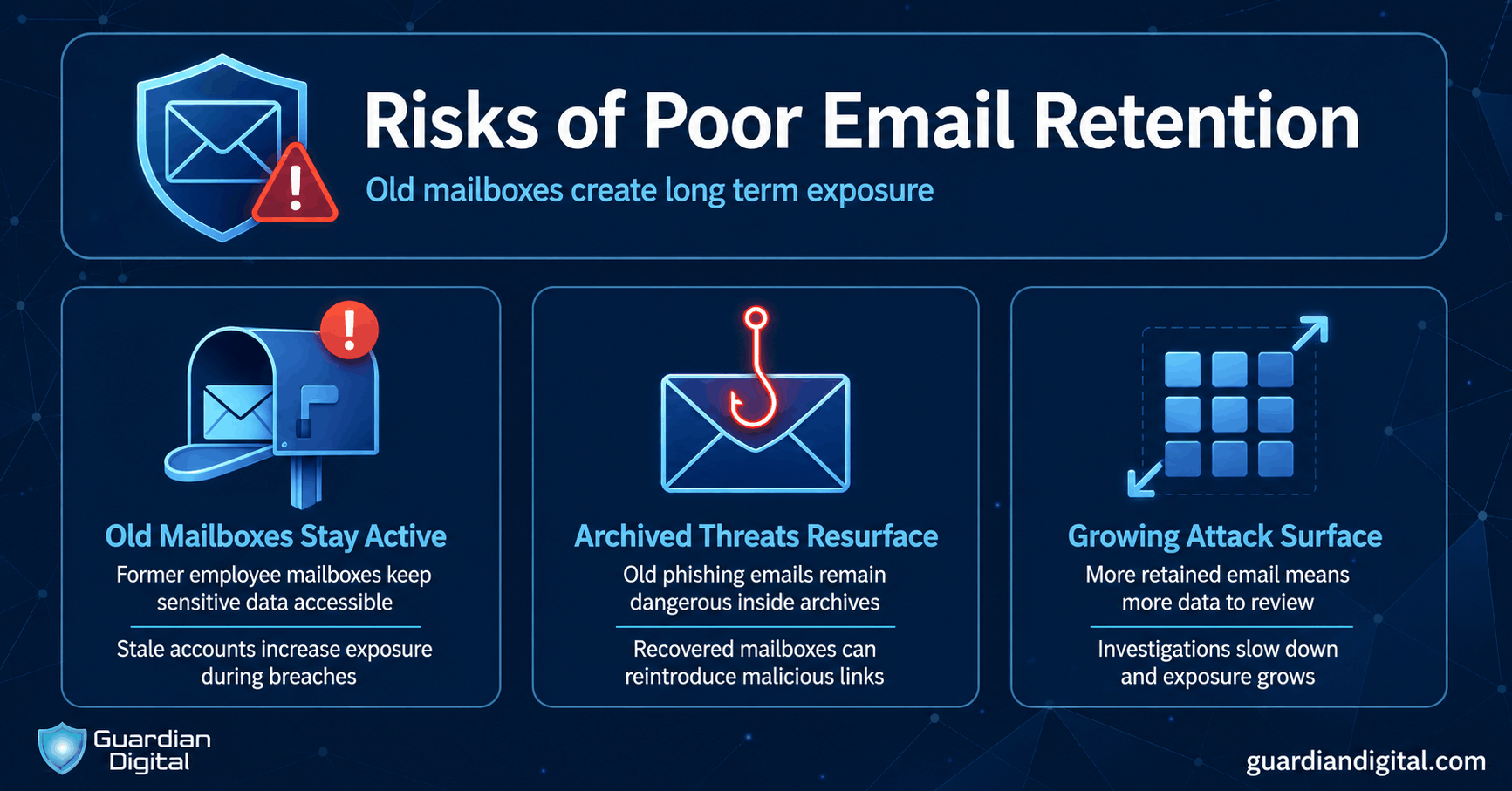
Legal discovery costs grow the same way. More retained email means more data to review during lawsuits, audits, or regulatory investigations.
The Risk of Under-Retention
Deleting email too aggressively creates different problems. Important records disappear, audit trails become incomplete, and teams lose communications tied to disputes or investigations.
Missing an email during an audit can create compliance problems quickly, especially if retention rules were applied inconsistently.
Why Retention Is Part of Broader Email Security
Email retention policies directly affect how much historical data stays exposed inside mailboxes and archives over time.
Retention now overlaps closely with broader email security planning. Stronger email security best practices also help reduce how much outdated or risky data stays exposed inside the environment.
A lot of organizations now automate retention enforcement through cloud email security platforms. Archived records should still maintain strong email encryption protections because older emails often remain sensitive long after they leave active inboxes.
Smart Archives are Safe and Usable
Email retention policies have to strike a balance between security, legal and business obligations, and convenience. Whatever decision your organization makes, reliable encryption, antimalware, and anti-phishing measures are non-negotiable for protecting the inbox
Legal Rules for Keeping Emails
Legal requirements often shape retention decisions long before companies start thinking about storage limits or mailbox cleanup.
Retention Requirements Vary by Industry
Different industries are expected to retain different kinds of email.
Common examples include:
- HIPAA requirements covering healthcare communications and patient information
- FINRA retention rules for financial firms and broker-dealer communications
- SOX obligations tied to financial reporting
- GDPR rules affecting how long personal data can be retained
- State and regional laws governing employee records or public sector communications
Larger organizations often deal with several retention standards at the same time across departments or regions.
Why One Retention Timeline Doesn’t Work Everywhere
A single retention timeline usually breaks down once departments start using email differently.
Finance teams may need records preserved for audits years later. Legal and HR departments often follow separate requirements entirely. Some organizations also rely heavily on email operationally for approvals, vendor coordination, and customer communication.
The same retention rule rarely makes sense for every department or mailbox type across the business.
Legal Discovery and Audit Requirements
Email retention policies also affect what happens after investigations, lawsuits, or audits begin.
Common requirements include:
- eDiscovery searches
- Preserving email during legal hold procedures
- Internal audits
- Regulatory investigations
- Evidence preservation during incident response
If retention policies are inconsistent, businesses often discover too late that records were deleted too early or retained far longer than necessary.
How Long to Retain Business Emails?
There’s no universal retention timeline for business email. Requirements, legal exposure, and operational needs all change the answer. Most businesses mix retention timelines across departments instead of applying one rule everywhere.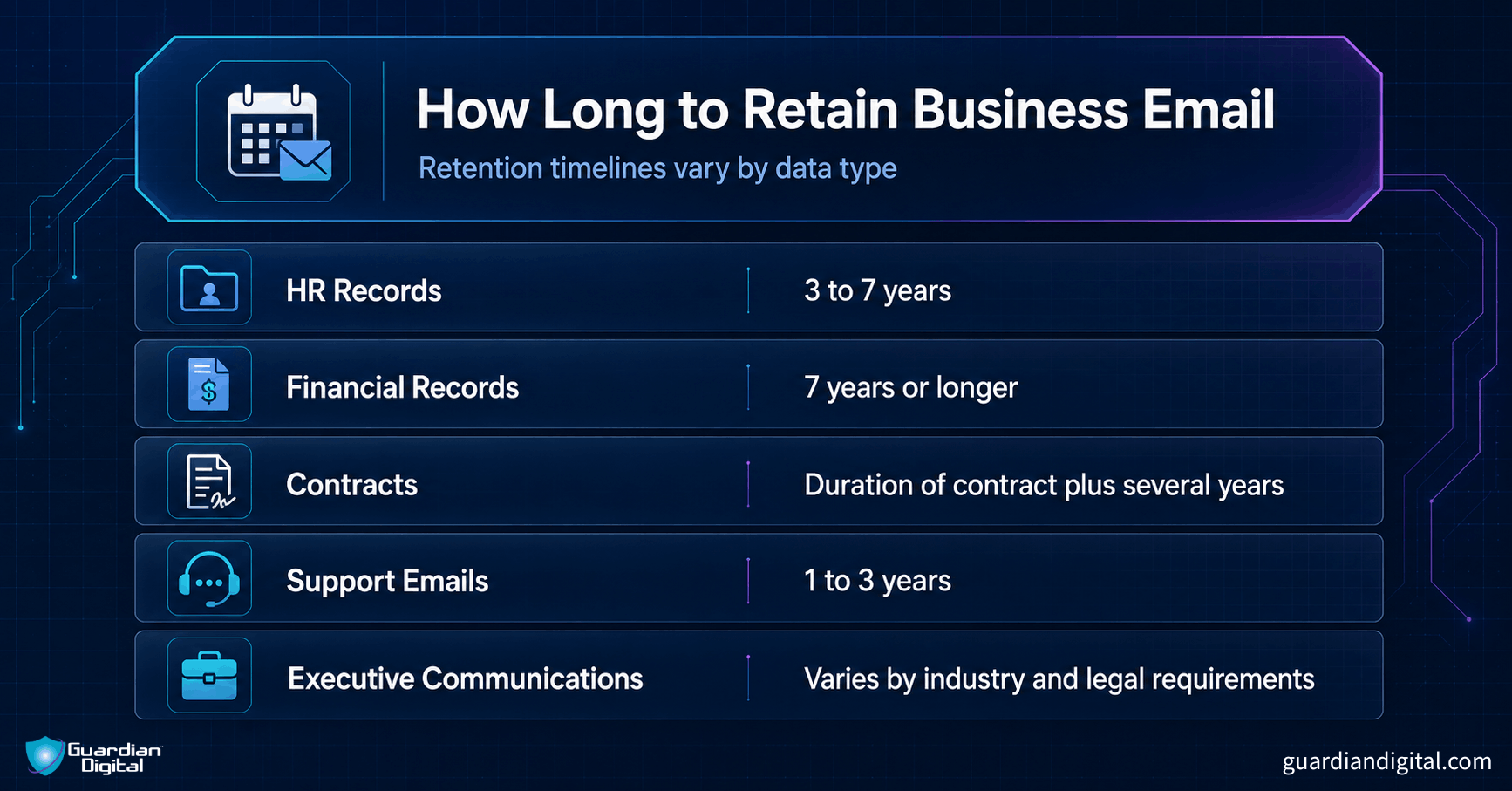
Factors That Influence Retention Decisions
Retention periods are usually shaped by:
- Compliance obligations
- Litigation risk
- Data sensitivity
- Operational value
- Storage strategy
Why “Keep Everything Forever” Creates Problems
Keeping all emails indefinitely sounds safer until the environment becomes difficult to manage.
Common issues include:
- Larger breach exposure during account compromises
- Slower investigations and mailbox reviews
- Higher storage and discovery costs
- More historical data is sitting at risk unnecessarily
Building Email Retention Policies
Most retention problems start with inconsistency.
- Classify Business Email Data
Separate emails by function and sensitivity. Financial records, customer communications, temporary conversations, and sensitive internal discussions usually need different retention handling. - Create Retention Categories
Build retention timelines around actual business use. Some email only needs short-term storage, while contracts or compliance records may require long-term retention. - Automate Archiving and Deletion
Manual retention management usually breaks down at scale. Retention tags and automated deletion rules help keep enforcement consistent. - Define Legal Hold Procedures
Retention policies need a process for suspending deletion during investigations or litigation. Legal hold procedures should preserve evidence while documenting what was retained and why. - Separate Personal and Business Communications
Personal email inside business accounts creates unnecessary compliance and discovery complications later. - Review Policies Regularly
Regulations, business requirements, and security risks change over time. - Retention Policies in Cloud Email Environments
Microsoft 365 and Google Workspace both support automated retention enforcement, but configuration matters. Administrative controls tied to Gmail security settings can affect how retention and mailbox preservation work across the environment. A properly configured spam filter also reduces how much junk and malicious email ends up unnecessarily retained in archives.
Risks of Poor Email Retention
Poor retention practices usually create problems slowly. Old mailboxes stay active too long, archives fill with outdated data, and exposure builds quietly in the background.
Common risks include:
- Sensitive data sitting inside old mailboxes long after employees leave
- Archived phishing emails and malicious attachments remain accessible
- Credential exposure tied to historical account activity
- Missing records during audits or legal discovery
- Inconsistent retention enforcement across departments
- Larger storage environments and slower mailbox investigations
Retained threat email creates another issue that organizations tend to underestimate. Old spam email messages do not become harmless just because they move into archives.
Recovered mailboxes and restored accounts sometimes bring phishing links or malicious attachments back into circulation years later. That’s one reason retention cleanup overlaps closely with broader email virus protection techniques and user awareness efforts. Employees may still need to recognize spam emails when reviewing archived or recovered mailboxes.
Archiving and Deletion Best Practices
A lot of businesses treat archiving, backup, and retention as interchangeable terms, even though they solve different problems.
Backups are designed for recovery. Archives are meant for long-term storage, searchability, and compliance.
Strong retention practices usually rely on a few consistent controls:
- Automatic expiration and deletion rules
- Retention tags tied to data type or department
- Secure deletion processes for expired records
- Monitoring and auditing around retention enforcement
- Cleanup procedures for inactive mailboxes and former employee accounts
Archived email still needs protection long after it leaves active inboxes. Organizations typically protect archived data through encryption, access controls, immutable storage, and logging.
Handling Legal Hold Exceptions
Email retention policies are not supposed to delete records blindly. Certain events require normal retention timelines to stop immediately so relevant communications can be preserved.
When Deletion Rules Must Pause
Legal hold procedures temporarily suspend deletion when an email may become evidence or part of a formal review process.
Common examples include:
- Litigation and pending lawsuits
- HR disputes or employee investigations
- Regulatory investigations and compliance reviews
- Incident response and forensic investigations
Once a legal hold becomes active, the affected email usually cannot follow normal expiration or deletion rules until the matter is resolved.
Why Documentation Matters
Legal holds only work if the retention process itself is documented clearly.
Businesses should be able to show:
- What was preserved
- When retention rules changed
- Who approved the action
- Which mailboxes were affected
That documentation supports audit trails, chain of custody requirements, and defensible retention practices during legal review.
Personal Emails on Work Accounts
Personal email inside business accounts creates problems once retention policies, legal discovery, and employee privacy start overlapping.
Why Personal Email Creates Compliance Problems
Most businesses allow occasional personal use of company email, whether the policy says so or not. The issue usually appears later during audits, investigations, or legal discovery when personal conversations end up mixed with business records inside the same mailbox.
That creates a few complications quickly:
- Privacy concerns around employee communications
- Discovery reviews involving personal content
- Ownership disputes over retained messages or attachments
The larger the mailbox archive becomes, the harder it is to manage those boundaries cleanly.
Creating Acceptable Use Policies
Effective policies usually define:
- What personal email use is permitted
- How long may a business email be retained
- Employee expectations around monitoring and access
- When retained communications may be reviewed during investigations
Most organizations are not trying to eliminate occasional personal use. They’re trying to keep personal communication from complicating retention later.
Does Email Retention Affect Security?
Email retention policies directly affect how much sensitive data remains exposed inside the environment over time.
More Retained Data Means More Exposure
The longer the email stays around, the more sensitive operational history accumulates inside mailboxes and archives.
Retention Policies Reduce Attack Surface
Good retention policies reduce unnecessary exposure by limiting how much historical data stays accessible indefinitely.
That usually includes:
- Data minimization practices
- Removing outdated or unused mailboxes
- Reducing clutter inside active accounts
- Improving visibility into retained records and archived data
Retention cleanup also makes investigations easier because teams spend less time sorting through stale email.
Old Threat Emails Can Still Create Risk
Archived phishing emails do not always stay buried. Users reopen old messages after mailbox migrations, restored accounts, or archive recoveries all the time, especially when the message looks familiar.
Old phishing emails can still contain credential harvesting links, fake invoice requests, malicious attachments, or fraudulent document-sharing notifications years later. That’s one reason organizations still train users on how to spot a DocuSign scam email long after the original campaign disappears.
Security teams also run into archived threats during compromised mailbox investigations and email bomb attack reviews.
Security and Retention Teams Must Work Together
Compliance alone is not enough. Retention timelines, archived mailboxes, and deletion rules all affect cybersecurity exposure.
Organizations that handle this well usually treat retention as a shared responsibility between legal, compliance, IT, and security teams.
Common Questions About Email Retention Policies
What are email retention policies?
Most companies already follow some kind of retention policy, even if nobody formally calls it that. Some messages disappear after a few years, while others remain searchable indefinitely.
How do I decide email retention periods?
Usually, by looking at what the business would regret losing later. Financial records tend to stay longer because audits can surface years afterward. HR and legal teams often have separate requirements entirely.
What happens if I delete emails too soon?
Sometimes nothing. At least not immediately.
The problem usually appears later during a lawsuit, compliance review, HR dispute, or investigation when somebody needs records that no longer exist.
How does retention impact data security?
Historical email creates historical exposure. Old inboxes quietly collect customer data, contracts, financial discussions, and forgotten attachments for years.
Security teams run into this constantly during compromised mailbox investigations because email tends to become a long-term record of how the business actually operated over time.
Email retention policies are ultimately about control. The longer the email stays unmanaged, the harder it becomes to reduce exposure and secure historical communications properly.
Related Reading


 PREVIOUS
 NEXT
NEXT 
Other FAQs
- Exploring Malicious Code Risks: Strategies for Email Safety
- Proven Strategies for Effective Malware Removal on Windows Computers
- Why Outsourcing Email Security is Critical for Modern Businesses
- Comprehensive Guide to Safeguarding Against Domain Spoofing Threats
- Effective Strategies to Combat Insider Threats in the Workplace
- Strategies for Email Authentication to Counter CEO Impersonation
- Critical Factors for Selecting Email Security Solutions in Business
- Harnessing Managed Security Services for Enhanced Cybersecurity Vigilance
- Effective Penetration Testing Techniques for Cybersecurity Enhancement
- Managed SIEM Solutions: Boosting Email Security for Small Businesses
In this article

Join Our Community
of Readers!