Inboxes aren't the only place that stores your sensitive information online. Your browser also holds on to many small pieces of information.
Whenever you log into a webmail service, open a cloud dashboard, or schedule a meeting online, the browser records website data to keep those sessions active. Protecting your browser is just as important as your email account, because this trail of cached information can give away access.
Browsers are often the easier target for threat actors. There's no need to break into your email account if they can control the browser cookies that keep you signed in. Or, they can scrape up records of site visits and learn where to target you with fake login pages designed to steal your credentials.
How Account Security and Browsing Behavior Converge
Every time you visit a website, it puts information on your computer. Cookies remember whether you are logged in. Cached files are copies of pages that load faster. Browsers also keep settings and preferences for specific sites. While these features make everyday browsing more convenient, they also leave a record of how you use the web. 
If someone gets into your device, that stored information can tell a lot. It can reveal the services you regularly use, what accounts you are still signed into, and the sites you visited most recently. Your browsing history can even assist someone in determining your routine.
Wiping this data from time to time doesn't make a device immune from attack, but it does reduce what is left behind. There are fewer cookies left. There's less browsing history available. There's just less information to gather if they get access to the browser profile.
This is particularly true if you regularly use web-based email, cloud services, or shared computers. Periodically choosing to clean your history means that there is less stored information available if the device is later accessed by someone else. This won’t stop every attack, but it does limit how much of your recent activity and active sessions can be found.
Thread Hijacking and Advanced Phishing
Once they get into your browser, email is the next target.
Email thread hijacking is a popular tactic because users are less likely to question an existing message. There's no suspicious, new email to scrutinize. The hacker just waits for an existing e-mail thread and replies as if they are already part of the conversation. When you're in a familiar message, opening an attachment or clicking on a link is just the normal procedure.
That trust is what makes the attack so effective. If the browser is compromised, then someone may be able to sit in on conversations as they happen. They can take their time. They can wait until the conversation turns to a payment, a review of a document or an invoice, and then send a fake update that flows naturally into the conversation.
There’s no catch-all defense against this kind of attack. The browser and the email account are mutually supportive, and both should be protected. People also have to watch for little things that aren’t quite right.” A change in writing style, a request at an odd hour, or an unexpected attachment should all raise alarm bells.
Don’t expect the email thread itself to confirm if something feels off. Call the person on a trusted number or reach out to them by another means you already know to be legitimate. Sometimes all it takes is a quick check to make sure the attack does not cause any damage.
Calendar Phishing: When Scheduling is Deceptive
Phishing is no longer just email. Fake calendar entries are an easy way to lure targets. At work, most people don't give a second thought to meeting requests. As long as it looks like it's from someone they know, at a normal time, it's okay. 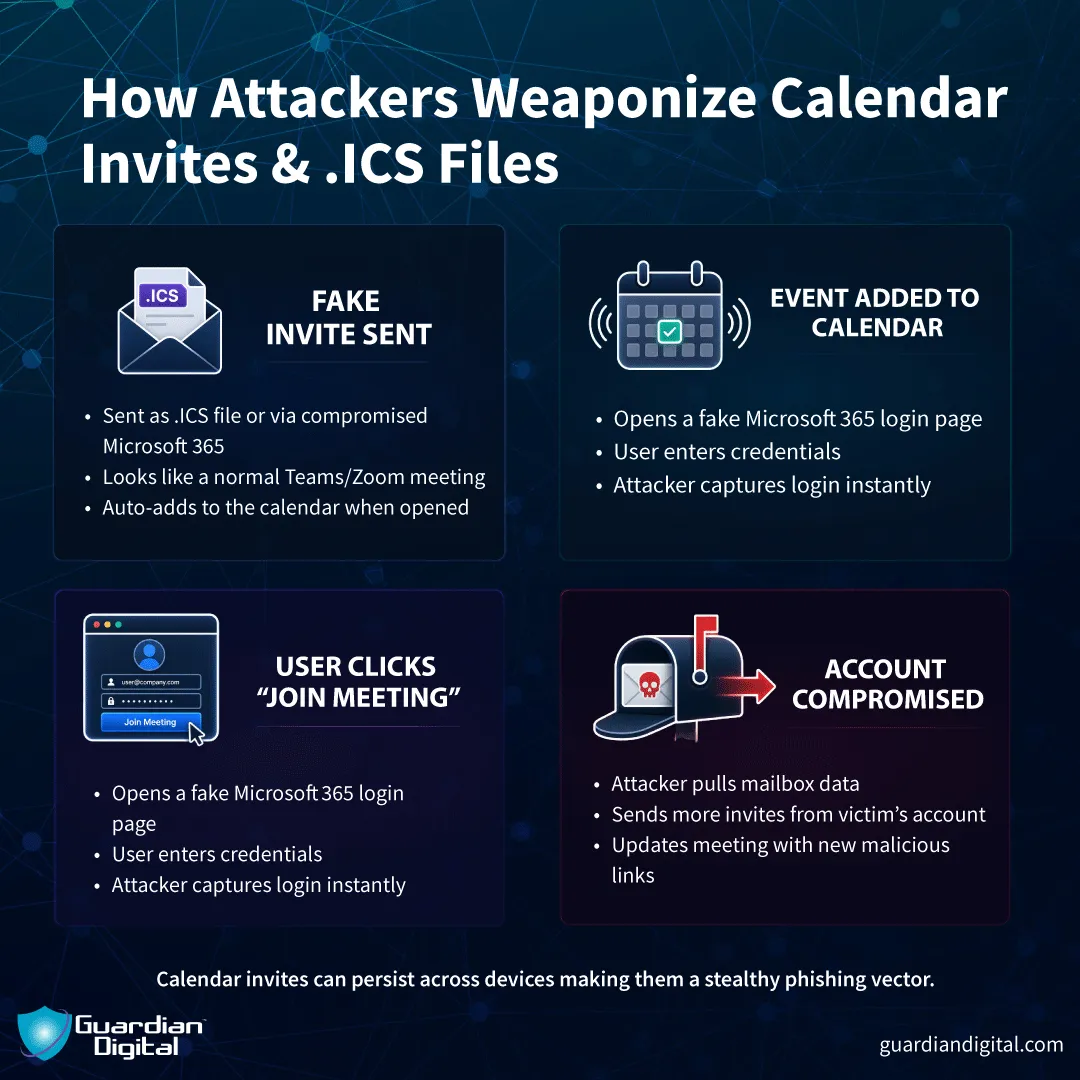
The calendar phishing invitation could also contain a link to a sign-in page that appears legitimate but is actually a scam to steal usernames and passwords. The link might even send them to a website that attempts to trigger a browser exploit or directly install malware.
Calendar apps are so interwoven with email and cloud accounts that one malicious invitation can be the opening act to a much larger compromise. If you receive a meeting request out of the blue, treat it like a suspicious email, especially if it includes any links, attachments, or urgent requests that seem out of place.
The risk is in the trust we place in our scheduling tools by nature. It looks like a proper administrative alert, such as a calendar invite that pops up on your screen. Attackers use this sense of urgency to circumvent normal filters.
By hardening your browser and taking a skeptical view of every notification that comes in via a calendar link, you can help neutralize these automated scheduling traps before they get the opportunity to compromise your security.
The Role of Frontier AI Models
The threat landscape is becoming much more complex as cybercriminals use new technology to hone their techniques.
Experts now understand that frontier AI models are reshaping cyber defense for every organization. These potent systems can create very realistic lures that are nearly impossible to tell apart from real corporate communications.
Artificial intelligence can analyze enormous data sets to uncover personal habits and workplace ranks, and thus fashion phishing efforts that are highly specific to one person's role and most recent activities.
This change means that security can’t be based on a single piece of software or a one-time configuration. Phishing attacks continue to evolve, especially with automation speeding up and improving the quality of campaigns. To guard against them, you’ve got to look beyond the mailbox. Your browser, email account, and the devices you use every day need the same attention because they work together.
Building a Resilient Digital Security Posture
Good security is about keeping things running smoothly. Check your browser extensions and uninstall what you don’t use anymore. Keep your operating system, browser, and software you use up to date with all patches. Use two-factor authentication, making sure it's turned on for all your key accounts. Then, stolen passwords won’t be enough to compromise your accounts.
Your response to unexpected messages also matters. Be careful when opening attachments, clicking on links, or accepting meeting invitations you weren’t expecting. If it sounds wrong, check with some other means. Don't take the message at face value.
No single product can stop all attacks, but small habits done consistently make a big difference. Software updates, limiting the amount of data stored in the browser, removing unnecessary extensions, and confirming unusual requests all reduce the number of opportunities someone has to take advantage of your accounts.
Securing your online accounts is a never-ending process. The best way to protect your identity and critical communications from the risks of today’s automated world is to ensure the integrity of your browser, calendar, and connected email app environment.


 PREVIOUS
 NEXT
NEXT 
Other FAQs
- Exploring Malicious Code Risks: Strategies for Email Safety
- Proven Strategies for Effective Malware Removal on Windows Computers
- Why Outsourcing Email Security is Critical for Modern Businesses
- Comprehensive Guide to Safeguarding Against Domain Spoofing Threats
- Effective Strategies to Combat Insider Threats in the Workplace
- Strategies for Email Authentication to Counter CEO Impersonation
- Critical Factors for Selecting Email Security Solutions in Business
- Harnessing Managed Security Services for Enhanced Cybersecurity Vigilance
- Effective Penetration Testing Techniques for Cybersecurity Enhancement
- Managed SIEM Solutions: Boosting Email Security for Small Businesses

Join Our Community
of Readers!