Fileless malware attacks are 10 times more successful than file-based attacks, but many people don’t understand why it’s a different beast from most other types of malware. The ability to evade security defenses, eavesdrop on corporate networks, compromise systems, and access sensitive data has made it a favorite tool for threat actors.
Fileless malware is involved in 70% of major malware incidents.
The majority of businesses are unprepared to combat this stealthy emerging threat and are paying the price in data theft, financial loss, reputation damage, and system downtime.
In this article, we’ll explore the anatomy of a fileless malware attack. Then, we’ll examine the email security measures that your business can take to avoid this hidden threat.
Why Is Fileless Malware A Threat to My Business?
The majority of traditional email security solutions are unable to detect fileless malware and protect businesses’ critical data, accounts, and systems from compromise. Unlike traditional malware and email viruses, fileless malware has no signature, so it evades antivirus software. The trick is that fileless malware has no executable file or “payload” to deliver. Nothing gets written to the disc. Instead, it runs entirely in a computer's random access memory (RAM) and exploits existing system applications to install and run malicious code on target systems. Then this code encrypts and exfiltrates sensitive data, placing it directly in the attacker's hands. Fileless malware attacks leverage legitimate, trusted operating system tools for malicious purposes, essentially turning systems against themselves.
Anatomy of a Fileless Malware Attack
Fileless malware attacks are carried out in a series of clearly defined steps, beginning with the initial lure of a phishing scam and ending with the compromise of sensitive data. Let’s take a step-by-step look at how fileless malware attacks work to help you better understand this malicious exploit.
Step 1: Victim clicks on malicious links or attachments
Like traditional file-based email malware, fileless malware is most commonly distributed via phishing. However, fileless malware is not limited to links inside phishing emails. Attackers also abuse malicious attachments, shortcut files, and weaponized documents to trigger code execution without delivering a conventional executable. 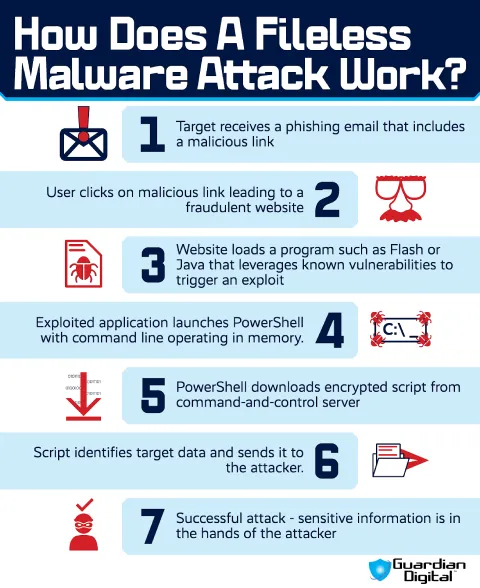
Step 2: An application triggers an exploit
The phishing link takes the victim to a fraudulent website that immediately starts looking for an opening. Older browser plugins, Java, Flash, or another vulnerable application. If it finds one, the site uses that weakness to execute malicious code directly in browser memory and trigger the next stage of the attack.
A website is not the only delivery path. The exploit can also begin with PDF malware that takes advantage of flaws in a vulnerable PDF reader. Different entry point. Same result. Trusted software is used to execute code the user never intended to run.
Step 3: Exploited application launches an operating system tool
The exploited program launches a known and trusted built-in operating system tool, or “LOLBin,” such as PowerShell, Microsoft Office Macros, or WMI, with a command line running in memory. Attackers can also distribute malicious Windows shortcut files using the LNK file extension. This advanced, deceptive technique of essentially turning systems against themselves by using legitimate, trusted tools for malicious purposes is known as “living off the land”.
Step 4: Encrypted script identifies target data
The LOLBin that has been launched downloads an encrypted script from the attacker's command-and-control server, designed to identify target data on the victim’s system.
Step 5: Data is sent directly to the attacker
Once the script has identified the target data, it sends it directly to the attacker. The system tools exploited in these attacks can’t be removed or disabled and remain running on the system until they’re either told to stop by their operators or render the system inoperable.
Unlike other forms of malware, a fileless malware attack leaves no typical footprint on the target system. Identifying IOCs during an attack requires defenders to pay attention to system activity instead of rewritten programs.
How Can I Prevent an Attack?
To protect against fileless malware, it’s important to keep track of operating system behavior and avoid leaving vulnerable programs hanging around for attackers to exploit. These are the best practices that users should follow to mitigate the risk of an attack: 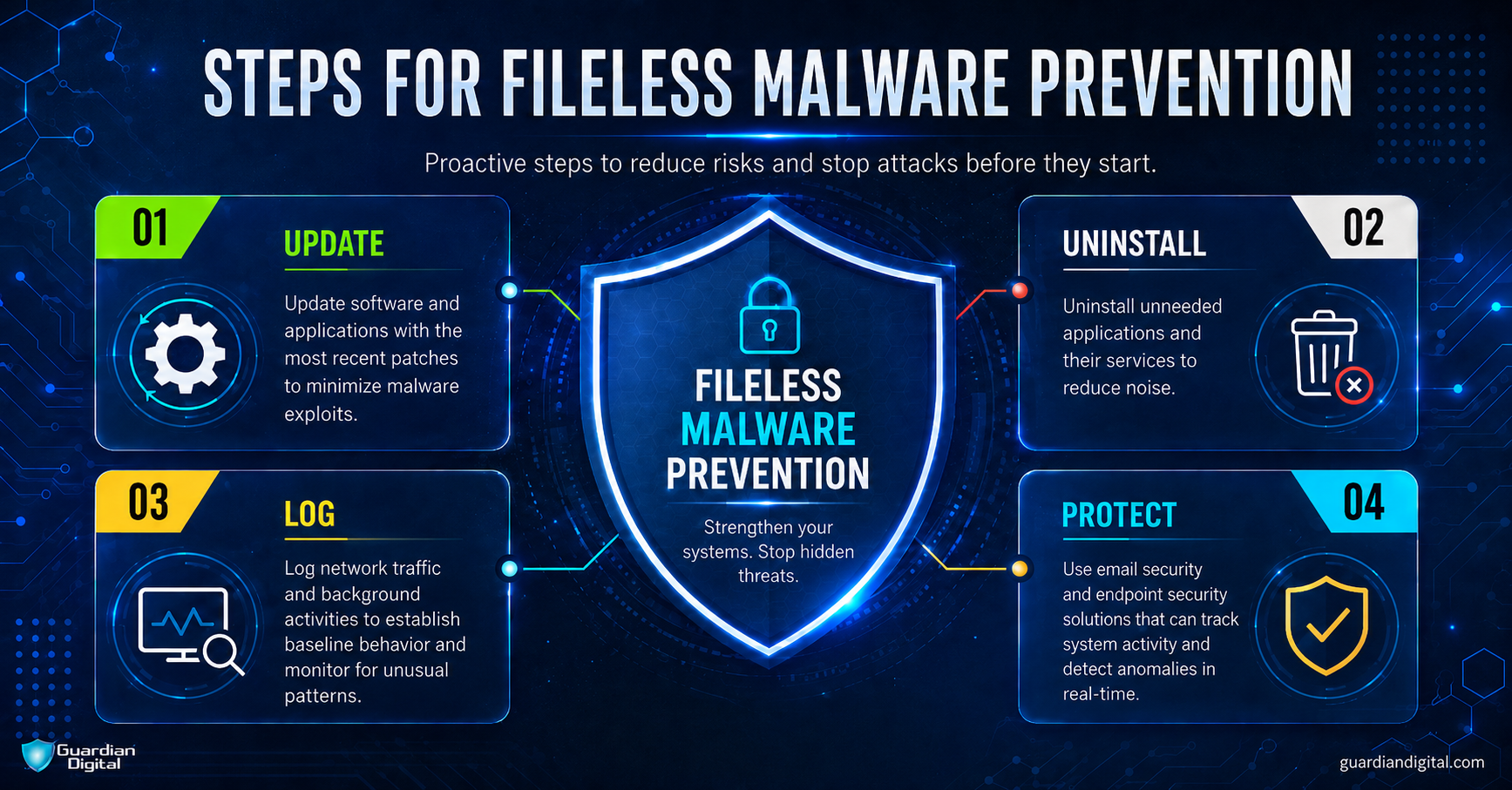
- Make sure that all software and patches are up-to-date.
- Uninstall applications that you never use, and disable unnecessary services and features for all necessary applications.
- Restrict admin privileges - only grant the privileges that are necessary for a user to do his or her job.
- Monitor network traffic and check activity logs frequently.
- Require employees to complete email security training on the safe handling of suspicious URLs and email attachments.
- In the event that an infection occurs, change passwords immediately upon becoming aware of it and again after disinfection.
- Supplementary training and security practices with an email security solution that provides real-time protection against fileless malware and other sophisticated modern cyberattacks. Selecting a solution that manages security services can simplify administration, enhance security, and free up valuable IT resources.
- Keep endpoint security up to date as well. Once malicious code reaches the endpoint, security teams need visibility into script execution, PowerShell activity, and process behavior to detect attacks that leave little evidence on disk.
Fileless Malware FAQ
Fileless malware does not leave the same kind of trail as a dropped executable. The useful questions are usually about what stayed behind, what ran, and what the system did next.
How long can fileless malware stay hidden on a system?
Longer than expected if nobody is watching process behavior. A memory-only process may die after reboot, but persistence can survive through WMI, scheduled tasks, registry run keys, or abused admin tools. The malware may be gone. The mechanism that reloads it may still be there.
What is a fileless malware attack example in real life?
SamSam is a common example. This hybrid ransomware abuses legitimate Windows tools, including PowerShell, before dropping its payload. The fileless behavior is not the final ransomware attack, but the way it runs commands to infiltrate and spread between systems without being detected by antivirus software.
What tools are used to detect fileless malware?
EDR, Sysmon, PowerShell logs, Windows Event Logs, process command lines, network telemetry, and SIEM correlation all help. Look at tools that record behavior, not just files. 
What security tools help protect against fileless malware?
Email security helps stop the first message. Endpoint security helps after the click. Application control, attack surface reduction rules, privilege limits, patching, and EDR give the team more chances to interrupt the chain. Not perfect. Better than waiting for a file hash that may never exist.
The Bottom Line
Safeguarding your critical business assets from fileless malware requires adaptive email security that goes beyond standard email virus protection. There is an ongoing “cat and mouse” game at play between cyber criminals and security companies - as security defenses evolve, attackers continue to develop new ways to “outsmart” providers.
Best practices like firewall implementation and firewall change management systems can offer considerable protection from attackers. In order to fortify business email against today and tomorrow’s threats, it is imperative that organizations implement a solution that is constantly learning from the threats that challenge it and rapidly updating its protection to protect against the latest, most evasive attacks.


 PREVIOUS
 NEXT
NEXT 
In this article
Stay Informed with Our Latest Insights
- Why Email Thread Hijacking Makes Compromise Harder to Detect
- Calendar Phishing Attacks: How Malicious Invites Bypass Email Defenses and Change Enterprise Risk
- SaaS Attacks and Email Security: How SaaS Platforms Became the Delivery Layer
- Data Leaks from AI-Generated Code Are Fueling Email Breaches
- How to Protect Your Business Against Spear Phishing: A Defense Playbook

Join Our Community
of Readers!
Must Read Blog Posts
- Phishing Scams in 2026: The Rise of AI and Deepfake Risks
- Understanding Email Viruses: Detection, Prevention, and Security Strategies
- Effective Phishing Protection: Strategies and Training for Businesses
- Essential Ransomware Strategies for Effective Business Protection
- Maximizing Email Security: Advanced Strategies for Threat Defense
- Microsoft 365 Phishing: Why Attacks Still Reach Inboxes and How to Stop Them