
When confidential data constantly streams through your email systems, compliance isn't just a requirement. It’s a critical responsibility that underpins daily operations. The Microsoft Office 365 compliance center makes it easier to stay up to date on data protection. In this article, you'll gain an in-depth knowledge of these tools so that they can help manage email threats and keep your organization safer.
How Microsoft 365 Compliance Center Protects Your Organization 
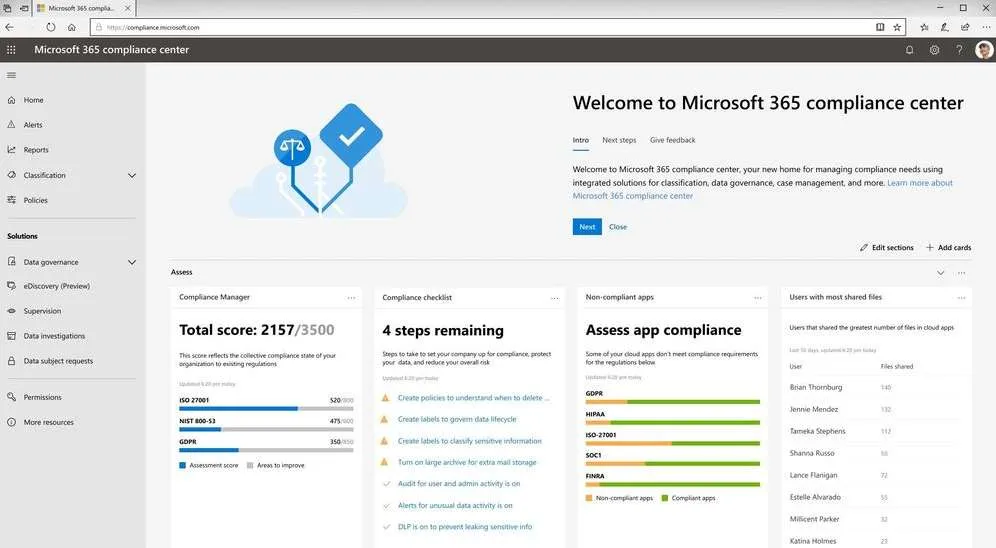
Most teams are not short on tools. They are short on visibility. Microsoft 365 Compliance Center solves this issue by bringing everything into a single view: policy controls, audit logs, retention rules, and investigation workflows. Consolidation makes day-to-day email security much simpler to track. There's no need to bounce between multiple admin portals to piece together what actually happened during an incident.
The compliance center’s data loss prevention stops user mistakes from turning into data breaches. Email encryption features protect messages in transit. There are also options for archiving that determine how long these messages are retained, which matters when someone needs to reconstruct events to answer compliance questions. This is further supported by content search and legal hold tools. They let you preserve mailboxes and review evidence without risky exports or a broken chain of custody.
Why Is Data Loss Prevention (DLP) Critical for Email Security?
DLP is the thing that stops users from emailing the entire customer database to the wrong person. It inspects outbound mail and attachments in real time, looking for patterns like SSNs, card numbers, routing numbers, or whatever sensitive data you’ve defined in policy.
We see it trigger on the boring stuff. Payroll spreadsheets. HR onboarding forms. A sales rep exporting CRM data and firing it off to a personal account because it’s “easier.” Not malicious. Just careless.
Policies are where it either works or becomes noise. You can scope by department, set confidence levels, require justification overrides, or block outright. If you skip tuning, you get alert fatigue and angry tickets. If you tune it properly, you quietly prevent data from walking out the door every week.
And that matters more than people think. Exposed data feeds follow on attacks, whether that’s targeted phishing, account takeover, or a ransomware crew using harvested details to make their social engineering more convincing. DLP will not make headlines when it works. It just reduces the number of bad days.
Email Encryption in Microsoft 365 Compliance Center
Encryption is one of those controls everyone assumes is working until they have to prove it. In Microsoft 365, email encryption protects message content in transit and, depending on configuration, at rest, so intercepted traffic or misrouted mail is not immediately readable. That alone reduces exposure during credential theft, mailbox compromise, or packet capture scenarios.
But transport encryption is only part of it. Rights management and S/MIME encryption let you define what the recipient can actually do with the message once it lands in their inbox, including blocking forwarding, printing, or copying and pasting. That becomes critical when sensitive data leaves your tenant and enters someone else’s environment.
Email encryption is a tool for containment. If a user accidentally sends financial data to the wrong external contact, message-level restrictions can limit how far that mistake spreads, buying you time to respond before it escalates into a data breach
Post-delivery control is the real differentiator. With properly configured policies, access can be tied to identity and authentication state, so if an account is disabled or access is revoked, previously sent protected emails are no longer readable. That kind of persistent control changes the blast radius calculation during an incident.
Respond to Data Breaches with Content Search and eDiscovery
When something goes wrong, the first questions are simple: Who knew what, and when? Content Search in Microsoft 365 lets you query across mailboxes, SharePoint, and Teams data without pulling manual exports. That can save valuable hours when for a team under pressure.
The importance of searchable data comes up during internal investigations or after confirmed phishing attacks. You need to know how many users received the message, who clicked, who replied, and whether similar payloads are sitting in other inboxes. Fast answers matter.
eDiscovery is a tool that allows investigating teams to build structure out of chaos. You can create cases, place custodians on hold, preserve data, and track review activity in a single workflow, rather than passing PST files back and forth over encrypted drives. When keeping the chain-of-custody secure, eDiscovery makes life easier.
It is also useful for tracking patterns tied to recurring email scams, especially when executives ask whether this is a one-off or part of a larger campaign. Being able to search, tag, and organize evidence without breaking integrity speeds up both legal response and technical containment.
Strategies for Amplifying Microsoft 365 Email Security
Microsoft 365 gives you a solid baseline. But baseline is not the same as full coverage, and most SOC teams figure that out after the first incident review. Even with Microsoft 365 advanced threat protection enabled, well-crafted phishing payloads and low-volume business email compromise attempts still land in inboxes because attackers test filters the same way we test detections.
Layering machine learning driven policies on top of that baseline helps, but only if you are reviewing detections and tuning regularly. Controls drift. Attack patterns shift. What worked six months ago may now be generating false negatives or too much noise to act on.
Identity controls are just as critical. Combining encryption with user behavior analytics and enforcing multi-factor authentication makes it harder for attackers to reuse stolen credentials or quietly access high-value mailboxes and exfiltrate data in bulk. Account takeover is still one of the most common entry points we investigate.
Many organizations also extend native controls with cloud email security solutions to gain deeper inspection, sandboxing, and external threat intelligence feeds. That additional layer improves visibility into targeted campaigns and commodity malware alike, reducing exposure from account compromise and long-running phishing operations that rely on gaps between tools.
Microsoft 365 Compliance Center FAQ
Read these quick answers on how to use compliance center tools and improve overall email security.
What is Microsoft 365 Compliance Center, and how does it work?
The compliance center is a centralized control panel for data policies across Microsoft 365. It logs what users and admins do. That's why SOC teams can go there to get answers about access, file sharing, and data retention during and after a breach.
How do I encrypt emails in Microsoft 365?
Most orgs use Microsoft Purview Message Encryption with mail flow rules or sensitivity labels. You define conditions like external recipient or specific data types, and the system encrypts automatically.
Users can also click Encrypt in Outlook if the policy allows it. Sounds simple. It is, until someone creates a rule that conflicts with another rule and suddenly half your finance emails are not protected.
How do I set up email archiving in Office 365?
You enable archive mailboxes in Exchange Online and apply retention policies. Messages age out of the primary mailbox into the archive based on the tags you define.
This is not just about storage quotas. When legal asks for a two-year history of communications and your retention window was misconfigured, you feel it immediately.
How does Microsoft 365 email encryption protect confidential data?
Encryption protects messages in transit with TLS and can apply rights management so only authenticated users can open them. If someone intercepts traffic or compromises an account, encrypted content is harder to exploit.
You can also restrict forwarding or printing. That helps contain damage when someone sends sensitive data to the wrong external contact. It does not fix the mistake. It limits how far it spreads.
How does Data Loss Prevention stop data leaks?
DLP scans outbound email and shared files for things like SSNs, account numbers, or other sensitive patterns you define. When it finds a match, it can block the send, encrypt automatically, or throw a warning in the user’s face.
We see it catch payroll sheets and customer exports all the time. Quiet saves that never make it to incident status.
If you do not tune it, though, you get flooded with false positives and users start ignoring policy prompts. Then it becomes background noise.
What threats does Microsoft 365 miss, and how can I add protection?
Microsoft 365 is vulnerable to low-volume phishing, brand-new domains, QR code lures, and business email compromise attacks that hijack legitimate accounts. To close these gaps, teams can add layered controls. Stronger identity enforcement, continuous DLP tuning, external filtering, and regular phishing simulations.
Why should I combine Microsoft 365 compliance features with an external cloud email security solution?
Microsoft’s native stack is solid, but it is still one stack. External cloud email security tools add another inspection layer, often with different detection logic and threat intelligence sources.
If one filter misses a payload, the second might catch it. That overlap is not redundant. It is insurance. In email security, single points of failure rarely stay theoretical for long.
Keep Learning About Email Security in Microsoft 365
Microsoft 365 compliance center tools are solid, but they do not stay effective on autopilot. Rules get added during projects. Exceptions get approved for executives. Over time, no one remembers why a transport rule exists or why a DLP policy is set to audit instead of block.
We see it during reviews. A phishing simulation goes out, and half the users still click. A mailbox with global admin privileges has not had its access reviewed in a year. Ransomware defense looks good on paper until you test recovery timelines and realize no one validated restore procedures.
Ongoing tuning is not glamorous. It is reviewing alerts, cleaning up stale accounts, validating Multi Factor Authentication coverage, and walking through practical email security tips with users who would rather not sit through another training.
Long-term email hygiene is maintenance work. With small adjustments and regular testing, your team can close the gaps before someone else finds them.


 PREVIOUS
 NEXT
NEXT 
In this article
Stay Informed with Our Latest Insights
- Why Email Thread Hijacking Makes Compromise Harder to Detect
- Calendar Phishing Attacks: How Malicious Invites Bypass Email Defenses and Change Enterprise Risk
- SaaS Attacks and Email Security: How SaaS Platforms Became the Delivery Layer
- Data Leaks from AI-Generated Code Are Fueling Email Breaches
- How to Protect Your Business Against Spear Phishing: A Defense Playbook

Join Our Community
of Readers!
Must Read Blog Posts
- Phishing Scams in 2026: The Rise of AI and Deepfake Risks
- Understanding Email Viruses: Detection, Prevention, and Security Strategies
- Effective Phishing Protection: Strategies and Training for Businesses
- Essential Ransomware Strategies for Effective Business Protection
- Maximizing Email Security: Advanced Strategies for Threat Defense
- Microsoft 365 Phishing: Why Attacks Still Reach Inboxes and How to Stop Them




