Filters, reporting buttons, and block rules all help to stop spam emails from piling up. But if you do not understand how your address got out there, you are just reacting to whatever hits the inbox next.
Spam emails usually start with a leaked list, a scraped website, or a signup that shared your details wider than you expected. This guide breaks down how that happens and what actually cuts down spam volume, whether you are dealing with one mailbox or an entire company.
Why Am I Suddenly Receiving More Spam Emails?
Your email address ended up on a list somewhere. How it got there is not always clear, but once someone has the address, it tends to get copied and resold. That is where a handful of spam emails could snowball into larger problems like an email bomb attack. 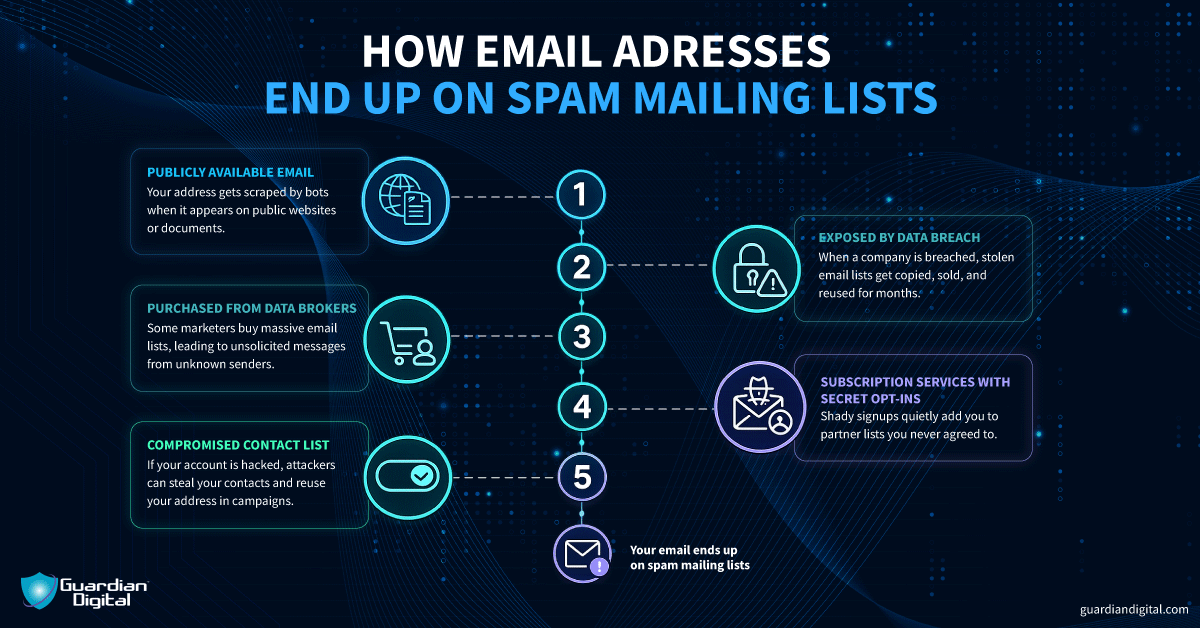
Public Email Exposure
When addresses sit on a website or document that search engines can read, they will get scraped. Email harvesting bots crawl the internet all day looking for strings that match email formats, then dump those finds into bulk mailing tools without anyone manually reviewing a thing.
Data Breaches
When a company gets breached, email addresses are almost always part of what is taken. Those lists get sold or traded, which is why the fallout goes well beyond the original incident. Once your address shows up in one of those dumps, it gets copied, merged into other lists, and reused in campaign after campaign. You start seeing waves of unrelated spam months after the original leak.
Purchased Lists
Some addresses end up on purchased or outright stolen marketing lists. Anti-spam legislation is designed to protect consumers from this practice, but not every sender cares how their marketing list was built. If a data broker is selling a million verified email addresses, someone will buy them and run a campaign just to see what sticks. That is why you sometimes get unsolicited email promotions from companies you have never interacted with.
Suspicious Websites and Subscriptions
Signing up on suspicious websites, clicking through pop-ups that promise discounts, or entering your address into sketchy download portals will almost always result in follow-on spam. The same goes for newsletter over-subscription, where one signup quietly opts you into partner lists you did not fully read about.
Weak Email Security
If an attacker compromises your email account, they can scrape your contacts, reuse your address in other campaigns, or sign you up for services as part of larger fraud activity. At that point, you are not just receiving spam. You are providing a distribution list.
What Should I Do If I Clicked a Spam Email?
Act quickly, especially if you clicked a malicious link or opened an attachment. Spam emails might have malware, so follow these steps to contain it:
Disconnect the device:
Pull the network connection right away. Unplug ethernet or turn off the WiFi so any malicious download or command and control traffic cannot keep communicating with external servers or move laterally.
Reset passwords:
Change your email password and update any other accounts using the same or similar credentials.
Check mailbox rules and sign-in logs:
Review inbox rules for anything you did not create, especially auto-forwarding rules or rules that hide messages in obscure folders. Then check recent sign-in activity for unfamiliar IP addresses, locations, or devices, which can signal someone else already accessed the account.
Notify IT:
Report the incident as soon as immediate threats have been taken care of. The security team will check for suspicious activity across other systems and determine whether additional containment steps are required.
For businesses, the damage does not stop at cleanup. Compromised mailboxes start sending spam to customers and vendors. If your domain is used to send spam because one account was taken over, partners notice. Customers question it. Rebuilding trust takes longer than resetting a password and closing an incident ticket.
Spam is Not Just a Time Drain
Clearing spam eats into the workday, but the bigger issue is what might hide inside it: Credential-stealing malware and phishing pages that capture MFA tokens.
How to Stop Spam Emails from Reaching My Inbox?
Spam protection comes down to email security basics done well. In most cases, the spam we see is not random. 
It is how cyberattacks gain initial access. Setting up defenses in advance reduces the potential damage from a spam email that lands in your inbox.
Enforce email authentication (SPF, DKIM, DMARC)
Domains where SPF is wide open, DKIM is misaligned, and DMARC has been in monitor mode forever are easier for attackers to spoof. The SPF record should only include what you actually use. Make sure DKIM is signing correctly and aligned with your sending domain. Then move DMARC to enforcement once you have reviewed the reports and know your legitimate mail flow. Otherwise, you are just watching abuse instead of stopping it.
Require MFA and disable legacy authentication
Treat 2FA and MFA as mandatory. In most account takeover cases, MFA was either disabled or never enforced. To keep everything working properly, always update your email software and clients. Outdated apps with legacy authentication protocols are easy for attackers to bypass.
Monitor for compromised accounts
If your email account gets compromised, everything connected to it is exposed next. Password resets, internal threads, cloud apps tied to that inbox.
To stop account takeover, ensure you have strong, unique passwords for your email. Do not reuse them anywhere else. That way, when breach data gets dumped and recycled, attackers won't be able to break in with reused credentials. A password manager helps here.
Reduce Public Exposure of Your Email Address
Avoid putting your address directly on public websites, forums, or social media profiles. Bots crawl the internet looking for anything that looks like an email address, then dump those into bulk mailing systems. This process is automated and constant. On business websites, do not just drop your email address in plain text. Use a contact form instead.
Tune filtering policies over time
Filtering and flagging suspicious messages help prevent account takeover and the lengthy cleanup that usually follows. Watch for weird login patterns and impossible travel alerts. Review quarantine reports and adjust filters when attackers change their wording or infrastructure, because they will. It is not one magic control. It is steady tuning and tightening, so most of the junk dies quietly before it becomes your next incident call. Also, make sure your email provider has a built-in spam filter so fewer threats can reach your login page.
Why Is Spam Getting Through My Spam Filter?
You might have the right spam protection policies in place, but they aren’t set up properly. Below are a few troubleshooting questions to run through if your spam filtering isn’t getting results:
Is DMARC still set to p=none?
If it is still set to p=none, you are not stopping any spoofed mail. Check the reports, make sure legitimate senders are accounted for, then move them to quarantine or reject so fake messages using your domain actually get blocked. 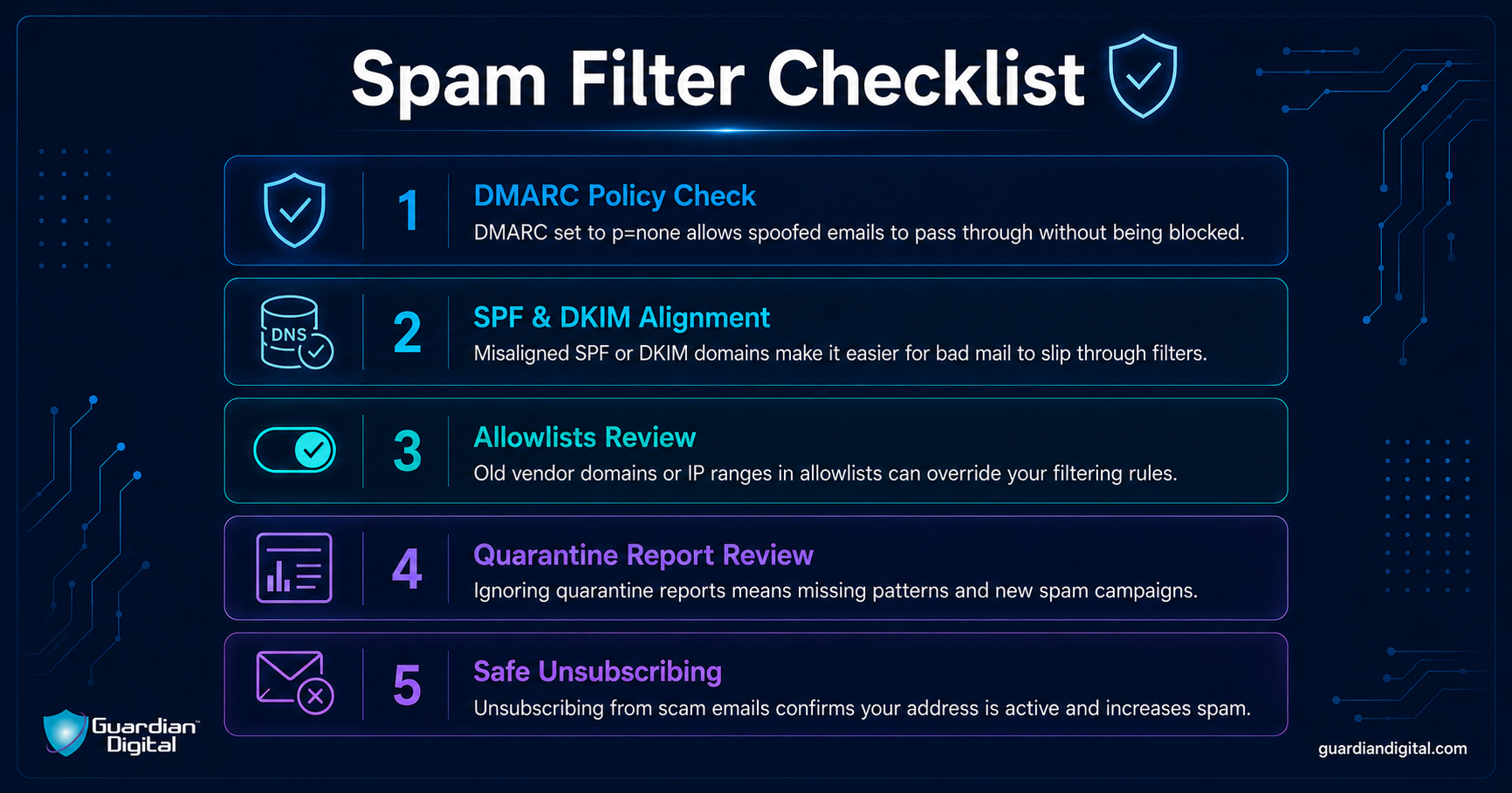
Are SPF and DKIM properly aligned?
Look at a few real message headers and confirm the domains line up the way they should. If SPF is too broad or DKIM is signing with the wrong domain, you either break good mail or make it easier for bad mail to slide through.
Are allowlists overriding filtering decisions?
Go through your allowlists and see what is in there. We often find old vendor domains or entire IP ranges whitelisted years ago, and attackers love abusing those gaps because the filter will not touch anything on that list.
Are quarantine reports being reviewed regularly?
Make sure reports are checked on a schedule and false positives are handled carefully. Then, track patterns so that you can adjust policies when a new spam campaign starts pushing through.
Are you unsubscribing from unwanted emails?
It’s fine to unsubscribe normally from companies you recognize, but do not hit the unsubscribe button on obvious scam emails. That informs the spam sender that your account is active and can bring in even more junk. When you encounter scam or spam emails that don’t honor your unsubscribe, the next step is to mark these messages and report the sender. 
How to Stop Spam Emails Already in My Inbox?
Once spam is already in your inbox, the goal is simple: Do not make it worse.
Step 1: Do Not Engage
Do not reply. Even a short response confirms the account is active.
Do not click links, even out of curiosity. While there’s a difference between classic spam vs. phishing emails, they often go together. Many spam email campaigns use tracking URLs to log who clicked before redirecting to a phishing page. Do not download attachments either, because that is how “just spam” turns into malware execution and an endpoint alert five minutes later.
Step 2: Mark as Spam
If you immediately delete unwanted messages, they will just come back. Use the spam button instead. That provides data to the spam filter that improves pattern recognition. Over time, this reduces how often the same campaign reaches your inbox.
Step 3: Report the Email
Report email scams or spam messages to your email provider instead of just deleting them. Most providers have a built-in “report phishing” or “report spam” option, or at least a forwarding address for abuse complaints. That data feeds into their filtering systems and helps block similar campaigns across other accounts.
In a corporate environment, use the phishing report button or whatever official channel IT set up. That sends the message to us so we can dig into the headers, check the auth results, look at the sending IP, and see who else got it.
One reported email can save a lot of cleanup. We can block the domain or URL at the gateway, pull the same message out of other inboxes, and shut down the campaign internally before it spreads any further.
You can also forward persistent spam to reporting services like SpamCop. They compile complaints and notify the responsible hosting providers or source networks, which sometimes results in the sending infrastructure being shut down. This can slow down repeat campaigns and reduce spam emails beyond your own inbox.
Step 4: Block Repeat Offenders
If the same sender keeps getting through, block the email address. If multiple messages are coming from variations of the same source, block the domain at the filter level when possible.
It’s also important ot know how to delete junk mail safely when your spam folder fills up. These steps handle the immediate problem. Reducing how often you see spam in the first place takes stronger filtering and tighter account controls.
How to Stop Spam Emails with Better Security?
If you are running a business, it’s worth looking into more advanced spam protection. When your contact information is in the public eye, basic spam filtering won't cut it. Attackers know what default protections look like, and they test against them.
You want a system that looks at sender reputation, scans attachments, checks links at delivery and again at click time, and gives you real reporting instead of a black box. When we review incidents, environments with properly tuned filters usually catch the obvious phishing waves before users ever see them.
Email gateway security creates a buffer between the internet and your users. Attachments can be sandboxed. URLs can be rewritten and inspected when someone actually clicks. Policies can block high-risk file types outright. It is another control point, and in investigations, that extra layer often makes the difference between a blocked attempt and a compromised mailbox.
AI-based detection helps with the stuff that does not look malicious on the surface. Business email compromise emails with no links, just a request for a payment change. Subtle wording shifts from a “CEO” account that was just taken over. Behavior-based detection can flag that kind of anomaly, but it still needs human review. It is an assist, not autopilot.
Cloud spam filtering is also critical now that most companies live in Microsoft 365 or Google Workspace. API based tools can scan internal mail, catch compromised accounts sending phishing internally, and provide visibility into what your controls are actually blocking.
Ongoing monitoring is where a lot of programs fall short. Reports need to be reviewed. Trends need to be tracked. Policies need adjustment when attackers rotate domains or shift tactics. Advanced spam protection is not a product you buy once, but an ongoing process.
Why is Layered Defense for Spam Protection Necessary in 2026?
Spam emails fluctuate in volume and tactics, but the pipeline never really stops. Waves come through, get blocked, then come back dressed up a little differently.
The best plan for how to stop spam emails is to use layered controls that make sure one mistake does not turn into a more serious incident:
- Good filtering at the gateway.
- Properly enforced SPF, DKIM, and DMARC to stop email domain spoofing.
- Users who know how to report suspicious emails.
Email security training that teaches how to recognize spam emails helps with reporting. Even solid filters let something through now and then, so trained users are often the last line of defense.
Prevention, reporting, and authentication catch most spam emails and limit damage when something slips by. It also gives security teams visibility, which matters more than any single feature.
Staying informed about how to stop spam emails is an ongoing project. Filters need tuning. Reports need review. Users need reminders. If you are looking for stronger coverage in a cloud environment, Guardian Digital’s EnGarde Cloud Email Security is built for that layer in Microsoft 365 and similar platforms. The goal is simple. Fewer malicious emails in inboxes, and fewer incident calls because of them.


 PREVIOUS

 NEXT
NEXT

Other FAQs
- Exploring Malicious Code Risks: Strategies for Email Safety
- Proven Strategies for Effective Malware Removal on Windows Computers
- Why Outsourcing Email Security is Critical for Modern Businesses
- Comprehensive Guide to Safeguarding Against Domain Spoofing Threats
- Effective Strategies to Combat Insider Threats in the Workplace
- Strategies for Email Authentication to Counter CEO Impersonation
- Critical Factors for Selecting Email Security Solutions in Business
- Harnessing Managed Security Services for Enhanced Cybersecurity Vigilance
- Effective Penetration Testing Techniques for Cybersecurity Enhancement
- Managed SIEM Solutions: Boosting Email Security for Small Businesses
In this article

Join Our Community
of Readers!