
The last decade has seen the evolution of mobile phones as they have increased in capabilities. Smartphones have endless uses for calling, texting, video chatting, banking, emailing, and capturing 4k photos. Nearly everyone has a phone, since it can serve as a mobile desktop, providing access to the internet, banking, email, work accounts, and more. Unfortunately, this dependence on phones has made them a more popular target for cybercriminals.
Public Wi-Fi networks typically warn you about the danger of connecting to a non-private internet server. However, phone threats are not always as easy to notice. Threat actors now use emails, SMS messages, spoofed phone numbers, and phone calls to formulate targeted phone phishing scams and steal login credentials, money, and private data from user devices.
This article will discuss phone-phishing email threats, how to recognize an attack, and a real-life example to help you recognize one.
How a Phone Phishing Attack Works
Most modern phone scams do not start with a call; they start with an email that looks routine enough to pass a quick glance:
- A fake receipt
- A subscription renewal
- A support ticket
- A notice about a recent order
The message may include a logo, invoice number, product code, or customer ID so the target does not stop and inspect it. The phone number is the real hook. 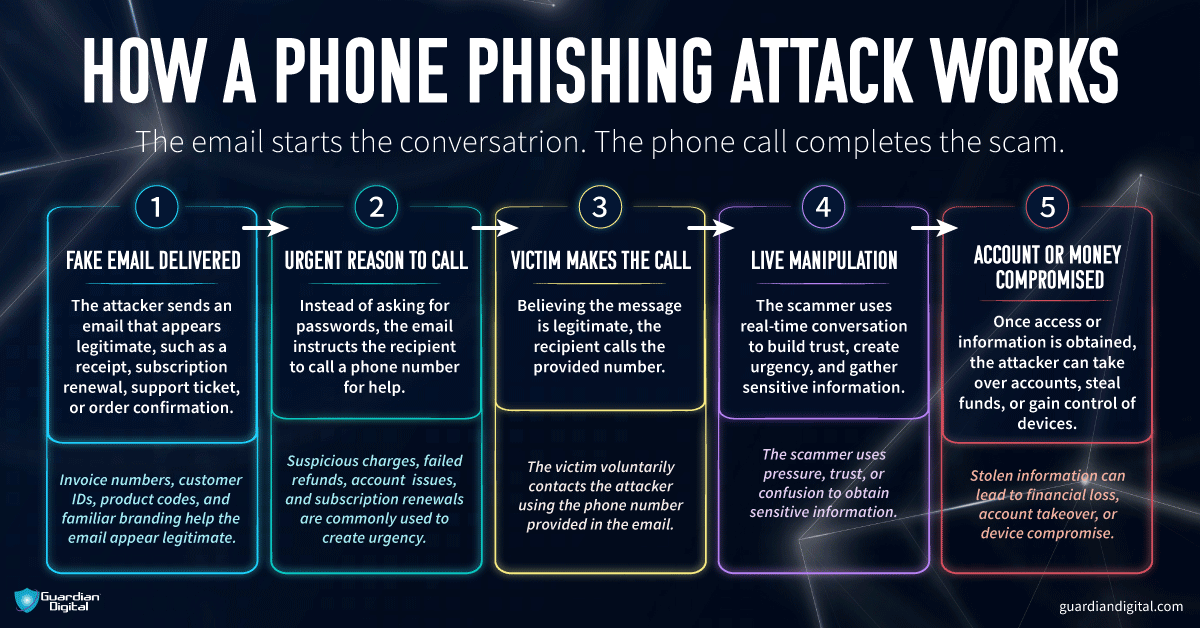
Instead of asking for passwords in the email, the message tells the person to call. Maybe it says there was a charge. Maybe a refund failed. Maybe the account needs attention. The email is just there to get the call started.
Once the person calls, the scammer can work in real time. They can slow the victim down, rush them, change the story, or keep them talking until they hand over a login code, payment details, banking information, or remote access to the device.
That is what makes phone phishing harder to catch. It is still a phishing attack, but the pressure does not stay in the inbox. The email gives the scammer a reason to talk. The call gives them control.
How Email Leads to Phone Scams
Phone phishing attacks are successful because they usually begin in a place users already trust: their inbox. These messages may include:
Common Email Tactics | Potential Risks |
Fake invoice or payment confirmation | Payment fraud |
Fake subscription renewal | Financial loss |
Refund notice | Account takeover |
Package or shipping update | Credential theft |
Warning about account access | Device compromise |
These details show up in plenty of phishing scams. Familiar brand. Urgent message. Just enough account or order information to make the email feel real.
For businesses, it gets worse when the message is aimed at one employee. A finance worker gets a fake invoice. An admin gets a fake support request. The scammer is not blasting everyone anymore. They are shaping the message around one person, which starts to look a lot like a spear phishing attack.
Why Email Filters Fail Here
Cybercriminals can attach malicious PDFs, PNGs, and JPEGs to a message to get past email filters, as users cannot access embedded, malicious information in documents and images until they open the file itself.
A phone phishing email may bypass filters when:
- The phone number is placed inside an image or attachment.
- The message does not include a direct malware link.
- The email copies a real company’s formatting.
- The sender uses ordinary customer service language.
- The scam depends on the victim making the call.
For more on how to identify these threats, explore phishing threats and how to prevent phishing attacks.
How Should I Recognize and Handle Phone Phishing?
Phone phishing works because it catches people mid-task. The email looks normal, the call sounds urgent, and the scammer keeps the person moving before they verify anything.
- Do not trust unknown calls. Let unexpected calls go to voicemail, especially if the caller brings up money, account access, refunds, invoices, or security issues.
- Be careful with familiar-looking numbers. Scammers can spoof local area codes, company numbers, and support lines. A number that looks right is not proof that the call is safe.
- Do not call numbers from suspicious emails. Go to the company’s official website, use a verified customer service number, or check the account through a trusted app.
- Slow the call down. If the caller says you must act now, treat that as a warning sign. Real companies give people time to verify charges, accounts, and support requests.
- Do not share sensitive information. Passwords, banking details, authentication codes, recovery answers, and remote access should stop the conversation.
- Watch for QR codes and fake links. Unexpected QR codes can lead to fake login pages, fake support forms, or phone numbers controlled by scammers. This is where qr code phishing can become part of the same attack path.
- Use security tools. Antivirus software, email filtering, browser warnings, and a phishing link checker can catch some malicious files, links, and pages before the scam moves further.
- Report it internally. Employees should know who to contact when an email or call creates pressure around payroll, invoices, refunds, account access, or company data. No guessing during triage.
Real-Life Example: The Geek Squad Scam
In April 2025, police in Westchester County, New York, warned about a Geek Squad scam that hit an elderly victim.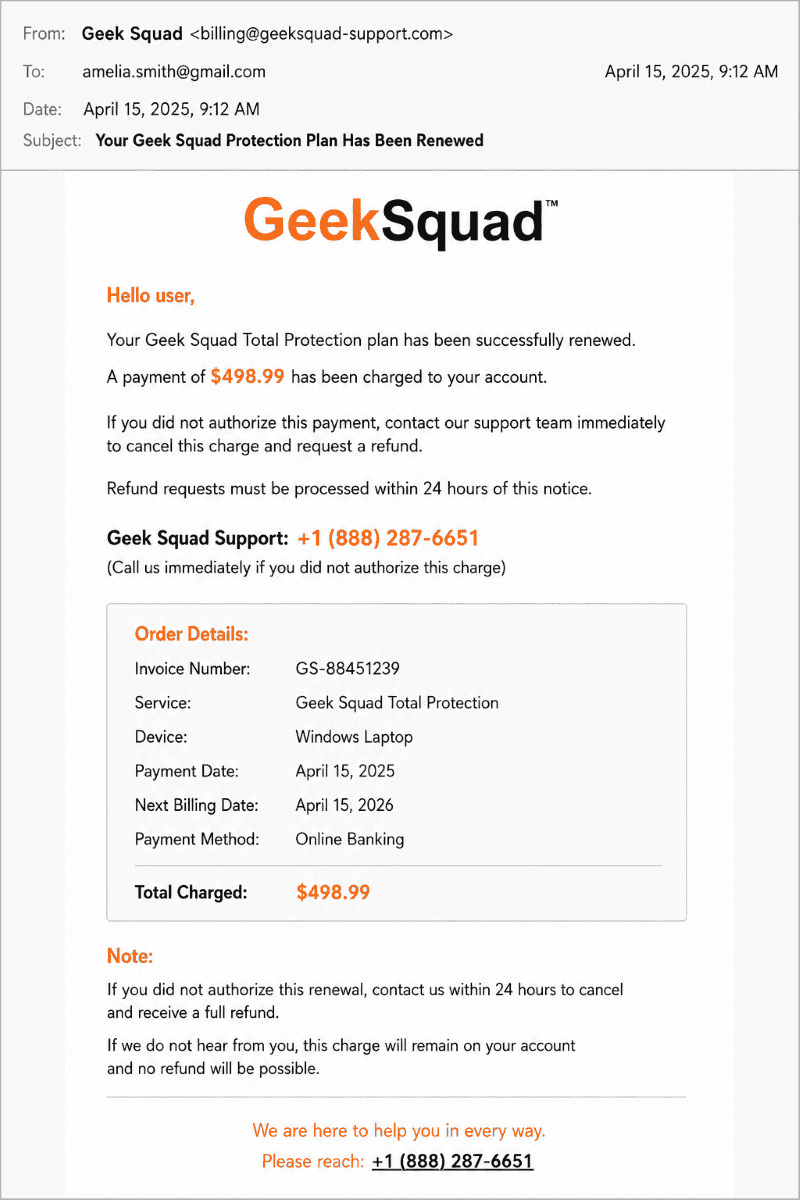
- The Entry: An email appearing to be from Best Buy support.
- The Hook: A fake support page with a phone number.
- The Execution: Once the victim called, the scammer convinced them to grant remote access to their computer.
- The Outcome: The scammer manipulated the victim's banking view to make it look like a “mistake” had been made, eventually pressuring them to withdraw cash.
Layered Defenses Are Necessary
Phone phishing is not just a phone problem—it often begins in the inbox. To improve protection, companies should:
- Consider outsourced email security.
- Update servers frequently.
- Engage in best practices for email security.
- Improve email protection with cloud-based filtering.
- Implement mandatory employee security awareness training.
Training should also include spear phishing, callback scams, fake invoices, and other pressure-based attacks. Some of these tactics overlap with trap phishing as well. For more background, see our blog, What is trap phishing.
FAQ: Phone Phishing
How do phone scams start with emails?
They use fake invoices or order confirmations to trick users into calling a fraudulent support number.
Why can’t email security stop these?
Because the dangerous part of the scam, the phone call, happens outside the email environment.
What should I do if I suspect an email is a scam?
Do not call the number. Verify the contact information through the company’s official, independent website.


 PREVIOUS
 NEXT
NEXT 
In this article
Stay Informed with Our Latest Insights
- Why Email Thread Hijacking Makes Compromise Harder to Detect
- Calendar Phishing Attacks: How Malicious Invites Bypass Email Defenses and Change Enterprise Risk
- SaaS Attacks and Email Security: How SaaS Platforms Became the Delivery Layer
- Data Leaks from AI-Generated Code Are Fueling Email Breaches
- How to Protect Your Business Against Spear Phishing: A Defense Playbook

Join Our Community
of Readers!
Must Read Blog Posts
- Phishing Scams in 2026: The Rise of AI and Deepfake Risks
- Understanding Email Viruses: Detection, Prevention, and Security Strategies
- Effective Phishing Protection: Strategies and Training for Businesses
- Essential Ransomware Strategies for Effective Business Protection
- Maximizing Email Security: Advanced Strategies for Threat Defense
- Microsoft 365 Phishing: Why Attacks Still Reach Inboxes and How to Stop Them




