Whaling phishing is a targeted phishing attack aimed at executives, finance teams, and employees with access to sensitive systems or financial approvals. Unlike broad phishing campaigns sent to thousands of users at once, whaling attacks focus on a small number of high-value targets using impersonation, stolen credentials, and business context that makes the email look legitimate.
The attacks matter because they blend into normal business communication surprisingly well. A fake invoice, wire request, or Microsoft 365 login prompt can look routine enough to bypass suspicion, especially when attackers hijack real email threads or compromise legitimate accounts first. Most successful Business Email Compromise incidents start there.
This guide breaks down how whaling phishing works, how it differs from spear phishing, why executives are common targets, and the warning signs organizations should watch for before a phishing email turns into wire fraud or account compromise.
What Are Spear Phishing Attacks?
Spear phishing attacks are highly targeted phishing campaigns designed to trick specific individuals into giving up sensitive information, opening malicious attachments, or granting attackers access to corporate systems. Unlike broad phishing emails sent to thousands of users at once, spear phishing attacks are carefully researched and personalized using real names, job roles, company details, vendor relationships, or ongoing business activity to make the message appear legitimate.
Attackers commonly impersonate executives, coworkers, vendors, or trusted organizations to pressure employees into clicking malicious links, resetting passwords, approving payments, or sharing credentials. Because the emails often blend into normal business communication, spear phishing remains one of the most effective methods cybercriminals use to gain initial access to corporate environments, launch Business Email Compromise (BEC) attacks, and steal sensitive data.
Whaling is Spear Phishing with High-Level Business Targets
Understanding how spear phishing works helps organizations strengthen security awareness, improve verification processes, and reduce the risk of credential theft, financial fraud, and account compromise.
How Whaling Attacks Work
Most whale phishing attacks begin with impersonation.
Sometimes the attacker spoofs the executive address. Sometimes they log into the real mailbox and work from there. The second one causes more damage because employees stop questioning the messages once the thread history looks familiar.
Most requests are operational. Payment approvals. Banking changes. Shared documents. MFA resets. Things employees deal with every day, which is exactly why the phishing attempt blends in.
Some campaigns stay quiet for weeks before doing anything visible. Attackers monitor conversations, study approval chains, learn how finance teams communicate, then insert themselves into active email threads where employees already expect payment requests or sensitive document exchanges.
That’s what makes the attacks effective. The phishing email often arrives inside a workflow that already exists, which lowers suspicion immediately.
Why Executives Are Prime Targets
Executives sit close to the systems that attackers actually want access to. Financial platforms, legal records, payroll systems, cloud administration panels, acquisition planning, and internal contracts. One compromised executive account can expose a large amount of operational visibility very quickly.
Authority also changes employee behavior. Staff members are naturally less likely to challenge requests coming from leadership, especially when the request sounds urgent, confidential, or tied to financial deadlines.
Public exposure creates another problem. Conference appearances, hiring announcements, interviews, LinkedIn updates, and social media activity give attackers enough context to build phishing lures around real events happening inside the organization at that moment.
Common Industries Targeted by Whaling Attacks
Finance organizations remain common targets because attackers can move directly toward payment workflows and vendor systems once they gain access.
Healthcare providers regularly deal with sensitive records and time-sensitive operations, which makes urgent phishing requests harder to slow down and verify properly. Legal firms get targeted because sensitive negotiations move fast, and confidentiality already limits verification. Manufacturers deal with procurement chains and vendor invoices constantly. Government agencies have their own problem set. Lots of approvals, lots of email, and usually too much trust in internal communication.
Whaling vs. Spear Phishing: Key Differences
The mechanics behind spear phishing and whaling are mostly the same. The difference is who gets targeted and what the attacker gains once access is gained.
Spear phishing usually goes after employees with access or credentials. Help desk staff. HR. Payroll. IT admins.
Whaling shifts higher up the chain. Executives, finance leadership, and legal teams. Accounts connected directly to approvals, contracts, acquisitions, or payment systems, where one mistake creates a much bigger mess.
You start seeing the difference once financial systems become involved. A compromised help desk account may provide initial access into the environment. A compromised CFO mailbox may lead directly to wire fraud, vendor compromise, payroll diversion, or exposed legal communications within days.
What Makes Whaling More Dangerous?
The emails feel believable because attackers spend time learning how the company communicates before they send anything. Internal phrasing. Vendor names. Approval timing. Small details that employees normally associate with legitimate requests.
A compromised mailbox changes the entire detection problem. SPF passes. DKIM passes. The email lands inside an existing thread with real conversation history attached to it.
By the time security teams notice something wrong, the payment has already moved, or the attacker has expanded into additional accounts through internal phishing and credential theft.
Organizations investigating a successful spear-phishing attack frequently discover that attackers later escalated to executive impersonation and payment fraud once they understood how internal workflows operated.
Spear Phishing vs. Whaling Comparison Table
Spear phishing and whaling phishing use many of the same social engineering tactics, but the targets, financial impact, and level of attacker preparation are usually very different. 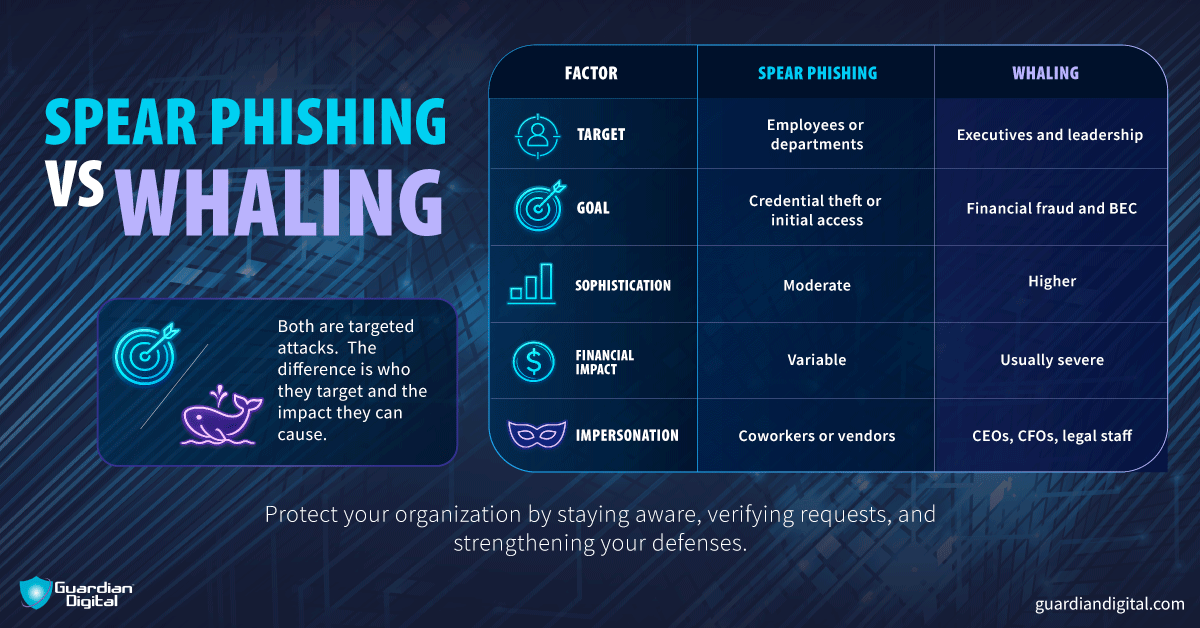
Real-World Whaling Phishing Examples
Most whaling attacks look ordinary while they’re happening. That’s usually the problem.
CEO Wire Transfer Fraud
A finance employee receives what appears to be an urgent message from the CEO requesting payment tied to a confidential acquisition, legal issue, or vendor dispute. The attacker pressures the employee to move quickly and avoid discussing the request internally with other departments.
The urgency matters. The faster the request moves through approvals, the less likely someone is to pause long enough to verify it.
Executive Microsoft 365 Credential Theft
Fake Microsoft 365 login portals remain one of the most common whaling techniques.
An executive receives what looks like a document-sharing notification, MFA warning, or secure file request, enters credentials into a cloned login page, and unknowingly exposes mailbox access to the attacker. From there, the compromise often expands into internal phishing, vendor fraud, and broader Business Email Compromise activity using legitimate conversations already sitting inside the mailbox.
Payroll Diversion Scams
Payroll diversion attacks usually impersonate HR staff or executive leadership requesting direct deposit changes. The attacker reroutes salary payments into fraudulent accounts before employees notice payroll details have changed unexpectedly.
Business Email Compromise (BEC) and Whaling
BEC and whaling phishing overlap constantly because both depend heavily on trusted communication channels rather than malware delivery.
Once attackers compromise a mailbox, they may hijack vendor conversations, alter invoice details, impersonate internal leadership, or continue phishing employees using legitimate accounts already trusted throughout the organization. The attack chain often stays operational because nothing initially looks malicious enough to trigger panic.
Signs of a Whaling Email
Common indicators include: 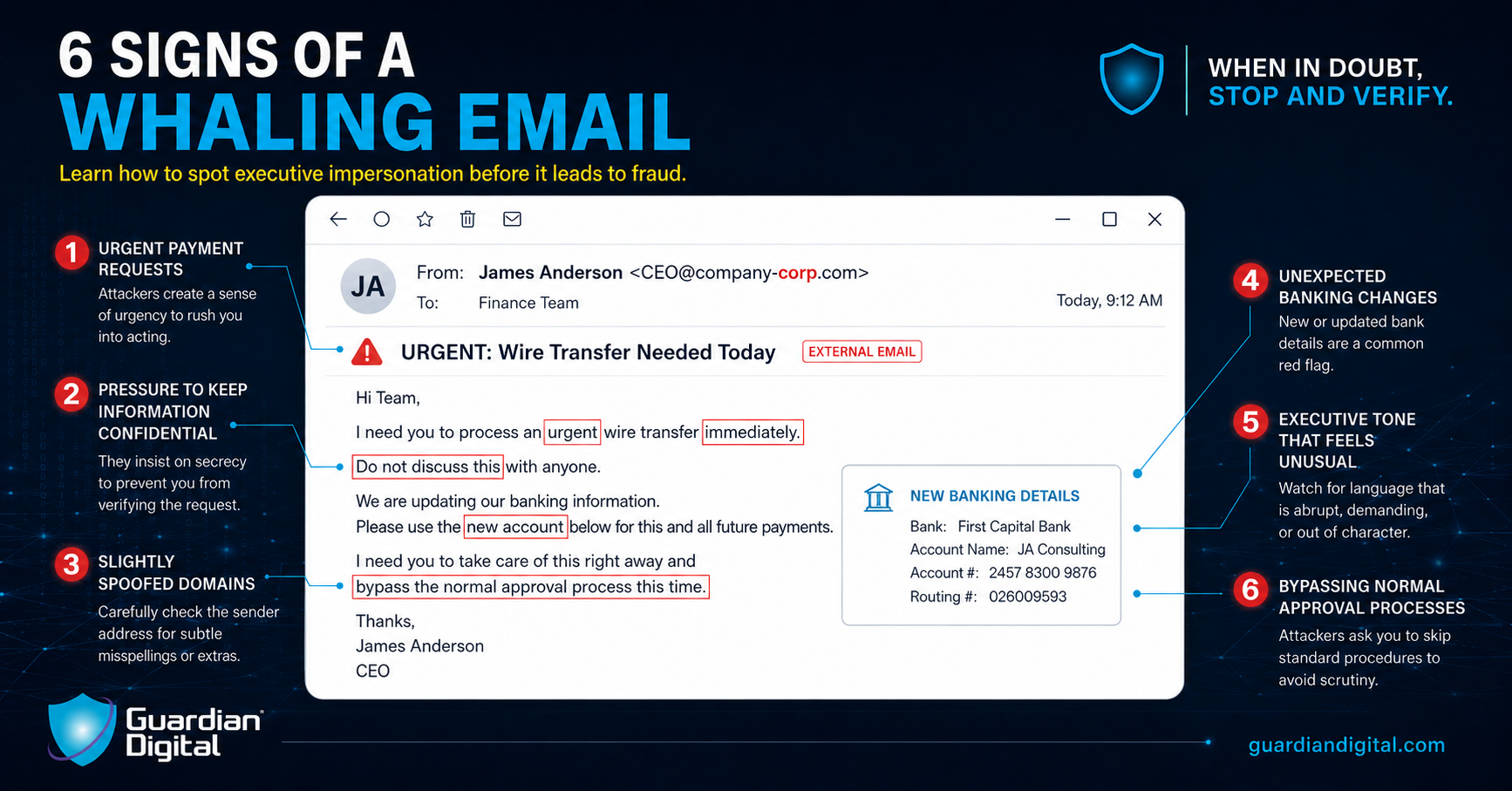
Common Phishing Attacks Every Business Should Know
Whaling gets attention because the financial impact is usually higher, but it’s still part of the same phishing-attack ecosystem that security teams deal with every day.
Traditional Phishing
Traditional phishing campaigns were volume games. Send enough emails, and eventually somebody clicks the fake login page or opens the attachment. Attackers only need a few working credentials to keep moving.
Spear Phishing
Spear phishing narrows the focus. The message gets customized around a department, role, or internal workflow so it feels routine instead of random.
QR Code Phishing
QR phishing pushed a lot of credential theft onto mobile devices, where people inspect links less carefully. The QR code redirects users to fake Microsoft 365 or Google login pages, and most people never stop long enough to check the URL.
Trap Phishing
Trap phishing usually leans on fake support pages, renewal notices, or account verification prompts designed to pressure users into logging in before they think twice about it.
AI-Generated Phishing Threats
AI cleaned up a lot of the mistakes defenders used to rely on. The broken grammar, awkward phrasing, and obvious translation errors. That stuff still exists, just less consistently now.
A well-written phishing email tied to a real conversation thread is harder for employees to spot, especially when the request already looks operationally normal.
Spotting and Avoiding Phishing Scams
Most whaling emails work because nothing about them feels urgent in the Hollywood sense. They look like normal business requests. Invoice updates. Vendor conversations. Executive approvals buried in the middle of a busy workday.
Detection usually depends on somebody noticing one small thing that feels off before money moves or credentials get entered into the wrong page.
Red Flags in Executive Emails
Urgency still shows up in a lot of these attacks. Not loud panic usually. More subtle pressure to move quickly, avoid delays, skip verification, or keep the request confidential because leadership supposedly needs it handled immediately.
Unexpected wire requests, secrecy, domain misspellings, unusual tone changes, and requests arriving outside normal processes matter too. Even small inconsistencies deserve verification when financial systems are involved.
How Employees Can Verify Suspicious Requests
Verbal verification remains one of the simplest protections against executive phishing fraud.
Finance teams should confirm payment requests using secondary communication channels instead of replying directly to suspicious emails. One phone call prevents a surprising number of Business Email Compromise incidents from escalating further into financial loss.
Why Security Awareness Training Matters
Phishing simulations help employees recognize attack patterns before they encounter them inside real workflows.
Training also works better when executives participate directly. Employees take phishing risks more seriously when leadership treats verification procedures as operational requirements instead of optional security friction.
Whaling Phishing Prevention Best Practices
No single control stops whaling phishing entirely because the attacks target communication habits as much as technical infrastructure.
- Implement DMARC, SPF, and DKIM: Email authentication controls help reduce domain spoofing and improve visibility into fraudulent sender activity moving through corporate email environments.
- Require MFA for Executive Accounts: MFA adds friction against credential theft and cloud account takeover attempts, especially for executives and finance teams using Microsoft 365 or Google Workspace daily.
- Monitor for Domain Spoofing: Attackers frequently register lookalike domains designed to resemble legitimate company email addresses closely enough to survive a quick visual inspection during busy workflows.
- Segment Financial Approval Processes: Separating approval authority across multiple employees reduces the risk of a single phishing email leading directly to wire fraud or vendor compromise.
- Deploy AI-Powered Email Security: Modern phishing threats increasingly rely on impersonation quality instead of malware attachments, which makes behavioral email analysis more important than traditional spam filtering alone.
Organizations dealing with seasonal phishing scams often see the same social engineering patterns reused later in executive fraud campaigns and payment diversion attempts.
Conclusion
Whaling phishing keeps growing because the attacks blend into ordinary business communication more effectively than older phishing campaigns ever did.
Executives remain attractive targets, financial workflows move quickly, and AI-generated phishing emails have removed many of the obvious warning signs employees used to rely on. Most attacks now look less like spam and more like routine operational requests arriving from the wrong person at exactly the wrong moment.
That shift changed the defensive side too. Verification workflows, employee awareness, layered email security, and stronger approval controls matter far more once phishing campaigns stop looking obviously malicious.
Continuous learning and collaboration with trusted experts like Guardian Digital will help fortify your defenses and safeguard your organization's sensitive information from targeted email attacks.
- Learn about an email security solution that understands your relationships and conversations with others.
- Following best practices, improve your email security posture to protect against cyberattacks and breaches.
- Get the latest updates on how to stay safe online.


 PREVIOUS
 NEXT
NEXT 
In this article
Stay Informed with Our Latest Insights
- Why Email Thread Hijacking Makes Compromise Harder to Detect
- Calendar Phishing Attacks: How Malicious Invites Bypass Email Defenses and Change Enterprise Risk
- SaaS Attacks and Email Security: How SaaS Platforms Became the Delivery Layer
- Data Leaks from AI-Generated Code Are Fueling Email Breaches
- How to Protect Your Business Against Spear Phishing: A Defense Playbook

Join Our Community
of Readers!
Must Read Blog Posts
- Phishing Scams in 2026: The Rise of AI and Deepfake Risks
- Understanding Email Viruses: Detection, Prevention, and Security Strategies
- Effective Phishing Protection: Strategies and Training for Businesses
- Essential Ransomware Strategies for Effective Business Protection
- Maximizing Email Security: Advanced Strategies for Threat Defense
- Microsoft 365 Phishing: Why Attacks Still Reach Inboxes and How to Stop Them